A Guide to Clothes Product Photography in 2026
Master clothes product photography with this guide on lighting, styling, and using AI tools like Picjam to create standout images faster and for less.
How to start saving money
Lorem ipsum dolor sit amet, consectetur adipiscing elit lobortis arcu enim urna adipiscing praesent velit viverra sit semper lorem eu cursus vel hendrerit elementum morbi curabitur etiam nibh justo, lorem aliquet donec sed sit mi dignissim at ante massa mattis.
- Neque sodales ut etiam sit amet nisl purus non tellus orci ac auctor
- Adipiscing elit ut aliquam purus sit amet viverra suspendisse potent i
- Mauris commodo quis imperdiet massa tincidunt nunc pulvinar
- Adipiscing elit ut aliquam purus sit amet viverra suspendisse potenti
Why it is important to start saving
Vitae congue eu consequat ac felis placerat vestibulum lectus mauris ultrices cursus sit amet dictum sit amet justo donec enim diam porttitor lacus luctus accumsan tortor posuere praesent tristique magna sit amet purus gravida quis blandit turpis.

How much money should I save?
At risus viverra adipiscing at in tellus integer feugiat nisl pretium fusce id velit ut tortor sagittis orci a scelerisque purus semper eget at lectus urna duis convallis. porta nibh venenatis cras sed felis eget neque laoreet suspendisse interdum consectetur libero id faucibus nisl donec pretium vulputate sapien nec sagittis aliquam nunc lobortis mattis aliquam faucibus purus in.
- Neque sodales ut etiam sit amet nisl purus non tellus orci ac auctor dolor sit amet
- Adipiscing elit ut aliquam purus sit amet viverra suspendisse potenti
- Mauris commodo quis imperdiet massa tincidunt nunc pulvinar
- Adipiscing elit ut aliquam purus sit amet viverra suspendisse potenti
What percentage of my income should go to savings?
Nisi quis eleifend quam adipiscing vitae aliquet bibendum enim facilisis gravida neque. Velit euismod in pellentesque massa placerat volutpat lacus laoreet non curabitur gravida odio aenean sed adipiscing diam donec adipiscing tristique risus. amet est placerat imperdiet sed euismod nisi.
“Nisi quis eleifend quam adipiscing vitae aliquet bibendum enim facilisis gravida neque velit euismod in pellentesque massa placerat”
Do you have any comments? Share them with us on social media
Urna ut fermentum imperdiet lacus, elementum etiam maecenas libero nunc, suspendisse massa, nisl, elit curabitur feugiat in quis ut nibh enim in tristique aliquam sed vitae dui, dis adipiscing pharetra aliquam turpis turpis nibh rhoncus enim, pellentesque leo laoreet neque in sed bibendum fermentum suspendisse tempus non purus adipiscing suscipit fringilla adipiscing convallis dolor nulla fermentum facilisis ullamcorper ut vehicula tortor libero metus donec velit, tristique fermentum, dictum euismod diam scelerisque enim non pharetra tristique lectus habitant pharetra est id
When Crocs tested AI-generated photos for a recent collection, they discovered they could roll out an entire campaign 60% faster. This isn't a fluke — it's a sign of where clothes product photography is headed. The best results now come from a smart workflow that blends proven photography techniques with powerful AI.
How Great Pre-Production Cuts Photoshoot Costs
The most successful fashion brands know that a killer photoshoot starts long before anyone picks up a camera. It all comes down to strategic pre-production, a planning phase that saves significant time and money.
Instead of booking a multi-day location shoot, brands can now take one clean studio shot and let AI generate an endless variety of on-brand lifestyle scenes. This is exactly what tools like Picjam are built for, offering huge post-production flexibility before a single photo has even been taken.
Define Your Visual Identity
Before you think about locations or models, you must nail down your brand's aesthetic. Are you minimalist and modern like Everlane, with a focus on clean lines and neutral tones? Or are you bold and expressive, leaning into vibrant colors and dynamic, lush settings?
Think of your visual identity as your brand's fingerprint. It should inform every decision, from the background you choose to the mood of the lighting. A strong, consistent identity makes your products instantly recognizable.
Locate the Right Scene
The setting tells a story. A chunky knit sweater feels right in a cozy cabin, while a sleek evening dress belongs in an upscale, urban environment. The location must connect with both your brand identity and the product itself.
It helps to think about your options in 3 buckets:
- Studio Shoots: These give you total control over lighting and background, ideal for clean, consistent e-commerce shots.
- Location Shoots: This is how you create authentic, context-rich lifestyle images that help customers see your clothes in the real world.
- AI-Generated Scenes: This is the savings-driver. AI offers limitless creative options without the high cost and logistical headaches of physical shoots, perfect for quickly testing concepts or scaling content production.
The market for AI in fashion photography is set to jump from $1.51 billion in 2024 to $2.01 billion in 2025, according to a recent report. This growth is driven almost entirely by e-commerce brands seeking faster, more affordable ways to create visuals. You can read more on the explosive growth of AI in fashion photography.
Plan Your Shot List
Your shot list is the roadmap for the entire photoshoot. A detailed list ensures you capture every angle and style you need, which is the best way to avoid expensive and frustrating reshoots. For effective clothes product photography, this is non-negotiable.
This simple flow shows how these core pre-production steps fit together.
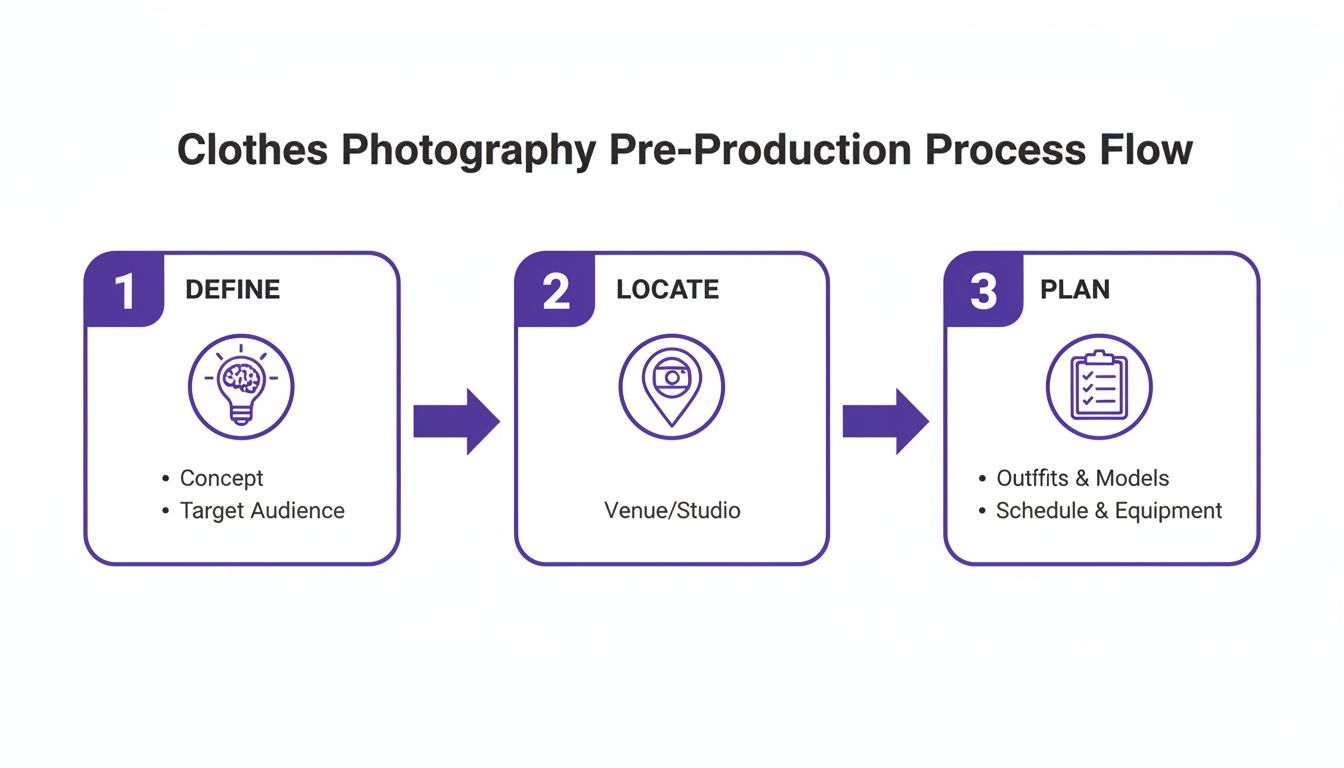
Following this framework ensures every shoot is strategic, efficient, and aligned with your commercial goals from the start.
Takeaway
- Plan Strategically: Your pre-production plan is your most valuable asset. Define your brand's aesthetic, choose settings that tell a story, and build a detailed shot list.
- Integrate AI Early: By planning with virtual assets in mind, you can dramatically increase creative output while lowering production costs. Use an AI tool to generate scenes you couldn't otherwise afford to shoot.
Mastering Flat Lay, On-Model, and Ghost Mannequin Shots
The way you present a garment can make or break a sale. Great clothes product photography isn't just about snapping a picture — it’s about choosing the right method to tell the right story. The 3 core shooting styles — flat lay, on-model, and ghost mannequin — each serve a distinct purpose.
Mastering all 3 gives your brand an edge. You can use a ghost mannequin shot for the main product page, on-model photos for lifestyle context on social media, and creative flat lays for email campaigns. It’s all about a cohesive visual strategy.
The Art of the Flat Lay
Flat lay photography, arranging items on a flat surface and shooting from above, is a favorite for a reason. It’s perfect for social media and building beautiful collection pages. Brands like Everlane use minimalist compositions that let fabric texture and garment details do the talking.
Here's how to elevate your flat lays:
- Create texture and depth: A subtle fold, a scrunched sleeve, or props like a book or a coffee mug can add a human touch.
- Use a consistent background: Whether it's white foam board, textured wood, or colored canvas, consistency creates a polished, cohesive look.
- Light it right: A single, large, diffused light source — think a softbox or a window with a sheer curtain — creates soft, gentle shadows that define the garment's shape.
On-Model Photography That Sells
Nothing sells clothes quite like seeing them on an actual person. On-model photography helps shoppers visualize fit, drape, and movement in a way static shots can't. You're not just selling a dress — you're selling the feeling of wearing it.
Look at how Reformation runs its campaigns. The models are in natural, dynamic poses that feel authentic and showcase how the clothes live in the real world. Forget stiff poses; ask your model to walk, turn, or interact with their surroundings.
For camera settings, a wider aperture (like f/2.8-f/5.6) is great for separating the model from the background. A faster shutter speed, 1/250s or higher, is non-negotiable for freezing motion and ensuring your images are perfectly sharp.
How to Create the Ghost Mannequin Effect in Seconds
The ghost mannequin technique creates a 3D, hollow-body effect that shows a garment's shape without a model. It’s the gold standard for clean product pages and a signature look for brands like Bonobos.
Traditionally, this required a complex process involving special mannequins and hours of manual photo compositing.
This is an area where AI delivers massive savings. Tools like Picjam can now automate the entire process, generating a perfect ghost mannequin effect in seconds from a single on-model photo. This saves hours of manual editing time and cost for every single product.
Takeaway
- Shoot with Purpose: Use flat lays for creative storytelling on social media, on-model shots to show fit and forge an emotional connection, and the ghost mannequin technique for clean, professional product pages.
- Automate Tedious Edits: Instead of spending hours on manual ghost mannequin composites, use an AI tool to generate them in seconds and reallocate that budget toward creative work.
How AI Cuts Post-Production Time and Costs by 90%

Post-production has always been the biggest bottleneck in content creation — hours spent removing backgrounds, cleaning up images, and correcting colors. That manual workflow is becoming obsolete.
Instead of a designer manually tracing a model's hair, an AI tool like Picjam can remove the background perfectly in seconds. The repetitive work that once ate up entire days is now automated, freeing up your team to focus on creative strategy.
From Hours to Seconds on Repetitive Tasks
An AI-powered workflow tackles the most time-consuming parts of post-production. Here are 3 tasks where AI makes an immediate difference in savings:
- Background Removal: Manually cutting out a product or model is slow. AI does it instantly, delivering clean PNGs ready for any backdrop.
- Image Cleanup: AI can automatically spot and erase dust, wrinkles, or small imperfections that would otherwise require hours of manual retouching.
- Image Upscaling: Web images are often too small for high-resolution uses. AI tools can boost image quality without losing sharpness — something notoriously difficult to do by hand.
To get a better sense of how these tools fit into the bigger picture, it's worth checking out guides on AI Creative Automation Platforms.
One Perfect Shot, Endless Variations
The biggest win with AI is the ability to generate dozens of creative assets without a reshoot. Take one clean studio shot of a jacket. In the past, showing it in a new location meant a new photoshoot.
Now, you can let AI create endless variations. Swap in models to match different customer demographics, place the jacket on a busy city street, or test different lighting to see what drives more sales. This transforms A/B testing, allowing agile brands to get real data on what resonates with their audience.
Traditional vs. AI-Powered Post-Production Workflow
The table below breaks down just how different the old and new processes are, highlighting the massive time and cost savings.
Post-production is no longer a bottleneck. By automating grunt work and unlocking endless creative variations, AI gives you the power to produce more content, test ideas faster, and sell more effectively. For a deeper dive, check out our guide to creating AI clothing product photos.
Takeaway
- Automate Repetitive Work: Identify the most time-consuming manual tasks in your workflow — like background removal or retouching — and replace them with an AI tool to immediately cut costs.
- Scale One Shot into Many: Use your best studio photo as a base to generate dozens of AI-powered lifestyle variations for different channels and A/B tests. This multiplies your creative output without multiplying your budget.
From Static Shots to Dynamic Assets for Social and Marketplaces
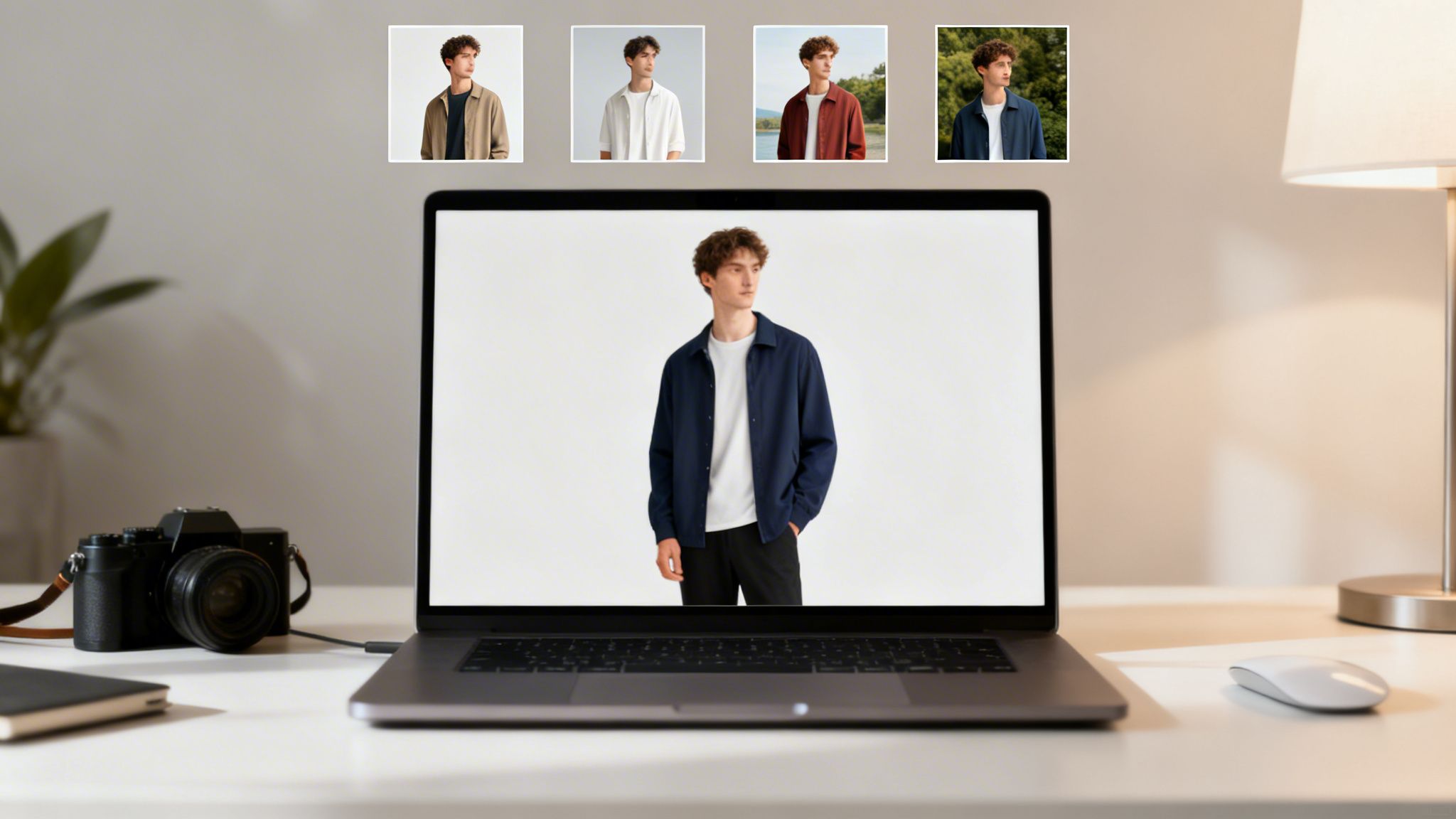
A single static photo just doesn't cut it anymore. Your clothes product photography has to deliver a richer visual experience on Amazon, Etsy, and TikTok. The goal is to spin your core photos into a suite of marketing assets that perform on every channel.
With 60% of shoppers finding new brands on Instagram and 80% of Gen Z using platforms like TikTok Shop, professional imagery has become a necessity.
Answer Customer Questions Before They're Asked
Every time a customer has to wonder about fit, fabric, or movement, you risk losing the sale. Smart brands anticipate these questions and answer them visually, going beyond standard front-and-back shots.
Your shot list should be designed to eliminate every point of friction:
- Detail Shots: Get a close-up of fabric texture, a unique button, or stitching quality. This signals transparency.
- Fit and Drape: Capture the garment in motion. A shot of a model walking shows exactly how a skirt flows.
- Contextual Shots: Show the item styled in a full outfit. This is a perfect, non-pushy way to cross-sell.
This approach turns your product page into a virtual fitting room, building trust and helping reduce return rates.
Win on Social by Blending Polished and Authentic Content
Brands like Princess Polly are crushing social commerce because they blend different visual styles. Their feed is a smart mix of polished studio shots alongside content that feels authentic and almost user-generated.
They understand that the same clean image that works on a product page won't stop someone from scrolling on TikTok. To win on social, your content has to feel native to the platform.
A powerful strategy is turning your product photos into engaging video content. You can even make Instagram videos with your product pictures to create attention-grabbing assets without a new shoot.
Turn Your Still Images Into Social-Ready Videos
Video content outperforms static images on social media, but you don't need a full video crew. This is where AI tools create massive savings.
Platforms like Picjam can take a single still photo and animate it into a short, punchy video perfect for Instagram Reels or TikTok ads. AI can add subtle motion, pan across the product, or create a dynamic slideshow with different backgrounds — all from one base image.
Optimize Your Images for Every Platform
One size does not fit all. Image requirements for Amazon A+ are different from what works on a Shopify product page. Each platform has its own rules for image size, aspect ratio, and file type.
For instance, Shopify has specific guidelines for image dimensions to ensure your store loads quickly. It's worth checking our guide on the ideal product image size for Shopify to make sure your visuals are optimized.
Takeaway
- Create a Library of Shots: Go beyond the hero image. Build a set of multi-angle and detail shots that answer customer questions about fit, feel, and quality.
- Repurpose with AI: Use an AI tool to transform your static images into engaging social videos, saving huge amounts of time and money on content creation.
- Optimize for Each Channel: Tailor your visual assets for every platform you sell on, from your own website to marketplaces like Amazon and Etsy.
Your Action Plan for Better Images and Higher ROI

To elevate your clothes product photography, you don't need a bigger budget — you need a smarter plan. The brands winning today are adaptable, data-driven, and focused on wringing every drop of value from each asset they create.
Here’s how to build a workflow that produces better images that actually sell.
Build a Hybrid Workflow
Invest in a solid foundation of high-quality core product shots. From there, bring in an AI tool like Picjam to generate an almost endless stream of creative variations.
Take that single studio image and use it to test different models, drop the garment into on-brand lifestyle backgrounds, and experiment with visual concepts you'd never have the budget to shoot traditionally. This hybrid approach expands creative output without the high costs of conventional photoshoots.
Optimize for Every Channel
Your imagery needs to be fit for purpose. A clean ghost mannequin shot is perfect for your product detail page, but it will get lost on Instagram, which demands engaging, on-model content.
Intelligently repurpose your core assets for each platform. Create scroll-stopping videos for social media, detailed multi-angle shots for marketplaces, and aspirational lifestyle images for email campaigns. Don’t just post the same photo everywhere.
Measure What Matters
Stop guessing and start letting data guide your creative direction. A/B test your images relentlessly. Does a smiling model convert better than a serious one? Does a studio background outperform a cityscape?
Track key metrics like click-through rates and conversions for different visual styles. These insights are invaluable for sharpening your visual strategy and ensuring every image is working as hard as possible for your business.
Takeaway
- Adopt a Hybrid Workflow: Combine one high-quality photoshoot with an AI tool like Picjam to generate endless creative variations at a fraction of the cost. This is the fastest way to increase content output while saving money.
- Measure and A/B Test: Don't guess what works. Test different image styles — from models to backgrounds — and track metrics like click-through rates and conversions to let data guide your creative decisions.
Frequently Asked Questions
As the world of clothes product photography evolves, many questions arise. Here are clear answers to the most common queries we hear from fashion founders and marketing teams.
How Many Photos Do I Need per Product?
The sweet spot is 5 to 8 photos for every product. A Statista study confirms that a robust image set is a huge driver for online purchases. This isn't just about hitting a number; it's about telling a complete visual story.
Your shot list should always cover these bases: a hero shot, front and back views, a detail shot, an on-model lifestyle shot, and a shot showing scale or fit. Brands like Reformation nail this, giving shoppers a true 360-degree feel for each piece, which directly impacts conversions and helps lower return rates.
What Is the Best Lighting for Clothes Photography?
Soft, diffused natural light is the gold standard for clothes product photography. It wraps beautifully around the garment, eliminates harsh shadows, and renders colors and textures accurately.
If you use artificial light, a large softbox is your best friend. It mimics that soft, even glow you get from great window light. Whatever you do, avoid direct, hard light, which creates distracting shadows and washes out colors.
Can AI Replace Photographers Completely?
Not yet, and that’s not the point. The smartest brands run a hybrid model that blends the unique skills of a human photographer with the scaling power of AI. The goal isn't to replace your photographer — it’s to make their work go further, faster.
The most effective workflow today looks like this:
- Start with a Human Photographer: Hire a pro to capture your foundational assets — perfectly lit, high-quality images of your products.
- Scale with AI: Take that one perfect shot and use an AI tool like Picjam to scale it infinitely by placing it on different models or in various on-brand backgrounds.
As one brand founder told us, "We use our photographer for the art, and we use Picjam for the scale. It's cut our content creation costs by over 50%."
How Can AI Help with Brand Consistency?
Maintaining a consistent brand aesthetic across thousands of product photos is a massive challenge. This is where AI shines. Instead of juggling different photographers and editing styles, you can use AI to lock in a uniform look.
With a platform like Picjam, you can build and save brand-specific "scenes." Once you’ve dialed in your perfect lighting, background, and model vibe, you can apply it across your entire product catalog in one click. Every new product drops into the same cohesive visual world.
What’s the ROI on Investing in Better Product Images?
The return on great clothes product photography is direct and measurable. Better images lead to higher conversion rates, fewer returns, and a larger average order value. A McKinsey report confirms that brands delivering a superior digital experience grow their revenue faster than competitors.
AI savings turbocharge that ROI. When you use AI to generate creative assets, you’re not just making more sales — you're slashing the cost of getting those sales. A/B testing 10 AI-generated ad creatives in minutes instead of weeks means you find the winner faster and make your marketing budget work harder.
Takeaway
- Don't Replace, Augment: The most cost-effective strategy is a hybrid one. Use a professional photographer for your core shots, then use an AI tool like Picjam to scale that content into hundreds of variations for different channels and tests.
- Use AI for Consistency: Leverage AI to create and apply a consistent brand style across your entire catalog. This ensures every image, on every platform, is instantly recognizable as yours.
- Focus on Measurable ROI: Great imagery isn't a cost center; it's a revenue driver. Track conversion rates on different images and use AI to lower your cost-per-asset, maximizing your return.
Curious how much a smarter workflow could save your brand? Compare your current photography costs against the efficiency of an AI studio with our savings calculator.

Picjam team
The Picjam team blends AI, product, and creative expertise to eliminate the cost and delay of traditional photography for modern eCommerce brands.