
AI Product Photography for Fashion Brands
Discover how AI product photography helps fashion brands create stunning visuals at scale. Learn key strategies, ROI calculation, and best practices.
AI product photography is a whole new way of creating photorealistic images of apparel and accessories, often without needing a single live model or an expensive, drawn-out photoshoot. It lets brands take a simple photo of a garment and instantly place it into a complete lifestyle scene, saving a massive amount of time and money. This technology isn't just a futuristic concept — it's quickly becoming the new standard for fashion e-commerce visuals, giving brands the power to create stunning content at a speed and scale that was once unimaginable.
The New Standard for Fashion E-commerce Visuals
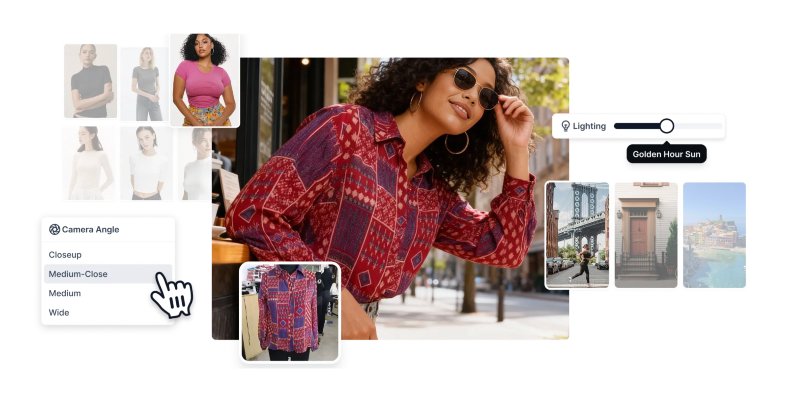
In the hyper-competitive world of fashion, staying relevant means churning out a staggering volume of high-quality imagery. Brands are in a constant race to refresh their online catalogs, social feeds, and marketing campaigns with visuals that stop the scroll and drive sales. Traditionally, this meant a slow, expensive, and logistically nightmarish process involving photographers, models, studios, and often, a lot of travel.
AI product photography cuts right through that complexity. It's a fundamental shift in how visual content gets made, and it's a solution that's ready to go today. The technology has moved lightyears beyond simple background removal; modern platforms can generate entire, on-brand lifestyle scenes featuring a diverse range of virtual models.
Revolutionizing Speed and Scale
Imagine showcasing a new collection on a dozen different models, each representing a unique customer demographic, in locations from a Parisian café to a bustling Tokyo street. With the old methods, you'd be looking at a six-figure production that would take weeks, if not months, to pull off.
Using AI, this entire campaign can be generated in a single afternoon from just a handful of basic garment photos. This isn't just an improvement—it's a complete reinvention of the content creation workflow.
This kind of speed is a lifeline, especially when competing with fast-fashion giants that are constantly dropping new arrivals. To keep up, brands need to be just as agile. AI gives you that edge, allowing you to:
Generate visuals for new SKUs instantly, slashing your time-to-market from weeks down to mere hours.
Test different creative concepts for ad campaigns without committing to a full-blown, costly photoshoot.
Localize marketing content with models and backdrops that genuinely connect with global audiences.
Unlocking Creative and Financial Freedom
Maybe the biggest impact of AI product photography is the dramatic drop in costs. By cutting out physical photoshoots entirely, brands can redirect those funds toward other growth areas like product development or influencer marketing. The savings are massive, often reducing the cost-per-image by up to 90%.
For up-and-coming fashion brands, this is a total game-changer. It levels the playing field, giving smaller labels the ability to produce visuals with the same polish and diversity as established industry leaders. A brand like Levi's has already started experimenting with AI-generated models to supplement their human models, aiming to increase diversity and efficiency. This newfound accessibility empowers brands to tell richer stories and connect with their customers on a deeper level, all while keeping the business financially healthy. The future of fashion isn't just about what you design; it's about using smart technology to build a more efficient, creative, and profitable brand.
How AI Creates Photorealistic Fashion Imagery
At its heart, AI product photography works like a super-fast, highly skilled creative team. It takes the mystery out of generating lifelike fashion visuals by breaking the process down into a simple, automated workflow. Forget the technical jargon for a second. The main technology, Generative Adversarial Networks (GANs), is best imagined as a constant conversation between an artist and a critic.
One side of the AI (the artist) creates an image of a model wearing an outfit. The other side (the critic) immediately examines it, checking it against millions of real fashion photos it's already studied. The critic then offers feedback—"the shadow on that sleeve looks off," or "the denim texture isn't quite right"—and sends it back. This loop happens thousands of times a second until the image is so convincing it's indistinguishable from a real photograph.
From Data to Draping
The real magic happens during the AI's training. These models are shown enormous datasets filled with millions of high-resolution fashion photographs, teaching them the subtle language of apparel visuals.
Through this education, the AI learns to intuitively grasp:
Fabric Texture and Light: It understands how light reflects off smooth silk versus rugged denim and how a sheer fabric might appear under bright studio lights.
Realistic Draping: The system learns the physics of how a cotton t-shirt hangs compared to how a heavy wool coat settles on the shoulders.
Human Anatomy: It knows how clothing should realistically fit and fold across different body types, creating a natural and believable on-model appearance.
This deep understanding is what allows an AI platform to take a simple, flat photo of a dress on a mannequin and realistically place it onto a dynamic human model. To see how this technology powers a full production, our guide on the modern artificial intelligence photoshoot breaks down the entire process from start to finish.
The Standard Workflow in Action
For a fashion brand manager, plugging AI into the production pipeline is surprisingly simple and works with your existing setup. There's no need to tear down your current system. Instead, AI slides in as a powerful accelerator, turning basic product shots into compelling marketing visuals.
A typical workflow looks something like this:
Upload a Simple Garment Photo: The brand takes a clean, well-lit photo of an item, usually on a ghost mannequin or as a flat lay. This is the only new picture you need.
Select a Model and Scene: Using an AI platform, the user picks from a library of diverse virtual models and chooses a background—a clean studio, a busy city street, or a calm beach.
Generate the Final Image: The AI goes to work. It expertly "dresses" the virtual model with the garment, making sure the fit, texture, and lighting blend perfectly into the chosen scene.
Refine and Export: In just a few minutes, a complete, photorealistic on-model shot is ready to download, perfectly formatted for e-commerce sites, social media, or ad campaigns.
This process lets brands turn a single, low-cost product photo into dozens of unique, high-quality marketing assets. A brand like Staud, known for its vibrant and modern style, could use this workflow to show off a new handbag on five different models in five different cities—all without booking a single flight or model. It's a massive saving in time and money, but more importantly, it's shaping the agile, data-driven fashion brands of the future.
Calculating the ROI of AI Photography
Beyond the creative doors it opens, the most powerful case for ai product photography usually boils down to the numbers. For fashion brands, especially those just starting out, the budget for visual content can feel like a massive hurdle. A traditional photoshoot is an intricate dance of expensive, moving parts—a serious financial commitment that can drain your resources before you've even sold a single item.
When you really break down the costs, the difference is night and day. A single day on set involves booking a photographer, hiring models, renting a studio, paying for stylists, and covering travel and food. And that's before you even get to post-production, which can take days or weeks, with every edit adding to the final invoice. It's easy to see how the total can soar into thousands, or even tens of thousands, of dollars for a small collection.
AI flips this entire model on its head. Instead of a messy, project-based cost structure, brands typically pay a predictable fee, often through a subscription. This simple shift turns a major capital expenditure into a manageable operational expense, giving you budget certainty and freeing up critical cash flow. The financial impact isn't just theoretical; it's immediate and significant.
The Financial Breakdown
To really wrap your head around the savings, let's put the two approaches side-by-side. The old way is front-loaded with high, one-time costs, while the AI approach spreads a much lower cost over time. For many brands, that single change unlocks a ton of financial flexibility.
This infographic lays out the simple, three-step process of turning a basic garment photo into a stunning on-model shot using AI.
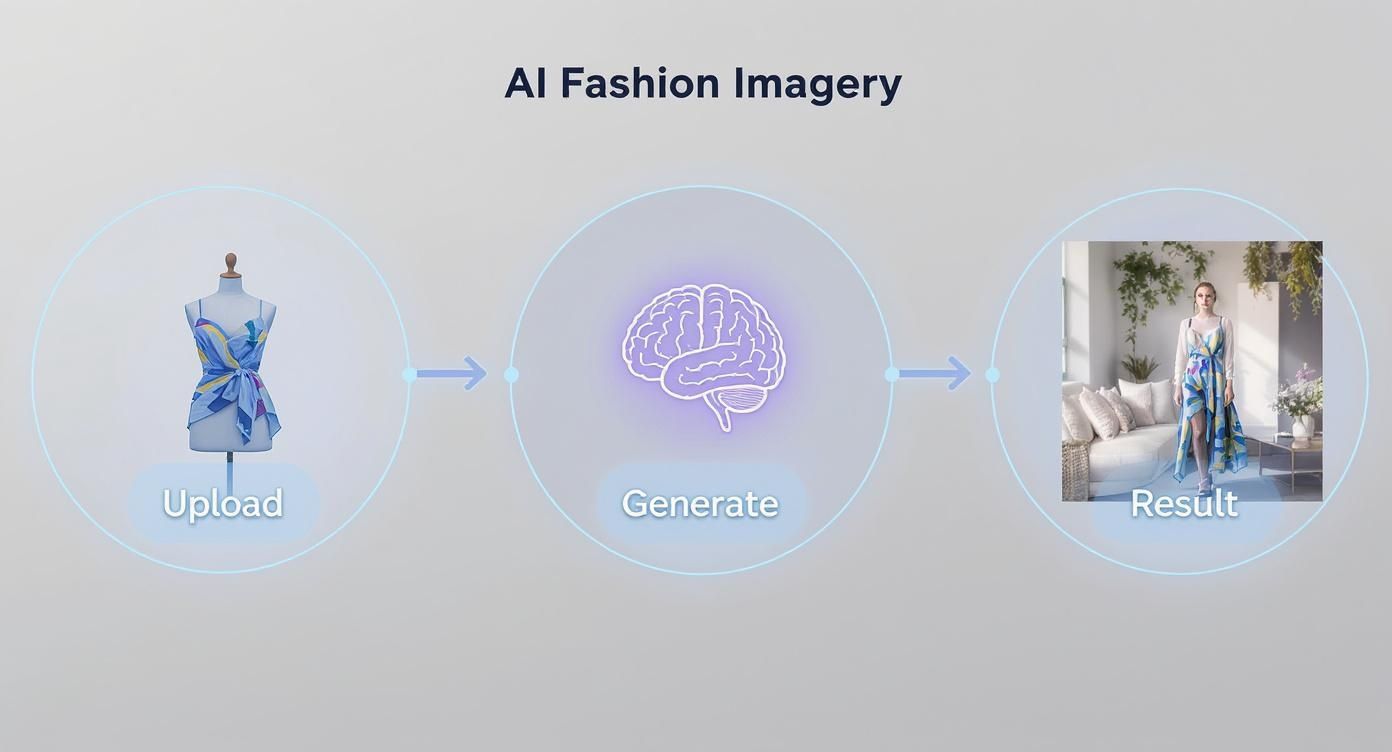
What it really shows is how efficient the AI workflow is, condensing what traditionally takes weeks of coordination into a process you can knock out in minutes.
The growth in this space is impossible to ignore. The global AI for Product Photography market is projected to hit roughly US$1.489 billion by 2031, which is a clear sign of just how many businesses are jumping on board these cost-saving technologies. This boom is fueled by the obvious financial perks and the sheer production speed AI brings to the table for brands of all sizes. If you want to dig deeper into the market's direction, you can explore these AI photography market findings.
To give you a clearer picture of the cost differences, here's a typical breakdown for a small collection of 10 products.
Cost Comparison Traditional Photoshoot vs AI Product Photography
As you can see, the difference isn't small. The savings from just one shoot can be reinvested directly back into the business activities that actually drive growth.
Reinvesting Savings for Tangible Growth
Let's imagine an up-and-coming direct-to-consumer fashion brand. For a new 20-piece collection, a traditional photoshoot could easily set them back $10,000. With an AI platform, the cost to generate hundreds of images for that exact same collection might be closer to $500.
The brand just saved $9,500. This isn't just a number on a spreadsheet; it's a strategic asset they can put to work growing the business.
Here's how that saved cash could translate into real-world growth:
Influencer Marketing: They could drop $5,000 on a collaboration with micro-influencers, getting their products in front of thousands of new potential customers.
Product Development: Another $3,000 could go toward sampling a new product line, getting the next collection off the ground way faster.
Paid Advertising: The last $1,500 could fund a targeted social media ad campaign to drive traffic and sales during a key shopping season.
Take a small, independent brand like Sézane, which is known for its beautifully crafted collections and tight-knit community. They could use these savings to double down on what makes them unique. Instead of sinking money into repetitive photoshoots, they could invest in exclusive pop-up events or expand their sustainability efforts, strengthening both their brand identity and customer loyalty.
This direct line between adopting AI and funding growth is exactly how the next wave of successful fashion brands are being built. They're leaner, more agile, and putting their capital where it actually matters: into their products, marketing, and customer experience. By slashing the cost-per-image by up to 90% and shrinking the time-to-market from weeks to hours, AI product photography delivers a powerful and undeniable return on investment.
Best Practices for High-Fidelity AI Imagery
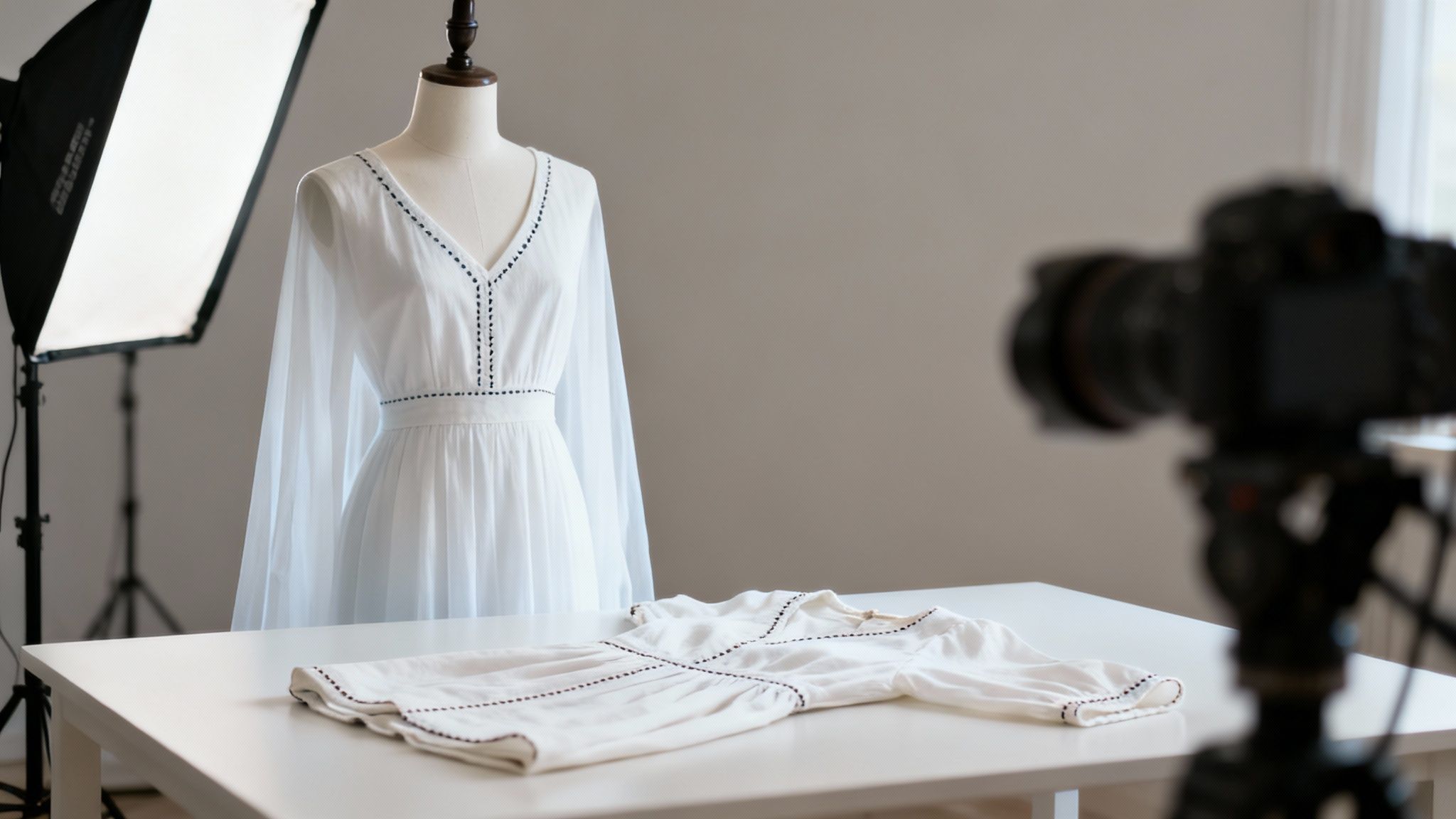
The quality of your AI product photography comes down to one simple rule: what you put in is what you get out. Think of it like cooking. Even the best chef can't create a masterpiece with bad ingredients. In the same way, the most sophisticated AI needs a clean, detailed starting image to work its magic and produce those crisp, high-fidelity results that actually drive sales.
Getting this right doesn't mean you need a high-end studio or a massive budget. This is where the cost savings really start to kick in. A few simple, repeatable steps are all it takes to make sure your AI-generated visuals are sharp, accurate, and perfectly on-brand, every single time. It all begins with how you capture that first photo of the garment.
Prepping Your Garment for the AI
Before you even think about the final image, you have to nail the source material. A clean, well-lit, and correctly styled input photo is the bedrock for everything that comes next. To get realistic results, this step is non-negotiable.
Here's a practical checklist to get your input shots right:
Use a Ghost Mannequin or Flat Lay: A ghost mannequin is the gold standard. It gives the garment a natural, human-like shape, which helps the AI understand its form and how it drapes. If you don't have one, a clean flat lay on a neutral, non-reflective surface is your next best bet.
Ensure Even, Diffused Lighting: Harsh shadows are the enemy. They can confuse the AI, leading to wonky textures or off-brand colors. Use soft, diffused light from multiple angles to illuminate the product evenly, making sure details like stitching and fabric weave are crystal clear.
Capture Multiple Angles: A front-on shot is essential, but don't stop there. Providing photos of the back and side gives the AI more data to work with, which translates into more accurate and versatile final images.
Keep the Background Simple: Shoot against a solid, neutral background like white or gray. This makes it a breeze for the AI to isolate the product without any distracting visual noise.
This initial effort is a fraction of what a traditional shoot demands, yet it pays huge dividends in the quality of your final assets.
Crafting the Perfect AI Prompt
Once your input photo is ready, it's time to tell the AI what you want. This is where you guide it to create the exact scene you have in your head, using clear, descriptive prompts. The goal is to give specific instructions that line up perfectly with your brand's look and feel.
A good prompt is like a creative brief for the AI. You're the director setting the scene. For example, a brand like Reformation, known for its effortlessly cool, slightly vintage vibe, wouldn't just ask for a "woman in a dress."
Their prompt would be far more specific: "A confident woman in her late 20s with natural, wind-swept hair, wearing the floral dress. Photographed during the golden hour in a sun-drenched Italian villa courtyard. Soft, warm lighting, candid pose, film grain effect."
This level of detail ensures the output isn't just some generic stock photo but a true branded asset. The prompt is your control panel for the model's appearance, the setting's story, and the overall mood. A critical part of this is choosing a virtual model who clicks with your target audience, as this directly shapes how customers connect with your product.
By mastering both the input photo and the descriptive prompt, brands can achieve an incredible level of visual consistency across their entire catalog. This cohesion, once reserved for high-budget productions, is now within reach for any brand ready to adopt a smarter workflow. It's a process that doesn't just save thousands on photoshoots—it builds a stronger, more recognizable brand identity for the future of fashion.
Navigating Common Pitfalls and Marketplace Rules
While the potential of AI product photography is huge, it's not a magic button that spits out flawless images on the first try. To really make it work, you have to understand the common hurdles and the non-negotiable rules of the e-commerce world. It's all about knowing how to refine the outputs and ensure every single image is ready for prime time, whether on your own site or a major online marketplace.
One of the first challenges people run into is the "uncanny valley"—that weird space where an image is almost real, but something just feels off. Early AI models were notorious for this, sometimes producing bizarre anatomical quirks like an extra finger or an awkward limb. While today's top-tier platforms have mostly ironed out these kinks, a sharp human eye for quality control is still your best friend.
Think of the AI's first render as a really good first draft, not the final cut. Your creative team's job shifts from wrangling a physical photoshoot to curating and polishing digital assets, making sure every image lives up to your brand's standards.
Meeting Strict Marketplace Guidelines
Big players like Amazon, Shopify, and Farfetch have incredibly strict image requirements, and they don't bend the rules. If your images don't comply, your listings can get rejected, leading to frustrating delays and lost sales. The good news? AI is exceptionally good at creating perfectly compliant images, and it can do it for your entire catalog.
Here are a few of the usual suspects when it comes to rules:
Pure White Backgrounds: Amazon is famous for this one. Main product images must have a pure white background (RGB 255, 255, 255). AI tools can nail this for thousands of products in the time it takes to brew a pot of coffee.
No Added Text or Logos: Your main image needs to be clean. That means no promotional text, watermarks, or logos cluttering the shot.
Product Occupancy: The product has to fill at least 85% of the frame. This ensures customers can clearly see what they're buying.
Using AI, a brand like Allbirds, which sells on its own site and through other retailers, can kill two birds with one stone. They can generate a primary set of clean, white-background shots for marketplaces and a totally separate collection of lifestyle images for their website and social media—all from the same initial garment photos. This workflow saves an unbelievable amount of time on manual editing.
Balancing Authenticity and Automation
The explosion of AI-generated content has, understandably, raised questions about transparency and authenticity. Since 2022, over 15 billion AI images have been created, with about 34 million new ones popping up daily as of 2025. With that kind of volume, brands need to be crystal clear about how they're using this technology.
The goal of AI in fashion photography isn't to trick the customer. It's to show the product in the best possible light, on a diverse range of models, in a way that is both aspirational and accurate.
It all comes down to accurately showing the garment's fit, color, and texture. This is about more than just technology; it's about maintaining authenticity in the AI era, especially when marketplaces have their own rules. The future of fashion brands depends on using these tools to build trust, not break it. By focusing on quality, compliance, and honesty, brands can use AI to create visuals that don't just save money but also create a genuine connection with customers.
Integrating AI Photography into Your Workflow

Adopting AI product photography isn't about flipping a switch and hoping for the best. It's a thoughtful process of weaving this powerful tech into your existing creative operations. The idea is to have a clear game plan that makes the transition smooth, proves the value of AI quickly, and gets your team genuinely excited about using it.
First things first, you need to pick the right AI tool. Look for platforms built for fashion, with a solid library of virtual models and an engine that gets fabric rendering right. But once you've found your tool, don't jump into the deep end. Start small with a controlled pilot project.
Starting with a Pilot Project
Pick just five to ten products from an upcoming collection to test the waters. This gives your team a chance to learn the ropes without the pressure of a full-scale launch. Imagine a brand like Everlane, with its signature minimalist style, testing an AI tool on a new line of basic tees. They could generate images on different models and in various studio settings to see if the AI can nail their clean, consistent brand look.
Think of this pilot phase as your proving ground. It shows what the tool can do, builds confidence within your creative team, and demonstrates that AI is here to complement their skills, not replace them. Plus, it gives you the first round of hard data to show stakeholders just how much time and money you can save.
Training Your Team and Defining Success
Once your team is comfortable, it's time to master the new workflow. This means training them on the best ways to shoot input photos and write effective prompts. Giving them these skills is the key to getting high-quality, on-brand results every single time. To see just how far you can take it, check out how a fashion AI generator can create entire campaigns from the ground up.
Of course, you can't know if you're winning without keeping score. You'll need to track the right Key Performance Indicators (KPIs) to see the full impact. Moving beyond just cost savings will paint a much clearer picture.
The real value of AI photography is measured not just in saved dollars, but in boosted sales and a better customer experience. It's about building a more efficient and profitable brand for the future.
Here are the key KPIs to keep an eye on:
Improved Conversion Rates: Are more shoppers hitting "buy" after seeing the AI-generated images?
Lower Product Return Rates: Are the detailed, diverse visuals giving customers a truer sense of fit and reducing returns?
Increased PDP Engagement: Are people spending more time on your product pages and interacting with the new photos?
The data doesn't lie. Visual tech like 3D and AR has been shown to improve conversion rates by up to 94% and bump up 'add to cart' actions by 35%, all while slashing returns. These numbers provide a solid foundation for proving the ROI of AI photography and making the case to roll it out across your entire brand.
Frequently Asked Questions
When fashion brands first start exploring AI product photography, a lot of the same questions pop up. It's totally normal. Let's clear up some of the common ones to see how this tech can fit into your creative workflow and shape your brand's visual future.
How Does AI Handle Complex Clothing Textures and Patterns?
This is a big one. Modern AI models are trained on massive libraries of fashion images, so they've gotten incredibly good at understanding and recreating textures like denim, silk, and knitwear with impressive accuracy. The secret to getting it right, especially with complex patterns, is the quality of your input photo.
Give the AI a clear, well-lit shot of your garment, and it can map that pattern onto the virtual model's body beautifully. Sure, extremely intricate fabrics can sometimes be tricky, but the technology improves every day. For most materials, the realism is spot-on, saving you the headache and cost of complex lighting setups in a studio.
Are AI-Generated Images Allowed on Major E-commerce Marketplaces?
Yes, for the most part. Marketplaces like Amazon and Shopify care most about image quality and making sure the customer isn't being misled. AI-generated images can easily meet their technical rules—especially for creating those required pure white backgrounds for main product listings.
The golden rule is that the final image must be a true and accurate representation of the product. As long as the AI image doesn't misrepresent the item's color, fit, or features, it's generally good to go. This can dramatically cut the cost of staying compliant.
Can I Use My Brand's Own Style with AI?
Absolutely, and this is where it gets really interesting. The tech is quickly moving in this direction. Some advanced AI platforms are already letting brands create their own consistent virtual models to use across all their shoots. You can also develop a cohesive look and feel by using similar prompts for backgrounds, lighting, and mood.
This means a brand like Ganni, known for its distinct Scandinavian cool, can keep that unique visual identity without the huge costs and logistical nightmares of hiring the exact same team for every single photoshoot. It's a perfect example of how AI is helping build the efficient, forward-thinking fashion brands of tomorrow.
Ready to slash your photoshoot costs and create stunning, on-brand visuals in minutes? Picjam is the AI-powered fashion studio built to help you sell more. Explore how our virtual models and AI-driven tools can elevate your e-commerce presence today. Discover the future of fashion imagery at https://picjam.ai.

Picjam team
The Picjam team blends AI, product, and creative expertise to eliminate the cost and delay of traditional photography for modern eCommerce brands.

