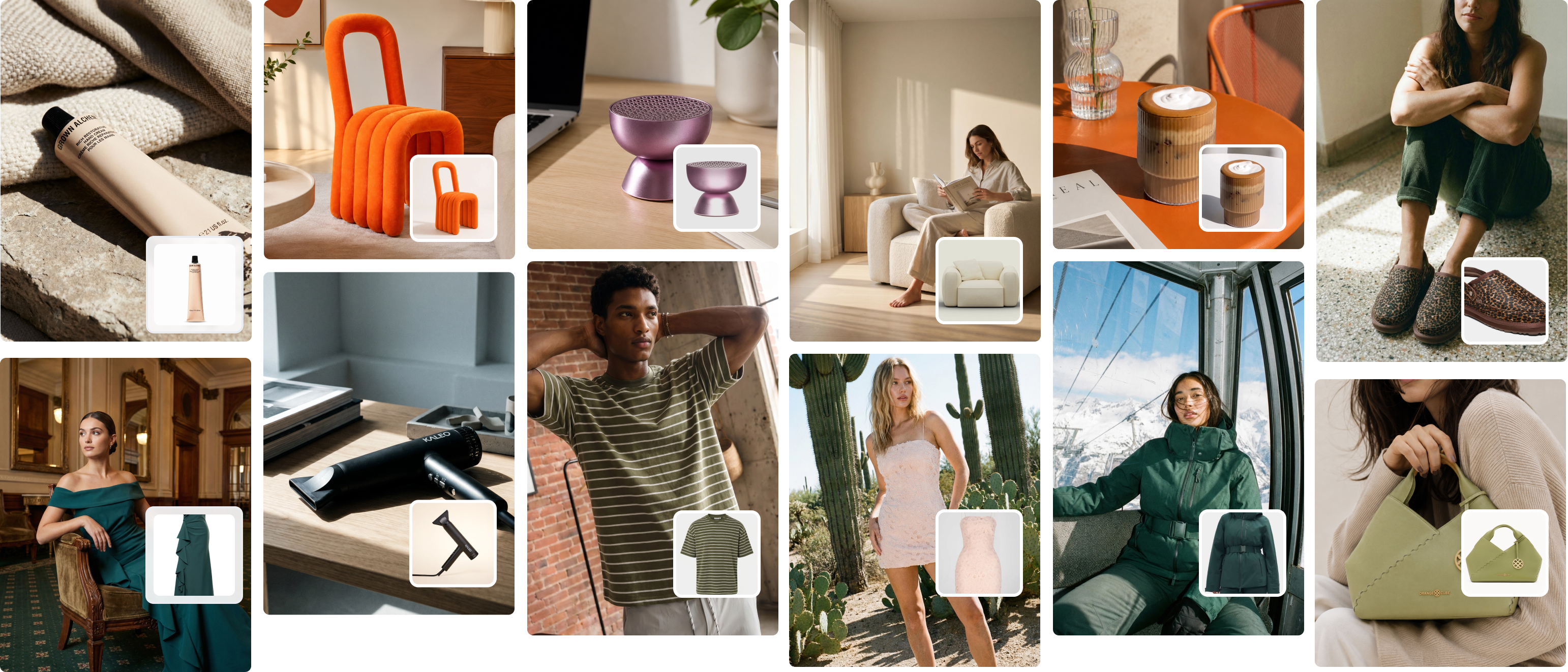
Modeling for Clothing Brands Playbook: AI Fashion Photography
Discover how modeling for clothing brands can boost engagement, cut content costs, and streamline campaigns with real and AI talent guidance.
Crocs tested AI-generated photos for their spring collection — they discovered a 90% reduction in photography costs and a faster time-to-market. The brands making the most of modeling for clothing are those treating visual content as a system, not a one-off expense. This guide explains what the system looks like and how to build it.
Why Model Photography Converts Better Than Flat Lays
Conversion rate data consistently shows that model photography outperforms flat lays and ghost mannequins for most apparel categories. The reason is simple: customers need to envision a garment on a human body to feel confident purchasing it.
The body acts as a real-world scale reference. It answers questions like: Where does this hem actually fall? How does it fit around the shoulders? Does this silhouette work the way the brand suggests?
These questions cannot be answered convincingly by a folded shirt on a table. For fashion brands selling online, where the customer cannot touch or try the product, model photography is the closest functional equivalent to the in-store experience.
The engagement gap in practice
Industry data supports what most visual merchandisers already observe:
- Product pages with model photography typically see 20–40% higher add-to-cart rates than those with flat lay alternatives.
- Return rates tend to be lower when customers can see a garment on a proportioned body before purchasing.
- On social channels, on-body images consistently outperform flat lay content in both reach and save rate.
This doesn’t mean flat lays have no role. They work well for detail shots, technical reference images, and specific product categories like home textiles. But for clothing, model photography is the performance standard.
What Makes Strong On-Body Imagery
Not all model photography achieves the same result. The quality of execution matters as much as the decision to use models in the first place.
Fit communication is the primary job
Before anything else, the image must communicate how the garment fits. This means:
- Visible silhouette from shoulder to hem
- No excessive post-production that distorts how the garment sits on a body
- Clean, uncluttered framing that keeps the product as the visual priority
Brands like Everlane have built their visual identity around precisely this principle: straightforward, honest photography that helps the customer see the garment as it actually fits. This clarity is a commercial asset, not a creative limitation.
Model selection and representation
Model selection is both a creative and commercial decision. Brands with narrow casting tend to perform less well with audiences who do not see themselves represented.
Research indicates that over 60% of consumers are more likely to purchase from a brand that shows diverse model representation. This includes diversity in body type, skin tone, age, and styling choices.
Practical implications for production:
- Show the same product on multiple body types where possible
- Use sizing callouts (e.g., "model is 5’9", wearing size M") to improve fit communication across customer profiles
- For hero products, consider casting at least two model sizes to broaden appeal
The styling discipline
Styling choices directly affect whether customers buy the garment shown, or buy a garment adjacent to what the brand intended to sell. Deliberate styling serves the product. Disconnected styling competes with it.
The guiding question for every styling decision: does this support the customer’s understanding of what they are buying, and does it reflect the brand’s established visual language?
Building a Photography Workflow That Scales
Most fashion brands face a structural production problem. Content demand is constant. New arrivals, seasonal refreshes, promotional windows, and channel-specific formats create an ongoing need for fresh visual assets. Traditional photography workflows are rarely designed to meet this demand efficiently.
At Picjam, we watched a luxury label reduce retouch rounds by two-thirds simply by mapping assets to engagement goals. They established upfront what each image needed to do before production began, and the downstream efficiency gains were substantial. Here’s how to build a workflow that achieves this kind of consistency.
Stage 1: Define the asset map before production
Before scheduling a shoot, document exactly what assets the business needs across all channels and formats. This includes:
- Product page primary images (number per SKU, required angles)
- Social channel formats (feed, Stories, Reels, TikTok)
- Paid advertising creative requirements
- Email and campaign imagery
- Any wholesale or marketplace-specific image requirements
A concrete KPI, such as knowing a particular type of image consistently drives a 40% reduction in review cycles, cuts the time spent on subjective creative debate. Decisions become grounded in commercial outcomes rather than personal preference.
Stage 2: Establish a consistent capture standard
The most efficient production operations run on documented shooting protocols. This doesn’t limit creativity; it eliminates the time spent relitigating basic decisions at every shoot.
A standard protocol covers:
- Camera height and angle for each shot type
- Lighting setup and acceptable variation ranges
- Background specification (color, texture, permitted environments)
- Model posing guidelines for each garment category
- Required shot list per SKU (minimum deliverables)
With a clear protocol, a new photographer or assistant can produce technically consistent work from day one. Without one, every shoot starts from scratch.
Stage 3: Plan for variation without re-shooting
A single well-captured model image can become multiple distinct assets through controlled post-production and, increasingly, through AI-assisted generation.
This is where the economics of modeling for clothing begin to shift significantly. Rather than scheduling separate shoots for every colorway, market, or format variant, teams can:
- Apply controlled background changes to place a product in different environments
- Use AI-generated model imagery to show the same garment on different body types without a re-cast
- Adapt a single primary image for different aspect ratios across platform requirements
The AI Shift in Clothing Model Photography
The most significant change in modeling for clothing over the past two years is the maturation of AI-generated model imagery as a production tool.
This is not a marginal development. Brands like H&M and Levi’s have publicly committed to using AI-generated models as part of their content strategies, citing both cost efficiency and the ability to represent a broader range of body types and demographics than traditional casting permits.
What AI model imagery can now do reliably
- Place a ghost mannequin product image onto a photorealistic model in seconds
- Generate the same product on multiple model types without a casting call or physical shoot
- Produce market-specific imagery by adjusting model characteristics for different regional audiences
- Create variation sets for A/B testing without repeating the cost of a full production
The most significant limitation remains complex styling interactions—overlapping fabrics, intricate layering, and fine garment details can still require human oversight. However, for the majority of standard e-commerce use cases, AI-generated model imagery now meets the quality threshold for product pages, paid social, and email.
What this means for production economics
The numbers are material. A mid-sized brand running quarterly collections and weekly content cycles might previously have required 8–12 model shoot days per year. With AI model imagery integrated into the workflow, the same brand can achieve comparable or greater output with 2–4 core shoot days—using those sessions for brand-defining hero imagery while generating volume content through AI.
The cost reduction is typically in the range of 60–80% for the image categories where AI performs reliably. Combined with faster turnaround and the ability to produce regional or demographic variants on demand, the operational advantage is substantial.
Setting and Enforcing a Visual Standard
One of the most common production failures in fashion is inconsistency across the image library. When images from different shoots, photographers, or production methods sit side by side on a product page or in a grid, inconsistency is immediately visible to the customer—and it undermines brand credibility.
Establishing a visual standard is not the same as producing visually identical images. It means defining the parameters within which variation is acceptable.
The four dimensions of visual consistency
- Color treatment: Define how images should be color-graded. Warm or cool? Punchy contrast or soft and muted? A brand like A.P.C. maintains a very specific tonal palette across all its imagery, which makes even disparate shoot environments feel cohesive.
- Lighting character: Establish whether imagery is predominantly studio-lit (controlled, neutral), natural light (warmer, variable), or a specific stylised approach. Mixing these without intention looks unresolved.
- Model and styling alignment: Casting and styling choices should reflect a consistent brand character. A high-fashion editorial casting does not mix well alongside casual lifestyle imagery in the same collection.
- Composition principles: Define expected framing conventions: how much headroom above the model, where the product should sit within the frame, whether cropping is permitted and where.
Documenting the standard
A visual style guide is the operational tool for enforcing consistency. It should include:
- Reference images showing correct and incorrect execution for each dimension
- Technical specifications (resolution, colour space, file format)
- Approved editing presets or LUTs for post-production
- Clear escalation process for edge cases that fall outside the standard
This document should be shared with every photographer, retoucher, and production partner before any shoot begins. It is not a creative brief; it is an operational specification.
Model Photography Across Channels: Matching the Format to the Platform
Different distribution channels have different image requirements—both technically and in terms of what performs well. A single model image rarely translates perfectly across all formats without intentional adaptation.
E-commerce product pages
Product pages prioritise clarity and consistency. The primary image should show the complete garment on a clean background with no distracting elements. Secondary images can introduce environment or styling context, but the primary remains the commercial reference image.
Recommended practice:
- 3–5 images per product as a baseline
- At least one full-length and one mid-length shot
- At least one detail image showing fabric, construction, or a key design feature
- Consistent background colour or environment across the full product range
Social channels (feed and Stories)
Feed images benefit from stronger visual composition and are often styled more editorially than product page content. They do not need to show the complete garment—cropped or lifestyle-oriented shots perform well.
Stories and Reels require vertical formats (9:16 aspect ratio) and benefit from motion, either through video content or animated stills. For brands generating high content volumes, AI-generated vertical variants from horizontal product images can reduce production friction significantly.
Paid advertising
Ad creative has specific performance requirements that differ from organic content. The first frame must communicate the product proposition within 1–2 seconds. Lifestyle context should support, not distract from, the product. Clear product visibility in the primary frame is typically associated with stronger click-through rates than heavily styled or abstract imagery.
For testing at scale, AI-generated model imagery significantly reduces the cost of producing ad creative variations for A/B testing.
Managing Production Partners
Most growing brands work with external photographers, studios, and retouchers at some stage. Managing these relationships effectively is an underestimated source of production quality and efficiency.
Briefing for clarity
Vague briefs produce inconsistent outputs. A production brief should include:
- The specific shot list with reference images for each shot type
- The visual style guide or a direct link to it
- The exact deliverable format (file type, resolution, naming convention)
- The commercial context: what is this image for and what does it need to communicate?
- The timeline, including review rounds and final delivery date
Structuring review rounds
More review rounds do not produce better images. Clearer briefs do. A well-structured workflow typically allows for:
- One round of selects review (choosing images to take to final edit)
- One round of retouching review (checking colour, crop, and final quality)
- One final delivery confirmation
Brands that require more than two substantive review rounds typically have a briefing problem, not a production quality problem.
The Economics of Model Photography
Understanding the full cost of model photography is necessary for making informed decisions about where AI-generated imagery adds the most value.
Direct production costs
A standard model shoot day involves:
- Photographer day rate: $2,000–5,000 depending on market and experience
- Model fee: $500–2,000 per day for commercial work
- Studio rental: $500–1,500 per day
- Styling and hair/makeup: $500–1,500
- Post-production: typically $50–150 per final image depending on complexity
A fully loaded shoot day for a brand producing 15–20 final images might cost $5,000–10,000 all-in before agency or production management fees.
The AI cost comparison
AI model photography platforms like Picjam operate on subscription or per-image pricing models, typically in the range of $0.50–5.00 per final image depending on volume and quality tier. For a 15–20 image set, this represents a cost of $10–100 versus $5,000–10,000 for a traditional shoot.
The 90% cost reduction figure reported by brands like Crocs is consistent with what most brands experience when they shift volume content production to AI.
Where to invest the savings
The most effective use of AI cost savings in model photography is reinvestment into the areas where traditional photography still has the greatest impact: hero campaign imagery, video content, and editorial work that defines brand positioning. AI handles volume. Traditional photography handles significance.
Getting Started: A Practical First Step
For brands that have not yet tested AI model imagery in their workflow, the practical starting point is low-risk: select 5–10 existing ghost mannequin or flat lay images from your current catalog and test them through an AI model photography platform.
Evaluate the outputs against three criteria:
- Fit communication: Does the image accurately represent how the garment fits on a human body?
- Brand alignment: Does the output match the visual standard established in your style guide?
- Technical quality: Does the image meet the resolution and format requirements for your primary distribution channels?
If the outputs meet these criteria, the case for broader integration is straightforward. If they don’t, the specific gaps identify where your production protocol needs refinement before scaling.
The brands winning on visual content in 2025 and beyond are not necessarily the ones with the largest photography budgets. They are the ones with the clearest systems: defined standards, efficient workflows, and a clear-eyed view of where traditional photography and AI-generated imagery each deliver the most value.
Explore how Picjam can integrate into your production workflow and use our savings calculator to model the impact on your content production costs.

Picjam team
The Picjam team blends AI, product, and creative expertise to eliminate the cost and delay of traditional photography for modern eCommerce brands.