
A Guide to Product Photography Amazon Sellers Need
Master product photography Amazon sellers need with our guide on image specs, shot lists, and AI tips to elevate listings and boost your sales.
How to start saving money
Lorem ipsum dolor sit amet, consectetur adipiscing elit lobortis arcu enim urna adipiscing praesent velit viverra sit semper lorem eu cursus vel hendrerit elementum morbi curabitur etiam nibh justo, lorem aliquet donec sed sit mi dignissim at ante massa mattis.
- Neque sodales ut etiam sit amet nisl purus non tellus orci ac auctor
- Adipiscing elit ut aliquam purus sit amet viverra suspendisse potent i
- Mauris commodo quis imperdiet massa tincidunt nunc pulvinar
- Adipiscing elit ut aliquam purus sit amet viverra suspendisse potenti
Why it is important to start saving
Vitae congue eu consequat ac felis placerat vestibulum lectus mauris ultrices cursus sit amet dictum sit amet justo donec enim diam porttitor lacus luctus accumsan tortor posuere praesent tristique magna sit amet purus gravida quis blandit turpis.

How much money should I save?
At risus viverra adipiscing at in tellus integer feugiat nisl pretium fusce id velit ut tortor sagittis orci a scelerisque purus semper eget at lectus urna duis convallis. porta nibh venenatis cras sed felis eget neque laoreet suspendisse interdum consectetur libero id faucibus nisl donec pretium vulputate sapien nec sagittis aliquam nunc lobortis mattis aliquam faucibus purus in.
- Neque sodales ut etiam sit amet nisl purus non tellus orci ac auctor dolor sit amet
- Adipiscing elit ut aliquam purus sit amet viverra suspendisse potenti
- Mauris commodo quis imperdiet massa tincidunt nunc pulvinar
- Adipiscing elit ut aliquam purus sit amet viverra suspendisse potenti
What percentage of my income should go to savings?
Nisi quis eleifend quam adipiscing vitae aliquet bibendum enim facilisis gravida neque. Velit euismod in pellentesque massa placerat volutpat lacus laoreet non curabitur gravida odio aenean sed adipiscing diam donec adipiscing tristique risus. amet est placerat imperdiet sed euismod nisi.
“Nisi quis eleifend quam adipiscing vitae aliquet bibendum enim facilisis gravida neque velit euismod in pellentesque massa placerat”
Do you have any comments? Share them with us on social media
Urna ut fermentum imperdiet lacus, elementum etiam maecenas libero nunc, suspendisse massa, nisl, elit curabitur feugiat in quis ut nibh enim in tristique aliquam sed vitae dui, dis adipiscing pharetra aliquam turpis turpis nibh rhoncus enim, pellentesque leo laoreet neque in sed bibendum fermentum suspendisse tempus non purus adipiscing suscipit fringilla adipiscing convallis dolor nulla fermentum facilisis ullamcorper ut vehicula tortor libero metus donec velit, tristique fermentum, dictum euismod diam scelerisque enim non pharetra tristique lectus habitant pharetra est id
When a brand like Crocs tests AI-generated photos for a new collection, they discover a 60% faster campaign rollout. This isn't an anomaly — it's the new standard for agile eCommerce brands. On Amazon, your product photography is your most critical sales pitch, and speed matters.
It all starts with one simple, non-negotiable rule: your main image must be on a pure white background. This isn’t just a suggestion; it’s the price of entry. Getting this right is the first step to making your apparel look clean, professional, and consistent with everything else in Amazon's search results.
This is exactly the problem that platforms like Picjam were built to solve. By using AI, you can take a single, simple photo of a garment and generate an entire gallery of studio-quality images — from the perfect on-white main shot to compelling lifestyle scenes — without the studio, streamlining the entire process.
How to Elevate Amazon Photos from Compliant to Compelling
On Amazon, your product photos are your single most important sales asset. Many brands treat the platform's strict technical rules as a checklist, but that's a missed opportunity. The sellers who thrive don't just comply; they use Amazon's guidelines as a framework to build trust and drive sales.
Let's break down the fundamentals.
First, that main image. It absolutely has to feature only the product on a pure white background — that’s RGB 255, 255, 255. The garment also needs to fill at least 85% of the frame. This creates the uniform shopping experience Amazon is known for.
Next, image size. All your photos must be at least 1,000 pixels on the longest side. This enables Amazon's zoom feature, and according to a McKinsey report, over 60% of online shoppers rely on zoom to inspect fabric, stitching, and fit.
Amazon Apparel Image Requirements at a Glance
Think of this table as your pre-flight checklist. Nailing these technical requirements is the first step to getting your listings live and optimized.
How AI Reduces Content Costs for Fashion Brands
A critical element that separates mediocre photos from great ones is lighting. A professional product photography lighting setup ensures your apparel's color and texture are represented accurately.
However, a traditional photoshoot is slow and expensive. Consider a fast-fashion giant like Zara. To test a dozen new styles, they would historically need a massive photoshoot.
Today, generative AI helps retailers slash content production costs by up to 90%, according to recent industry analyses. With AI, a brand like Zara can generate high-fidelity images to gauge customer interest first, transforming a mandatory operational cost into a strategic advantage. This efficiency is why the eCommerce product photography market is projected to grow from USD 0.85 billion to USD 2.38 billion by 2034.
Takeaway
- Audit Your Main Image: Ensure your primary photo is on a pure white background (RGB 255, 255, 255) and is at least 1,000 pixels on its longest side. This is non-negotiable for visibility.
- Move Beyond Compliance: Use alternate image slots to show on-model fit, fabric details, and lifestyle context. Each image should answer a specific customer question.
- Calculate Your Savings: The biggest cost in photography isn't the camera; it's the logistics. AI eliminates the need for studios, models, and stylists, drastically reducing overhead.
Curious how much an AI-powered workflow could save your brand? Plug your numbers into the Picjam savings calculator and see for yourself.
How to Build the Perfect Amazon Fashion Shot List
A winning Amazon listing tells a complete visual story. Think of your shot list as the script. The main image gets the click, but it’s the alternate shots — the lifestyle scenes and detail close-ups — that secure the sale.
Just look at a brand like Allbirds. They don’t simply show their wool runners on a white background. Their listings feature people on city streets, close-ups highlighting the merino wool, and images showing the shoe from every angle. Each photo has a specific job.
This flow chart breaks down the three core jobs your Amazon image gallery needs to do.
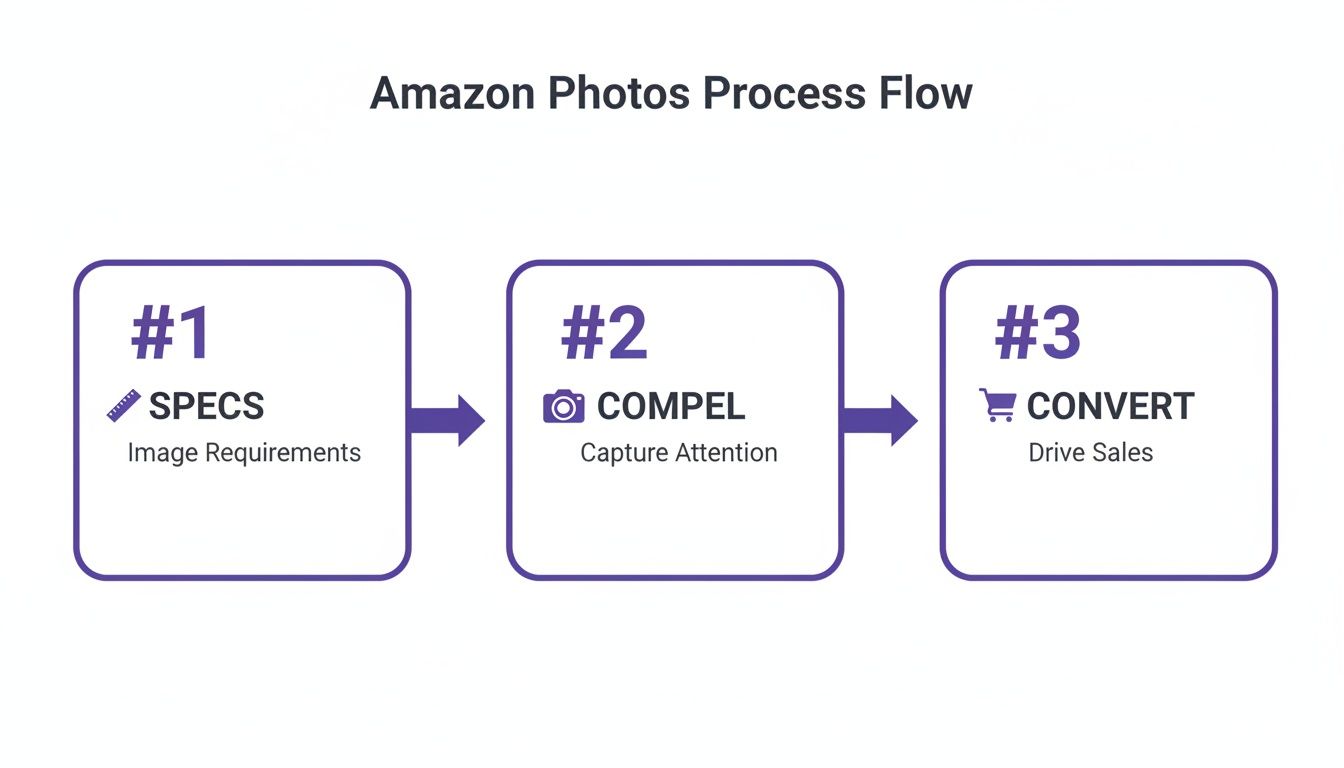
This process maps the customer journey, from meeting Amazon's technical specs to creating compelling visuals that convert shoppers.
The Main Image: The Hook
Your first image must be a crystal-clear shot of your garment on a pure white background. Make sure the garment is perfectly steamed and styled to show its shape. For a structured blazer, present it on a ghost mannequin to give it life.
On-Model and Fit Shots: The Reassurance
Fit is the #1 uncertainty for anyone shopping for clothes online. Your on-model shots crush this objection. A solid strategy involves more than just showing the front and back.
- Show Every Angle: You need front, back, and side views on a model to give a 360-degree understanding of how the item fits.
- Demonstrate Movement: A shot of a model walking can show how a skirt drapes, communicating quality and comfort.
- Vary the Poses: Mixing static and dynamic poses keeps the gallery engaging and shows off the garment’s versatility.
Traditionally, this meant booking models and studios. This is where AI offers a massive advantage. With Picjam, a single flat-lay photo can be transformed into dozens of on-model variations, featuring diverse models that reflect your target audience.
Lifestyle and Detail Shots: The Connection
Once a shopper feels confident about fit, lifestyle and detail shots create the emotional connection. These images answer finer questions and help the customer imagine the product in their life.
- Detail Close-Up: A macro shot of the fabric, a unique button, or intricate stitching speaks volumes about craftsmanship.
- Lifestyle in Context: Show your denim jacket at an outdoor cafe. This sells a feeling, not just a piece of clothing.
- Infographic: Use one image slot for a graphic with sizing info or key features like "wrinkle-resistant."
Takeaway
- Build a Strategic Shot List: Aim for 6–7 images: the main on-white, 3 on-model fit shots (front, back, side), 2 detail shots, and 1 lifestyle image.
- Answer Questions Visually: Use images to address worries about fit and fabric quality. This reduces returns.
- Use AI to Scale Efficiently: Use a tool like Picjam to generate your entire shot list from one photo, saving time and money compared to costly photoshoots.
Ready to see how a smarter workflow could benefit your brand? Compare your current costs with our savings calculator.
How to Master On-Model Photography Without a Photoshoot
For any apparel seller, one question towers above all others in a shopper's mind: “How will this actually fit me?”
Answering this visually is the fastest way to build confidence, but it has always been an expensive problem. Traditional photoshoots are bogged down by model fees, studio rentals, and retouching.
This is why so many fashion listings on Amazon miss the mark. They show a flat lay but never the garment on a relatable person, leaving the most important customer question unanswered.

Why Diverse Representation Sells More
Brands like Everlane have built loyal communities by showing their clothing on a range of body types. Their product pages feature models with different heights, sizes, and ethnicities, creating an immediate sense of inclusion.
When a buyer sees someone who looks like them wearing your product, it closes the gap between browsing and buying. This isn't just inclusive; it's a smart business move that boosts conversions and cuts down on returns.
How AI Virtual Models Elevate Your Listings
This is where AI-driven product photography for Amazon sellers completely changes the game. Brands can now generate an infinite variety of on-model images from just one photo of their garment.
Platforms like Picjam use virtual model technology to digitally dress AI-generated models with stunning realism. The AI analyzes your garment's texture and drape to ensure it falls naturally on the model's body.
This means you can showcase a new dress on 10 different models — representing your entire target audience — for a fraction of the cost and time of a traditional shoot. This capability rewrites the economics of content creation. You can dive deeper in our guide to AI fashion photography.
Actionable Steps for Generating On-Model AI Imagery
- Pick Models Who Look Like Your Audience: Choose AI models with body types, ages, and ethnicities that match your ideal customer.
- Generate a Full Range of Views: Use AI to create essential views like the back, side, and three-quarter angles to give shoppers a complete picture.
- Show Off Drape and Movement: Select poses that demonstrate how the fabric moves and hangs.
- Keep It Real: Double-check that final images maintain the garment’s true color, texture, and proportions.
Takeaway
- Prioritize Relatability: Use AI to feature models who reflect your target customer's diversity in size, age, and ethnicity.
- Show, Don't Tell, Fit: Generate a minimum of 3 on-model angles (front, back, side) to give shoppers a comprehensive view.
- Embrace Cost-Efficiency: AI eliminates the high costs of model booking, studio rental, and travel, making it possible to create high-quality, diverse imagery at scale.
How to Create Scroll-Stopping Lifestyle Scenes
The sterile white background shot gets the job done for Amazon's main image, but it doesn't make anyone fall in love with your apparel. That's where lifestyle images come in. This is your chance to make an emotional connection and sell a feeling.
The right scene gives your garment context and instantly bumps up its perceived value.

But here's the catch — it all starts with a perfect initial photo. Even if you're planning to use an AI-generated scene, you need a clean, well-lit shot of your garment first to capture true-to-life colors and fabric textures.
Sell an Aspiration, Not Just a Garment
The best fashion brands get this. Take a brand like Free People. Their imagery rarely just shows a dress; it shows a moment. It's a woman walking through a sun-drenched field. The background is central to the story.
This approach builds an aspirational identity. Customers aren't just buying a bohemian maxi dress; they're buying into that free-spirited lifestyle the image represents. The problem? Creating those scenes has always been expensive.
How AI Unlocks Infinite Creative Possibilities
This is where AI-driven content creation flips the script. Instead of being stuck with what your budget allows, you can place your product in any scene you can dream up.
Using a platform like Picjam, you can take that clean product shot and instantly generate hundreds of lifestyle variations. Want your new swimwear on a Bali beach? Done. Need your urban streetwear in a neon-lit cityscape? You can have that in seconds.
Your creative ideas are no longer tied to logistics and massive costs. For a deeper dive into the workflow, check out our guide on generating AI lifestyle photos. This agility allows for rapid A/B testing on Amazon to see which creative concepts actually resonate with your audience.
Best Practices for AI-Generated Lifestyle Scenes
- Make it Relevant: The background should complement the product. A formal evening gown looks ridiculous on a hiking trail.
- Keep it Cohesive: Your lifestyle images should feel like your brand. Stick to a consistent color palette and mood.
- Focus on Realism: Pay close attention to lighting and shadows. A high-quality AI platform will ensure the light on your product matches the environment.
Takeaway
- Tell a Story: Place your product in a context that reflects the lifestyle and aspirations of your target customer.
- A/B Test Your Scenes: Use AI to generate 2–3 different lifestyle concepts for a single product and test which one drives more clicks and sales.
- Start with a Quality Photo: The realism of your AI lifestyle scene depends entirely on the quality of your initial product photo. Ensure it’s well-lit and color-accurate.
How to Optimize Your Images to Get Seen on Amazon
Uploading a beautiful gallery of photos is only half the battle. If shoppers can’t find your listing, those stunning visuals don't matter.
This is where image SEO comes in. It’s a critical but often overlooked part of the process that tells Amazon’s A9 algorithm what your product is. So, while product photography for Amazon is an art, it’s also a science.
How to Prep Your Files for Maximum Visibility
Before you upload, your image files need to be properly optimized.
- File Naming is Your First SEO Win: Don't ever upload a file named
IMG_8542.jpg. For a black linen dress, a great filename would bebrand-name-black-linen-midi-dress-front.jpg. - Get the Size and Compression Right: Your images need to be at least 1,000 pixels on the longest side to enable zoom. Aim for a high-quality JPEG compressed to be under 1MB.
- The Right Color Profile is Non-Negotiable: Always save your images in the sRGB color profile. It’s the standard for the web and ensures your garment’s colors look accurate everywhere.
Weaving Keywords into Your Visuals
Amazon pulls data from your product title, bullet points, and description to understand what’s in your images.
Think like your customer. What terms are they searching for? For a silk blouse, you’d want to include terms like "women's silk button-down shirt," "long-sleeve luxury blouse," and "office-to-evening top."
To make sure you're ticking all the boxes, stay current on the official Amazon Product Image Requirements. For a deeper dive, we've also put together a guide on Amazon product image requirements.
Takeaway
- Optimize Your Filenames: Use a keyword-rich naming convention before you upload (e.g.,
brand-name-product-color-angle.jpg). This is a simple, high-impact SEO win. - Check Technical Specs: Ensure every photo is at least 1,000px on the longest side, under 1MB, and saved in the sRGB color profile for optimal performance.
- Align Keywords: Make sure the keywords in your filenames and product copy are consistent. This reinforces relevance for Amazon's algorithm.
Takeaway: Your Action Plan for an Elevated Amazon Strategy
Getting your product photography right on Amazon isn't about finding a secret hack. It's about building a smarter, more efficient visual strategy that gives customers what they’re looking for with absolute consistency.
1. Build a Shot List That Sells
Think beyond one static photo. You need a strategic shot list for every product. A mix of lifestyle shots and detailed close-ups is non-negotiable. Professional lifestyle photos can boost conversion rates by up to 40%, according to industry data. For a deeper analysis, see how quality images increase Amazon sales. One clothing brand even saw a 19% sales lift in just 30 days after adding lifestyle photos and infographics to their listings.
2. Embrace a More Agile Workflow
Finally, recognize the massive efficiency gains available with modern tools. AI platforms like Picjam empower brands to generate entire sets of diverse, studio-quality images at a fraction of the cost and time of a traditional photoshoot. It’s time to stop letting outdated workflows bottle up your creative potential.
3. Start with a Simple Audit
Pull up your current listings and compare them—honestly—against Amazon's technical rules and creative best practices. Are you using all the image slots? Is your main image pristine? Making small fixes here can give you an almost immediate bump in visibility and click-through rates.
Ready to see how much an AI-powered workflow could save your brand? See how your current costs stack up with our savings calculator.

Picjam team
The Picjam team blends AI, product, and creative expertise to eliminate the cost and delay of traditional photography for modern eCommerce brands.

