A Modern Guide to Modeling for Photographers in Fashion
Master modeling for photographers in fashion e-commerce. Learn pre-shoot prep, model direction, and how AI tools scale your visuals while cutting costs.
How to start saving money
Lorem ipsum dolor sit amet, consectetur adipiscing elit lobortis arcu enim urna adipiscing praesent velit viverra sit semper lorem eu cursus vel hendrerit elementum morbi curabitur etiam nibh justo, lorem aliquet donec sed sit mi dignissim at ante massa mattis.
- Neque sodales ut etiam sit amet nisl purus non tellus orci ac auctor
- Adipiscing elit ut aliquam purus sit amet viverra suspendisse potent i
- Mauris commodo quis imperdiet massa tincidunt nunc pulvinar
- Adipiscing elit ut aliquam purus sit amet viverra suspendisse potenti
Why it is important to start saving
Vitae congue eu consequat ac felis placerat vestibulum lectus mauris ultrices cursus sit amet dictum sit amet justo donec enim diam porttitor lacus luctus accumsan tortor posuere praesent tristique magna sit amet purus gravida quis blandit turpis.

How much money should I save?
At risus viverra adipiscing at in tellus integer feugiat nisl pretium fusce id velit ut tortor sagittis orci a scelerisque purus semper eget at lectus urna duis convallis. porta nibh venenatis cras sed felis eget neque laoreet suspendisse interdum consectetur libero id faucibus nisl donec pretium vulputate sapien nec sagittis aliquam nunc lobortis mattis aliquam faucibus purus in.
- Neque sodales ut etiam sit amet nisl purus non tellus orci ac auctor dolor sit amet
- Adipiscing elit ut aliquam purus sit amet viverra suspendisse potenti
- Mauris commodo quis imperdiet massa tincidunt nunc pulvinar
- Adipiscing elit ut aliquam purus sit amet viverra suspendisse potenti
What percentage of my income should go to savings?
Nisi quis eleifend quam adipiscing vitae aliquet bibendum enim facilisis gravida neque. Velit euismod in pellentesque massa placerat volutpat lacus laoreet non curabitur gravida odio aenean sed adipiscing diam donec adipiscing tristique risus. amet est placerat imperdiet sed euismod nisi.
“Nisi quis eleifend quam adipiscing vitae aliquet bibendum enim facilisis gravida neque velit euismod in pellentesque massa placerat”
Do you have any comments? Share them with us on social media
Urna ut fermentum imperdiet lacus, elementum etiam maecenas libero nunc, suspendisse massa, nisl, elit curabitur feugiat in quis ut nibh enim in tristique aliquam sed vitae dui, dis adipiscing pharetra aliquam turpis turpis nibh rhoncus enim, pellentesque leo laoreet neque in sed bibendum fermentum suspendisse tempus non purus adipiscing suscipit fringilla adipiscing convallis dolor nulla fermentum facilisis ullamcorper ut vehicula tortor libero metus donec velit, tristique fermentum, dictum euismod diam scelerisque enim non pharetra tristique lectus habitant pharetra est id
When fashion brands like Zara or ASOS shoot thousands of new items, maintaining visual consistency is a massive challenge. The disconnect between a perfect online photo and how a garment fits in reality is a key reason why fashion eCommerce return rates can hit a staggering 30–40%. As a photographer, your role is evolving — it's no longer just about a pretty picture, but about using modeling for photographers to build trust and cut costly returns.
This guide provides a modern playbook for fashion photographers, blending on-set artistry with AI-powered efficiency to meet today's content demands. We'll explore how to direct models, master your technical setup, and leverage tools like Picjam to scale your creative output, saving brands significant time and money.
How to Cut Content Costs with a Smarter Workflow
The real challenge for photographers today is the sheer volume of content required. Brands need a constant stream of high-quality, true-to-life apparel images for product pages, social media, and ad campaigns. This relentless pace puts a strain on traditional photoshoot workflows, forcing brands to find more efficient production methods.
The Problem of Scale and Inconsistent Storytelling
Think about brands like ASOS, which have to shoot thousands of different items. Trying to maintain visual consistency across that volume with traditional methods is nearly impossible. Every new shoot introduces variables — a different model, a slight change in lighting, a new pose — that can create a disjointed customer experience. The result is often an expensive cycle of reshoots and a brand image that feels off.
For a deeper look at creating a cohesive online storefront, explore these tactics for effective ecommerce merchandising best practices.
The Financial Drain of Inefficient Content Production
Content needs are exploding, but budgets aren't. When you consider that up to 40% of all online clothing purchases are returned, a number directly tied to the gap between what customers see and what they get, the financial drain becomes clear. A McKinsey report found that AI can slash content creation costs by 15–20%, a key reason many brands are adopting new technologies that deliver better visuals more affordably, a trend you can see in this report on AI fashion trends.
A Modern Workflow: How AI Saves Time and Money
This is where a hybrid approach comes in. By integrating a tool like Picjam into the workflow, photographers can move past the limitations of the physical studio. Picjam lets you take a single, perfect product photo and generate hundreds of on-model variations from it, solving the problem of scale and consistency.
The photographer's role evolves from just capturing images to becoming a strategic creative director. You set the visual standard with a perfect hero shot, and then AI multiplies that vision across different models, poses, and backgrounds.
This process ensures every garment is showcased with the same level of quality, every time. It cuts the immense overhead of managing endless, repetitive shots and frees you to focus on high-impact creative work. You're designing a scalable visual system for the brand, directly boosting their bottom line.
A modern, AI-assisted approach fundamentally changes the structure of a photoshoot. Here’s a quick comparison of the two workflows.
Traditional vs. AI-Assisted Modeling Workflow
As you can see, integrating AI doesn't replace the photographer's skill — it amplifies it. The focus shifts from repetitive execution to strategic direction, allowing for greater creative control.
For a closer look at how this works, you might be interested in our guide on the benefits of using AI fashion models.
How to Build the Foundation for a Flawless Photoshoot
Great eCommerce shoots don't just happen; they're the result of meticulous planning. A flawless, high-converting photoshoot is built in pre-production, and a solid plan ensures you get every shot a brand needs while keeping things efficient and creative.
Just look at brands like Allbirds. Their imagery feels effortless and natural precisely because the pre-production work is so dialed in. This blueprint ensures the final images align perfectly with their brand identity for a cohesive customer experience.
Create a Comprehensive Shot List for Zero Gaps
Your shot list is your strategic roadmap for the day. It's more than a simple checklist; it guarantees you capture every angle needed for product pages, social media, and paid ads, saving you from expensive reshoots.
A complete shot list has to specify:
- Key Angles: Full-length, 3/4 body, waist-up, and those crucial close-ups of fabric, seams, and hardware.
- Product States: Think about how the garment is worn — zipped, unzipped, hood up, hood down. Get it all on the list.
- Pose Types: You'll need a mix of static, clean eCommerce poses and more dynamic, editorial shots for marketing.
Define the Vibe with a Strong Mood Board
A mood board translates a feeling into a visual language for the shoot. It communicates the exact aesthetic, energy, and emotional tone you're after, getting your entire creative team aligned on the same vision.
A great mood board doesn't just show what the shoot will look like; it shows what it should feel like. It answers questions about the character the model is portraying and the story the brand wants to tell.
For instance, a mood board for a luxury silk brand like Cuyana would be full of soft, graceful poses in a serene, minimalist space. In contrast, a board for an activewear brand would be packed with powerful, energetic movements and vibrant settings.
Write a Clear and Actionable Model Brief
The model brief is arguably the most important piece of communication you'll create. It’s where you turn brand goals into an on-set performance, giving the model the context needed to connect with the target customer and sell the product.
Your brief should always include:
- The Customer Persona: Who is this person? What do they care about? This helps the model step into the shoes of the target audience.
- Key Garment Features: Call out what makes the product special — a unique drape, a technical fabric, or a specific fit.
- Emotional Tone: Are you going for confident and bold, or soft and approachable? Be specific.
This visual breaks down how a modern, AI-assisted workflow stacks up against a traditional one, showing just how much impact great prep has.
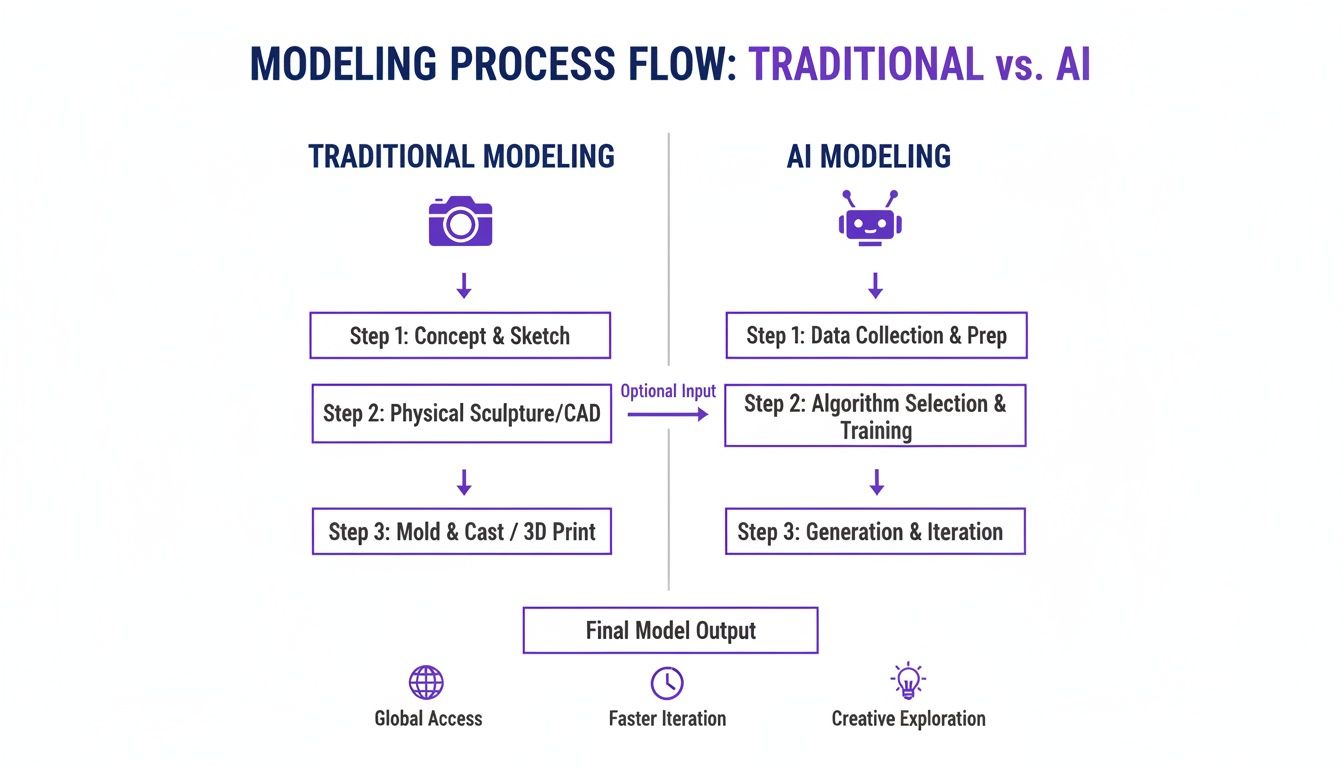
As the flowchart shows, an AI-assisted process like the one used by Picjam puts creative decisions upfront. By nailing a single, perfectly styled product shot, you can then generate endless variations without repeating the logistics of a traditional shoot. This preparation changes how you approach every model for photoshoot opportunity, making your work far more strategic.
How to Direct Models to Showcase Garments Perfectly
The difference between a photo that just shows a product and one that actually sells it often comes down to the model's performance. Great modeling for photographers isn't about hitting static poses; it's a dynamic conversation between you and the model to bring a garment to life.
Your ability to guide someone to showcase fit, fabric, and feel is what elevates an image from a simple catalog shot to a compelling, conversion-driving asset.
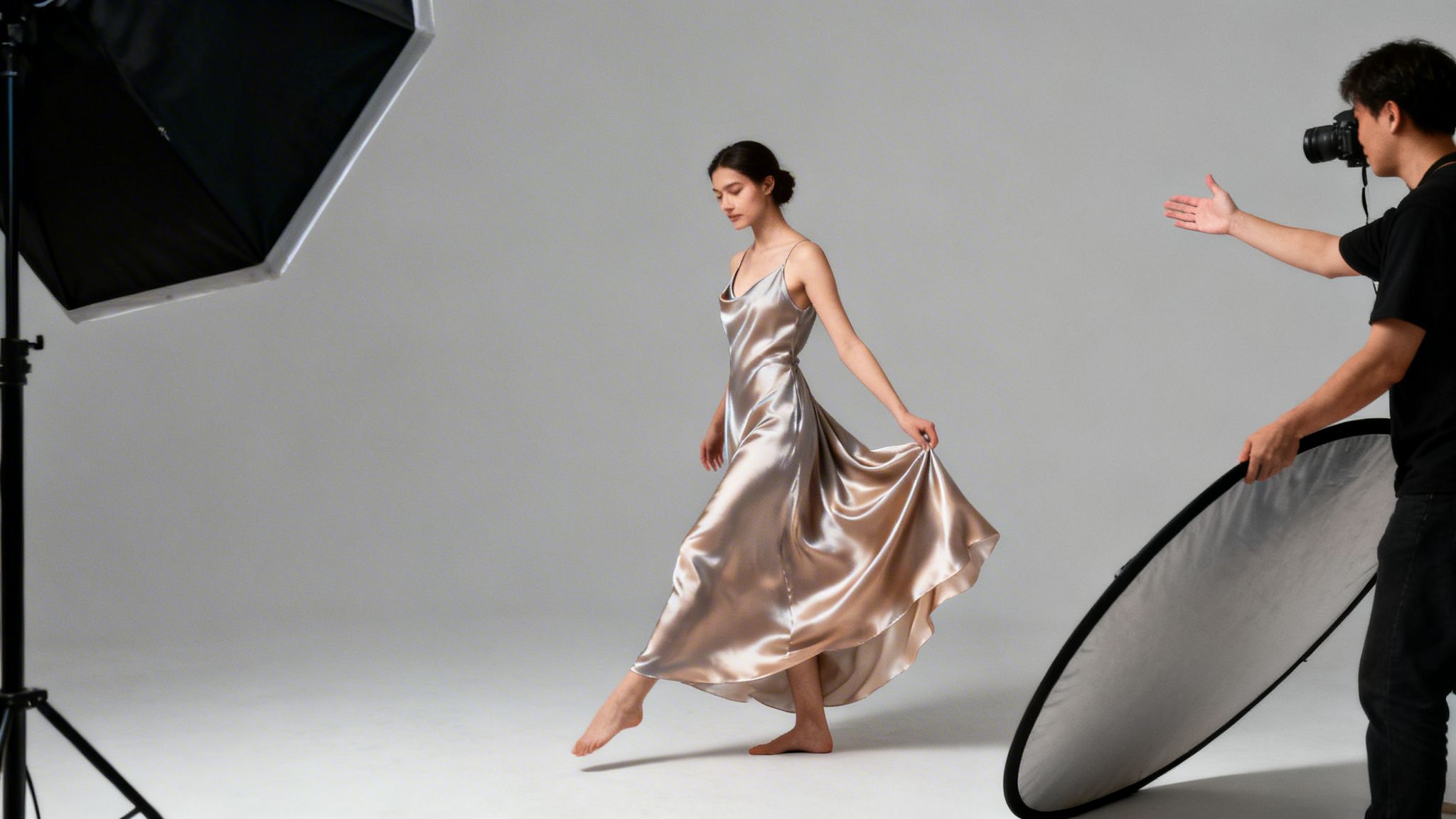
Go Beyond Static Poses With Pose Sequences
The most efficient way to capture a wide variety of natural-looking shots is to get away from the stiff "pose-hold-shoot" rhythm. Instead, build pose sequences — a series of small, fluid movements you direct the model to flow through. This approach produces a high volume of usable images, fast.
For instance, instead of just asking for a single "hand on hip" pose, direct a sequence:
- Start with hands in pockets.
- Slowly slide one hand out and bring it up to the hip.
- Now, let that hand gently brush through the hair.
- Finally, let it rest on the opposite shoulder.
That tiny sequence alone can yield 10–15 distinct, yet connected, images that feel authentic and unforced, giving you a rich library of content from a single set of instructions.
Direct for the Garment, Not Just the Model
Your direction has to be tailored to the specific product. The goal is to visually answer the customer's unspoken questions about the garment before they even have to ask them.
- For Stretchy Activewear: Use cues that demonstrate flexibility. "Let's try a long lunge to your right," or "Gently twist at your waist." This shows the garment's real range of motion.
- For a Flowy Silk Dress: Focus on creating movement that shows off the fabric's drape. "Walk slowly toward me and let the dress move," or "Give a gentle spin." These actions bring out the lightness of the material.
- For a Structured Blazer: Emphasize the tailoring. Ask the model to button and unbutton it, or to turn sideways so we can see the sharp silhouette. This communicates quality at a glance.
Brands like Reformation are masters at this. Their models give off an effortless, "cool girl" vibe because the direction focuses on natural movements that show exactly how the clothes hang and move on a real body.
Build Confidence With Clear Communication
A model's confidence translates directly into the final image. A nervous or unsure model will look stiff. Your job is to be their guide and biggest supporter on set.
As one industry pro shared, "I always make sure to take note of what an agent needs for a model's book. Making the agent happy ensures you're more likely to be asked to shoot more new faces in future." This highlights how important collaboration is.
To create a productive environment on set:
- Use Specific Verbal Cues: Avoid vague instructions like "look natural." Instead, try, "Drop your chin just a bit and look slightly past the camera."
- Demonstrate Poses Yourself: Don't be afraid to show the model exactly what you mean. It's often the fastest way to get the look you're after.
- Provide Positive Reinforcement: Offer continuous, genuine feedback. Simple phrases like, "That's perfect," or "Great energy," build momentum.
By mastering these techniques, you'll create a wider variety of compelling images, faster. For more ideas, our guide on essential model fashion poses offers even more to try.
How to Master Your Lighting and Camera Setups
Your technical setup is the foundation of any great eCommerce shoot. Getting the lighting and camera settings right isn't just about pretty pictures; it's about creating consistent, color-accurate images that reduce post-production headaches and lower return rates.
Top-tier brands like Net-a-Porter have this down to a science. Their consistency is no accident. It’s what allows their product pages to feel cohesive and trustworthy.
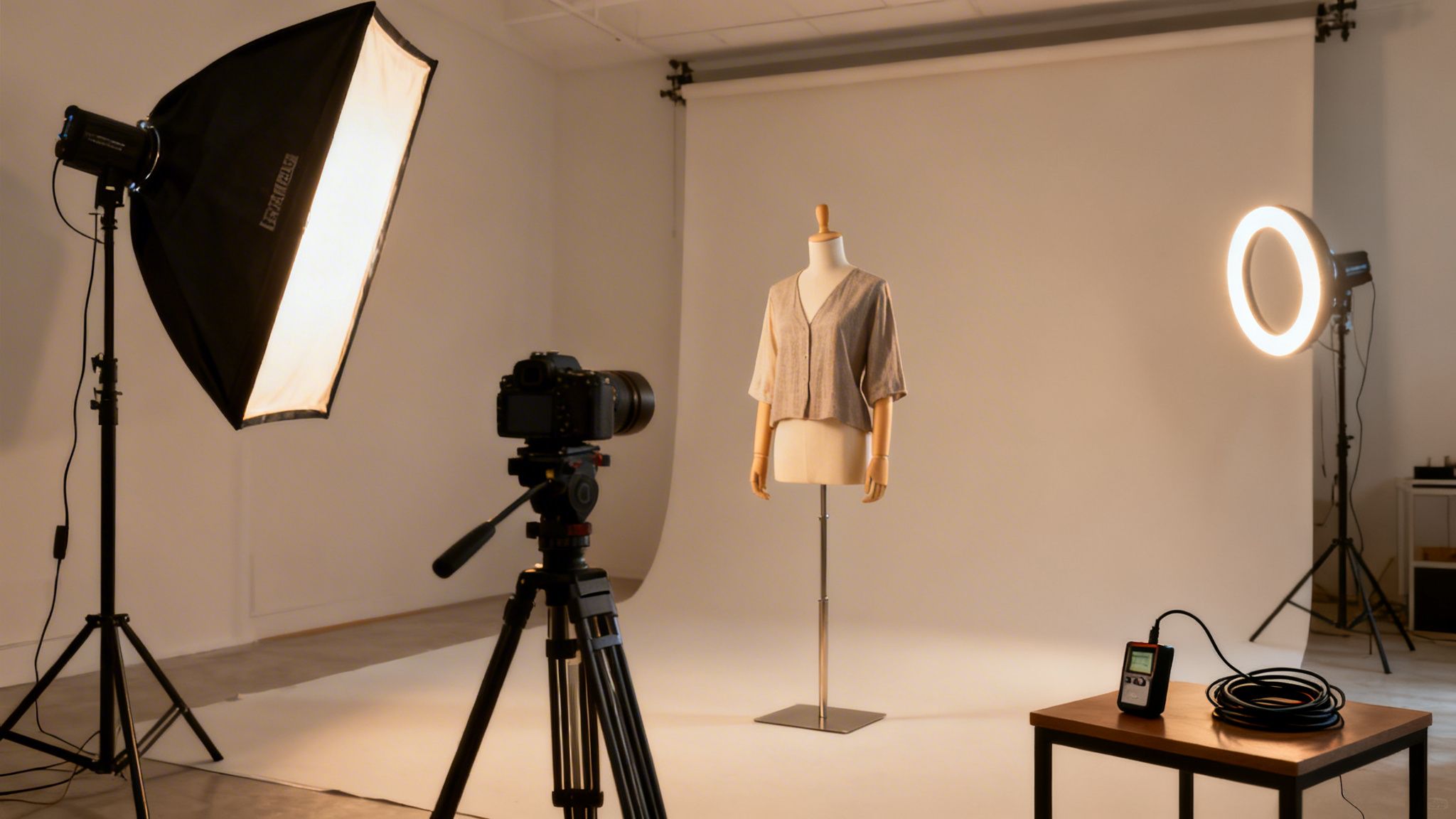
Let's dig into the technical skills required for clean, commercial results for modeling for photographers.
Choose the Right Lighting for Garment Accuracy
Lighting isn’t just about making things visible; it’s about communication. It tells a story about the garment’s texture, shape, and material. For eCommerce, that story needs to be crystal clear.
- Soft Light for Flattering Looks: Most of the time, you'll use a large, diffused light source like a big softbox. This creates soft, even lighting that minimizes harsh shadows, flatters the model, and gives a clean view of the product.
- Hard Light for Texture and Drama: Hard light from a smaller, direct source creates sharp, defined shadows. It’s your best friend for highlighting texture — think of a denim jacket's weave or a chunky knit sweater.
For a simple and effective setup, try placing a single large key light at a 45-degree angle to your model. This carves out the garment's shape with gentle shadows. For more polish, a three-point setup — using a key light, a fill light, and a backlight — pops the model off the background.
Dial In Camera Settings for Sharp, Consistent Images
Your camera settings are where the technical and creative meet. For on-model eCommerce, the goal is always sharpness, accurate color, and consistency.
- Aperture (f-stop): Your sweet spot for full-body eCommerce shots will be between f/8 and f/11. This ensures the entire garment is in sharp focus, from shoulders to shoes.
- Shutter Speed: To get tack-sharp images and freeze motion, start at 1/200s and go faster if the model is moving dynamically.
- ISO: Always keep your ISO as low as your camera allows, usually 100 or 200, to ensure clean, noise-free images.
Maintaining consistent camera settings and lighting placement is fundamental. This discipline allows tools like Picjam to take one perfectly captured image and scale it into hundreds of variations, saving brands a massive amount of time and money.
Your Essential On-Model Gear Checklist
Showing up prepared is half the battle. Having the right tools on hand prevents on-set delays and lets you focus on executing the creative vision.
- Camera: A full-frame DSLR or mirrorless camera that you can tether.
- Lenses: A versatile workhorse like a 24-70mm f/2.8 and a good prime lens like a 50mm or 85mm.
- Lighting: At a minimum, one key light (strobe or continuous LED) with a large modifier. A fill light and backlight are highly recommended.
- Support: C-stands, a sturdy tripod, and plenty of sandbags.
- Tethering: A reliable tethering cable and a laptop running capture software.
- Color Management: A color checker card is non-negotiable for accurate colors from capture to export.
Nailing these technical fundamentals builds an efficient workflow that delivers high-quality imagery, shoot after shoot.
How to Scale Production with AI-Powered Modeling
Even with a perfected on-set workflow, traditional photoshoots have physical limits. The pace of modern eCommerce content demands is relentless, and keeping up can feel impossible with a camera in hand. Integrating AI tools lets you move beyond those old-school bottlenecks.
Instead of being tied to studio bookings and call sheets, you can now scale your creative vision exponentially. Platforms like Picjam allow you to take a single, perfectly shot product photo and generate a massive campaign around it, complete with a diverse cast of AI models, custom backgrounds, and endless pose variations.
Your role evolves from a hands-on technician to a strategic creative director. You pour your expertise into crafting that one flawless "hero" shot. That single image then becomes the master asset for AI-driven production.
From Single Shot to Full Campaign, Instantly
Imagine you're tasked with creating an entire lookbook for a fast-fashion brand like ASOS, which needs to serve dozens of micro-trends at once. With an AI workflow, you can upload one solid ghost mannequin photo and let the technology do the heavy lifting.
This opens the door for lightning-fast testing. You can see how that jacket looks on models of different ethnicities and body types. You can drop it into an urban cityscape or a clean studio setting without booking a single location, offering creative freedom without the logistical headache.
The financial argument is getting harder to ignore. The market for AI-generated fashion photography was valued at $1.51 billion in 2024 and is projected to hit $6.12 billion by 2029. Brands are jumping on board to slash production costs and feed their digital advertising with fresh visuals.
Ensuring Consistency and Garment Realism
Sophisticated platforms are built to deliver realistic, on-brand results, giving you the controls to maintain quality and customer trust.
- Fixed Product: This feature locks your original garment photo in place. The AI then generates the model around it, so the fit, texture, and color stay completely true to life.
- Fit to Model: More advanced algorithms can realistically drape clothing onto different body shapes, giving customers an accurate idea of how a piece will look on them.
- Brand-Specific Models: You can create your own library of AI models that fit your brand’s unique aesthetic, ensuring every image feels consistent.
AI handles the repetitive, high-volume work, freeing up your time and budget. You get to focus on the high-level creative direction and producing the stunning hero images that truly define a brand's campaign.
Exploring various AI tools for content creators can help you scale production. This isn't about replacing your artistry; it's about amplifying it.
Takeaway
Here are 3 actionable insights to elevate your next fashion shoot:
Direct with Pose Sequences: Instead of static poses, guide models through a series of small, fluid movements. This creates more natural-looking shots and captures a higher volume of usable content quickly. Direct for the garment — ask for a lunge to show stretch or a spin to show drape.
Master Your Technicals for Consistency: Use a consistent lighting setup (like a single key light at 45 degrees) and lock in your camera settings (f/8-f/11, 1/200s, ISO 100) for every shot. This discipline is the foundation for creating scalable, high-quality eCommerce images.
Use AI to Scale Your Best Work: Focus your on-set efforts on creating a single, perfectly lit "hero" shot of each garment. Then, use a tool like Picjam to generate hundreds of on-model variations, saving immense time and money while maintaining brand consistency.
Curious what that looks like in real numbers? Use the Picjam savings calculator to compare your current photography costs with the savings of an AI-powered workflow.

Picjam team
The Picjam team blends AI, product, and creative expertise to eliminate the cost and delay of traditional photography for modern eCommerce brands.