
Mastering White Background Product Photography
Learn how to create flawless white background product photography for e-commerce. This guide covers traditional studio setups and new AI workflows.
Clean, consistent white background product photography isn't just an aesthetic — it's the foundation of modern eCommerce. Brands like The Row have built their entire digital presence on this principle, using minimalist backdrops to let the product’s quality speak for itself. This approach is essential for marketplaces like Amazon and for building a professional, high-converting online store.
Why? Because a crisp white background highlights a product's details, color, and texture without distraction. For fashion brands, this clarity builds shopper trust and directly boosts conversion rates. When a customer can see the exact weave of a fabric, their confidence to purchase skyrockets.
Platforms like Picjam are streamlining this entire process, allowing brands to generate perfect white background shots from a simple smartphone photo. This shift saves significant time and budget, which can then be reinvested into more creative marketing content.
Why a White Backdrop Delivers Higher Conversion Rates
A clean white background is a strategic tool, not just a design choice. Fashion giant Zara, for example, uses this approach to create a uniform digital storefront where thousands of items can be compared seamlessly. This consistency cuts through the visual clutter, allowing the texture of a denim jacket or the drape of a silk blouse to command attention.
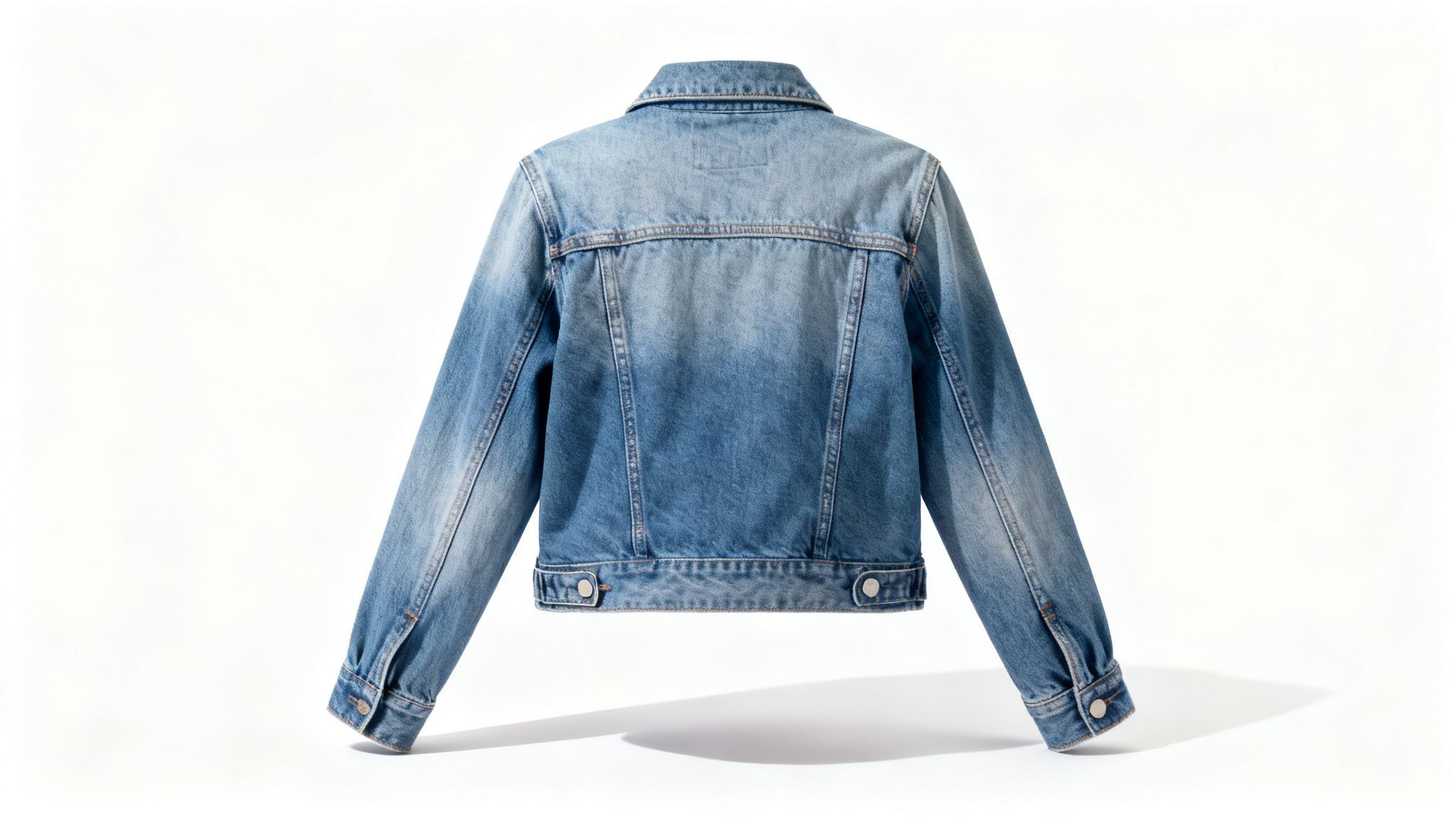
This method isn’t a passing fad; it’s a foundational requirement for selling online effectively, proven by its widespread adoption across every major eCommerce platform.
How White Backgrounds Meet Marketplace Demands
Major platforms like Amazon didn't land on white backgrounds by accident — data proves they work. For over a decade, Amazon has mandated a pure white background as the standard for main product images, a rule that remains firm.
The requirements are specific: your main image must have a pure white background (RGB 255, 255, 255), the product needs to fill about 85% of the frame, and it must meet minimum resolution specs. This isn't just about aesthetics; it builds trust and reduces returns by setting clear, predictable expectations for shoppers.
How Image Consistency Drives Brand Trust and Sales
For any brand, but especially in fashion, trust is currency. When a customer can clearly see a product’s details — from the stitching to the fabric texture — their confidence to hit "buy" increases significantly. A crisp, professional presentation signals quality and reliability, which directly impacts your bottom line.
This consistency is also a huge asset in marketing. Clean product images are critical for platforms like Google Shopping. As this Google Shopping Ads tutorial explains, clean images perform better because they are versatile and easy to repurpose across different ad formats.
While creative lifestyle shots have their place, the hero image on a white background is the anchor of a successful product page. It’s the digital equivalent of putting a product on a well-lit pedestal in a store — it commands attention and makes your product the star.
How to Build a Cost-Effective In-House Studio
If your brand is serious about an in-house photography team, nailing that perfect white background starts long before post-production. It begins with a thoughtful studio setup designed to produce consistent, high-quality images every time.

The goal is to capture photos that require minimal editing. Think of a brand like Everlane, with its famously clean aesthetic. Their product pages feature garments that seem to float, grounded by soft, natural shadows. That's not a Photoshop trick — it's the result of mastered studio technique.
Building Your Foundation: Essential Gear
Your equipment is the backbone of great white background product photography. You don't need a massive budget, but a few key pieces are non-negotiable for professional results.
Backdrop: A seamless white paper roll is your best friend. A 9-foot roll is a versatile industry standard. Paper is non-reflective, and when it gets dirty, you just cut off the end and pull down a fresh section. This saves hours of post-production cleanup.
Camera and Lens: A full-frame DSLR or mirrorless camera is ideal for capturing maximum detail. Pair it with a 50mm prime lens. This lens offers a perspective similar to the human eye, minimizing distortion and keeping your apparel’s proportions true to life.
Tripod: A solid tripod is essential. It eliminates camera shake, ensures consistent framing for every shot, and frees you up to adjust the product or lighting.
How to Master Lighting for Clean Images
Lighting is the most critical element in the studio. The goal is to light the product and the background evenly to eliminate harsh shadows that complicate background removal.
A classic 2-light setup is an industry go-to because it works. Here's the positioning:
Key Light: This is your main light. Place it at a 45-degree angle to your product. A large softbox will diffuse the light, wrapping it around the garment to soften shadows and reveal texture.
Fill Light: Place this on the opposite side, also at a 45-degree angle. Its job is to "fill in" shadows created by the key light. Set its power to about half that of your key light to create gentle definition.
For smaller items like accessories, a dedicated light box might be a smart investment. You can check our guide on finding the best light box for product photography.
A rookie mistake is lighting the product and background as one. Light them separately. Use 1 or 2 extra lights aimed only at the white backdrop to "blow it out" to pure white, making post-production far easier.
How to Dial In Your Camera Settings for Sharpness
With your gear in place, it’s time to dial in the camera. These settings are a solid starting point for sharp apparel photos. Always shoot in manual mode for full control.
Aperture (f-stop): Set your aperture between f/8 and f/11. This range provides a deep depth of field, ensuring the entire garment stays in sharp focus.
ISO: Keep your ISO as low as possible, usually 100. A low ISO minimizes digital noise, giving you the cleanest image file.
Shutter Speed: If using strobes, set your shutter speed to your camera's sync speed, typically around 1/125s or 1/200s. This ensures the shutter is fully open when the flash fires.
White Balance: Never leave this on auto. Use a grey card to set a custom white balance. This is crucial in fashion, where a slight color cast can misrepresent a product and lead to returns.
How to Achieve Pixel-Perfect Edits in Post-Production
Getting a great shot in-camera is only half the battle. The other half happens in post-production, where you turn a good photo into a pixel-perfect asset. This is where you transform a slightly off-white backdrop into the pure, industry-standard white that makes your products pop. For this precision work, a tool like Adobe Photoshop is essential.
This step is make-or-break for brands that thrive on visual consistency. Think of Reformation, where every product shot feels clean and cohesive. That seamless experience is the result of strict post-production discipline that makes the product the hero of every shot.
Mastering the Art of the Clean Cutout
First, you need a precise cutout. For professional white background product photography, this is non-negotiable. While AI selection tools are improving, the Pen Tool in Photoshop remains the gold standard for accuracy, especially with the soft edges of apparel.
Creating a path with the Pen Tool lets you trace the exact contour of your product. This manual control ensures you capture the gentle curve of a sleeve or the subtle texture of a hemline without jagged edges.
How to Create a Pure White Background
Once your product is isolated on its own layer, it's time to perfect the background. The goal is a pure white canvas — specifically RGB (255, 255, 255). This is a hard requirement for major platforms like Amazon.
A simple way to achieve this is with the Levels adjustment tool.
- Create a new layer below your product and fill it with white.
- Select your product layer and open the Levels adjustment panel.
- You’ll see a histogram with 3 sliders: shadows (black), midtones (gray), and highlights (white).
- Gently drag the white highlight slider left. The background will brighten. Continue until it registers as pure white, but watch that you don't "blow out" product details.
The key is to adjust the background without overexposing the product. If your white t-shirt loses its texture, you’ve gone too far. Use layer masks to apply adjustments selectively.
Final Polish and Color Accuracy
With a perfect white background, you’re almost done. The last step involves cleanup and critical color correction. Use the Spot Healing Brush or Clone Stamp Tool to remove any dust, stray threads, or imperfections.
Finally, ensure the on-screen product color is an exact match to the physical item. A staggering 22% of online returns happen because an item looks different in person.
Work on a color-calibrated monitor and tweak the hue, saturation, and brightness until it’s a perfect match. This step isn't just aesthetic; it’s a direct strategy to slash costly returns. For a deeper dive, check out our guide on essential eCommerce photo editing practices.
How AI Slashes Content Production Costs by up to 90%
The traditional studio process — from booking a space to final edits — is a major investment. For emerging brands, that cost can be a massive roadblock. AI tools are now offering a faster, more scalable alternative, completely changing the game for content production.
Platforms like Picjam automate the most time-consuming parts of the job, like cutting out backgrounds, cleaning up images, and even generating on-model shots. This represents a total shift in how brands can approach their visual strategy.
Imagine a new activewear brand. Instead of booking a studio and hiring a photographer, they can shoot their products on a mannequin with a smartphone. From there, AI like Picjam generates a perfect, pure white background image in seconds, saving thousands in production costs.
The New Cost Equation for Content Creation
The savings are immediate and substantial. For many direct-to-consumer brands, the cost per image can plummet from over $50 to just a few dollars. This frees up budget to create content that actually moves the needle.
Consider a brand like Allbirds, known for clean, effective product shots. With an AI workflow, they could test new colorways on their site without scheduling a full reshoot. This agility allows them to react to market trends and inventory changes instantly.
This workflow shows the manual post-production steps that AI now handles automatically.
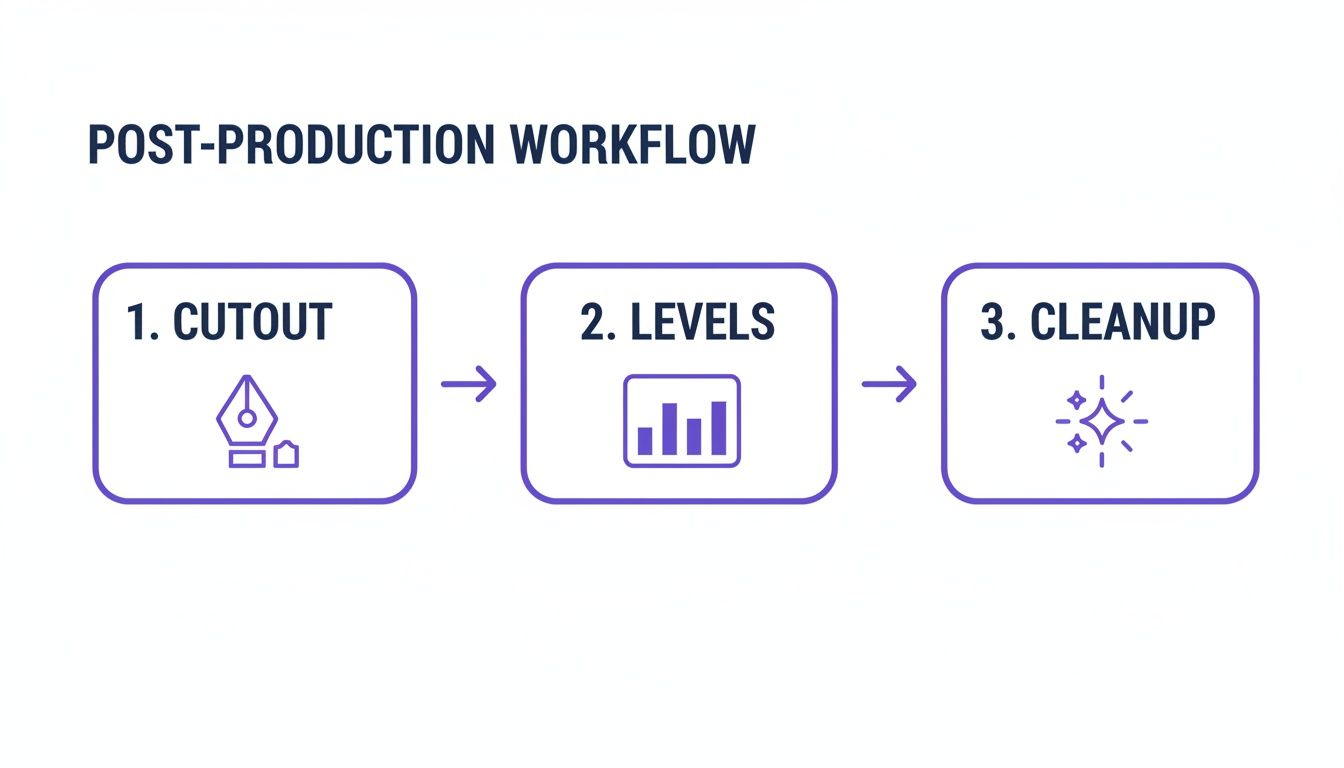
By automating the cutout, levels, and cleanup, platforms like Picjam let creative teams focus on big-picture strategy instead of repetitive tasks. The efficiency gains are significant, with McKinsey reporting that generative AI could add up to $2.6 trillion in value to the retail and CPG sectors.
Traditional Studio vs. AI Workflow Comparison
To give this real-world context, let's break down how the two approaches stack up.
The numbers speak for themselves. The AI approach doesn't just reduce costs; it makes content creation faster and infinitely more flexible.
How to Redirect Savings Toward Brand Growth
Forward-thinking brands are taking the budget they save on primary product shots and pouring it into engaging secondary content that drives sales. This includes more lifestyle images, on-model videos, and social media assets that tell a story.
"AI doesn't replace creativity; it funds it. The money we're not spending on basic product shots is now going directly into creating TikToks and influencer collaborations that actually connect with our audience."
– Paraphrased insight from a DTC founder interview.
This strategic pivot lets even small brands compete visually with the big players. They can produce a higher volume and variety of content, A/B test creative ideas, and keep their social feeds fresh without blowing their budget. Learn more about how brands are using AI product photography to get ahead.
The real win with an AI-driven workflow isn't just about saving money — it's about creative liberation. By automating the tedious work of creating clean white background product photography, brands can reinvest their time and budget into storytelling and community building.
Takeaway
Let's move from theory to practice with a strategic checklist to immediately elevate your white background product photography.
Audit Your Top Sellers: Go look at your top 10 best-selling products. Use a color picker tool to confirm the hero image background is pure white — RGB (255, 255, 255). A slightly off-white background can get listings suppressed on marketplaces like Amazon and hurt conversion rates. Fix any non-compliant images immediately.
Run a Smart A/B Test: For your next product launch, create two main images. The first is your best traditional photo. The second is an AI-generated image from a platform like Picjam. Test them against each other on your product page or in an ad campaign, tracking click-through rate, add-to-cart rate, and conversion. This provides hard data on what your audience prefers.
Reinvest Your Savings: Use the time and money saved with an AI workflow to fund the storytelling assets you've been putting off. Reinvest that budget into engaging lifestyle shots, short-form video content for TikTok and Reels, or user-generated content campaigns. Automating the essentials frees up resources for the high-quality media is crucial for digital advertising that builds a brand.
Ready to see exactly how much you could save? Use the Picjam savings calculator to get a clear picture of what upgrading your workflow could mean for your bottom line.
Still Have Questions?
Getting your white background photography right can be challenging. Here are answers to common questions we hear from fashion brands.
How Do I Photograph White Clothing on a White Background?
This is a classic challenge. The secret isn't more light — it's better light. Position your main light source slightly to the side to create soft, subtle gradients along the fabric's edges. This gives the product shape and dimension. A brand like The Row nails this, using minimalist lighting to highlight the texture of their neutral pieces.
In post-production, use selective adjustments. Gently lower the brightness or increase the contrast on the product only, while ensuring the background remains 100% pure white.
What Are the Best Export Settings for Marketplaces?
Getting your export settings wrong for platforms like Shopify or Amazon can slow your page speed or blur your images. Stick to these specs:
- File Type: High-quality JPEG. It offers the best mix of quality and file size.
- Color Profile: Always use the sRGB color profile for universal consistency.
- Resolution: At least 2048 x 2048 pixels to support zoom features.
- File Size: Keep it under 500 KB to ensure fast page loads.
Can AI Accurately Replicate Fabric Textures?
Yes. Modern generative AI models, like those in Picjam, are trained on millions of high-resolution fashion photos. They have a deep understanding of how different fabrics look and behave.
The technology now preserves tactile qualities — the rugged weave of denim, the subtle sheen of silk, or the cozy texture of wool. It works by generating hyper-realistic shadows and highlights that mimic the fabric's natural drape.
A brand like Zara, which needs to get new products online at lightning speed, can generate on-model shots in minutes, confident that the AI will render a linen blazer's texture with stunning accuracy. This maintains visual quality, boosts conversion, and cuts down on returns. The savings are not just in production costs but in the operational agility it provides.
Curious how much your brand could save by automating its content production? Use our tool to compare your current photography costs with the financial upside of a smarter workflow.

Picjam team
The Picjam team blends AI, product, and creative expertise to eliminate the cost and delay of traditional photography for modern eCommerce brands.

