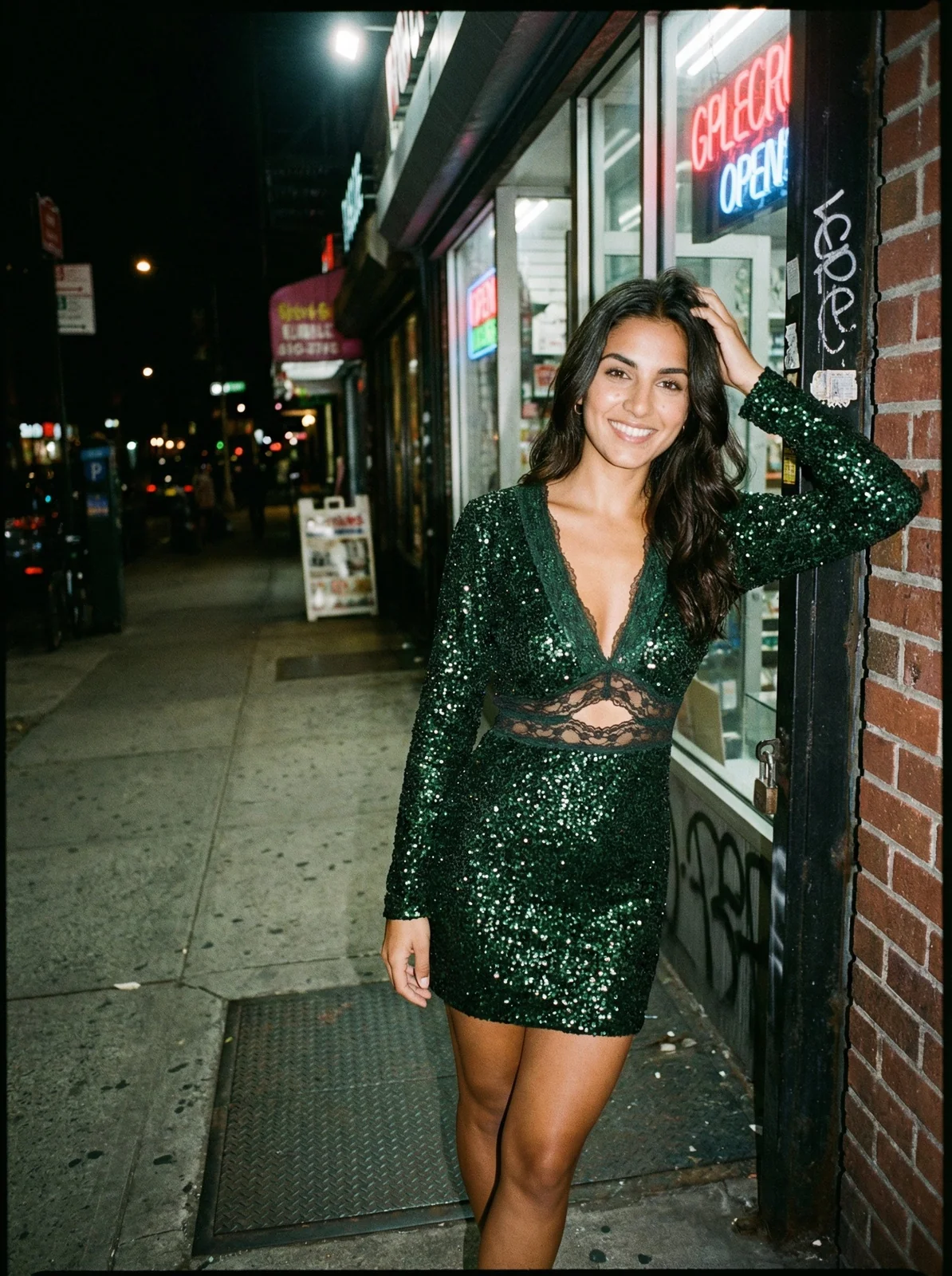
A Modern Product Photography Workflow for High-Growth Brands
Discover a modern product photography workflow built for speed and scale. Learn from Michael Pirone how to plan, shoot, and scale content with AI.
By Michael Pirone, Founder of Picjam & Vidico
A modern product photography workflow isn't just about taking pretty pictures. It's the entire system for planning, shooting, and publishing visual content — a repeatable process that turns sporadic photoshoots into a powerful content engine.
The Old Fashion Content Model Is Broken
The traditional, seasonal product photography model no longer works. High-growth brands like Zara and ASOS can't get by on a few big photoshoots a year. The market now runs on a continuous, ‘always-on’ content cycle that demands incredible speed and a ton of different visuals.
This isn't just about taking more photos. It's about fundamentally rethinking your production process to build a scalable content engine. To survive and grow, you have to adopt a new kind of product photography workflow — one that's both fast and cost-effective.
The Never-Ending Demand for New Content
Today's shoppers have an insatiable appetite for newness. This has completely shattered the old cycle of doing 2 or 4 big campaign shoots a year. Instead, you need a system that can constantly pump out content for:
- Daily social media posts on Instagram, TikTok, and Pinterest.
- Weekly email campaigns that show off new arrivals and sales.
- Non-stop A/B testing of ad creative to see what actually converts.
- Product pages (PDPs) that need to be constantly refreshed and expanded.
This relentless pace puts huge pressure on creative teams and budgets. The old way of doing things just can't keep up.
The Tough Economics of Content Production
As the demand for visuals has skyrocketed, so have the costs to create them. The global photographic services market is expanding because businesses need more visual assets than ever before, reflecting a massive shift from one-off campaigns to continuous content systems.
This financial pressure leaves brands with a tough decision: spend a lot more money or produce less content. For any fast-moving brand, producing less simply isn't an option. The only real solution is to make the entire production model smarter and more efficient.
As a brand founder, I've seen this problem up close. The sheer cost and complexity of traditional photoshoots were a huge bottleneck. We had to find a way to create high-quality, on-brand content at the speed of e-commerce, not the speed of a legacy photo studio.
This is where AI-powered platforms like Picjam are changing the game. They allow brands to take a single product shot and generate a massive library of diverse, studio-quality images from it. This approach transforms a slow, expensive process into a dynamic and efficient content engine.
This new model isn't just another option; it's a strategic must-have for the future of fashion retail.
How a Pre-Production Blueprint Saves Your Budget
Amazing product photography doesn't just happen. It's planned. A chaotic pre-production phase is the single biggest reason photoshoots go over budget and completely miss the brand's look and feel. The secret to an efficient product photography workflow is building a solid blueprint before a single shutter clicks.
Think of this stage as translating business goals into a concrete creative plan. Skipping it is like trying to build a house without architectural drawings — you might end up with four walls and a roof, but the mistakes will be expensive to fix. A little structure upfront saves a world of hurt later.
Define Your Shot List and Creative Direction
Your shot list is more than a checklist; it's the instruction manual for the entire shoot. It needs to be detailed, comprehensive, and tied directly to what your marketing team actually needs. For every single product, you have to think beyond the standard hero shot.
- Product Detail Pages (PDPs): You need the basics — front, back, and side views on a clean background. But don't stop there. Get detailed close-ups of the texture, hardware, and stitching. Show the quality.
- Social Media: This is where you can be more dynamic. Think styled images for Instagram, vertical shots for Stories, or even images that can be dropped into a quick Reel or TikTok.
- Email Marketing: You'll want a mix. Clean product shots work great for catalog-style emails, while more aspirational, styled photos are perfect for big campaign announcements.
With your shot list locked, build a mood board to nail down the visual tone. This isn't just a Pinterest board of pretty pictures; it’s a specific guide for your photographer and stylist. A brand like Ganni, known for its playful Scandi vibe, will have a completely different mood board than The Row, which is all about stark, elegant minimalism. Your mood board needs to spell out the lighting, model poses, composition, and overall energy.
This pre-planning is even more critical today. We've moved away from rigid, one-and-done photoshoots to a more fluid, continuous content model.
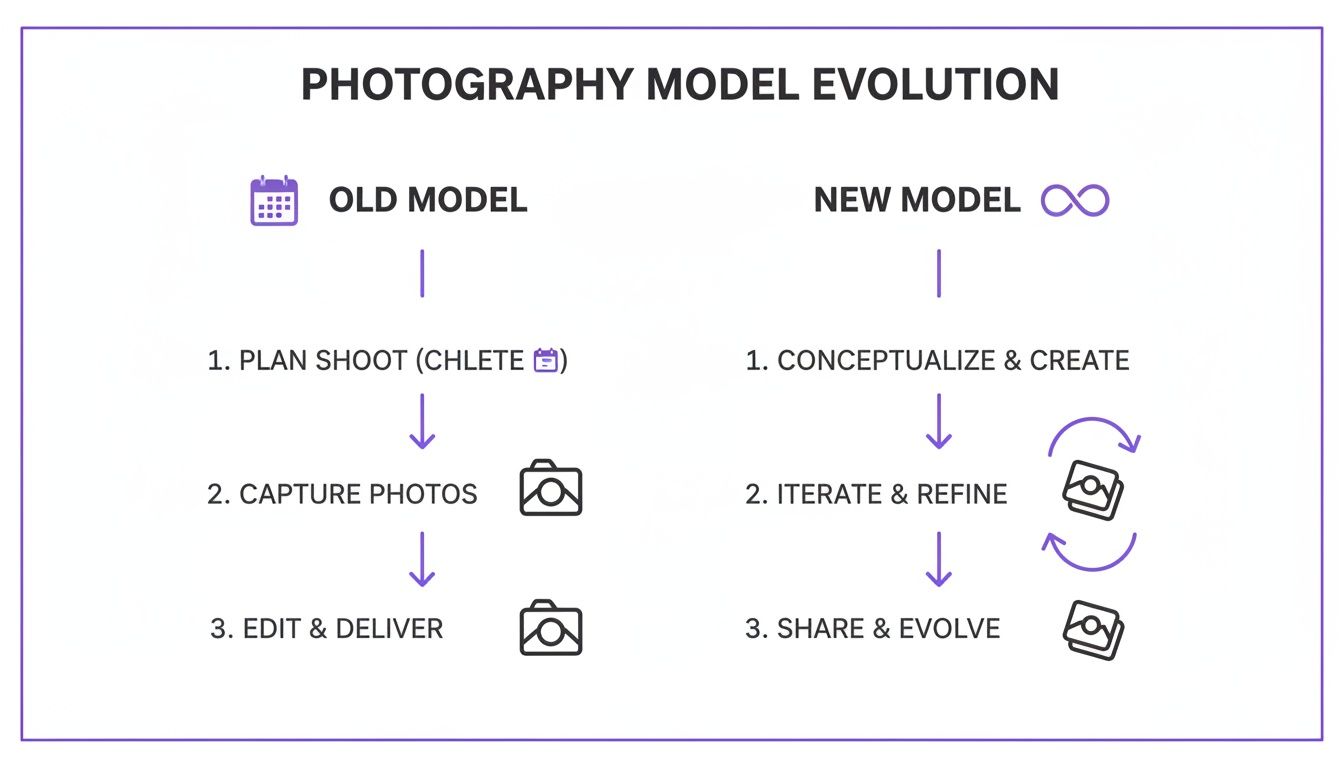
As you can see, modern workflows are an infinite loop. Your pre-production blueprint has to be strong enough to support this constant demand for new assets, which is a world away from the old linear process.
Systemize Your Logistics and Team Coordination
Once the creative direction is set, everything shifts to logistics. A perfect shoot day is built on meticulous organization. This is where you create repeatable systems for managing samples, planning styling, and locking in the schedule to kill common bottlenecks before they start.
A good Product Information Management system is your best friend here, turning potential data chaos into a structured production plan. You need one source of truth that tracks every sample from the moment it hits the studio to when it goes back into inventory. For each product, attach a simple styling brief outlining the exact pairings, accessories, and any special instructions.
In my experience, the biggest on-set delays almost always come from bad prep. A single lost sample or a missing accessory can throw the entire day off schedule, creating a domino effect of expensive downtime. A checklist-driven approach isn't optional — it's essential.
— Michael Pirone, Founder of Picjam & Vidico
This level of prep extends to your team, too. Whether your photographer, stylist, and model are in-house or freelance, everyone has to be on the same page. Share the shot list and mood board well in advance. Better yet, hold a quick pre-pro meeting to walk through the plan. It ensures everyone understands the creative goals and the flow of the day before they even step on set.
Executing an Efficient On-Set Photoshoot

This is where all your careful pre-production planning pays off. An efficient on-set process is what separates a smooth, productive day from a chaotic and costly one. A systematic approach designed for consistency, quality, and speed is a core part of a modern product photography workflow that ensures you leave the studio with every asset you need.
The goal is to turn shoot day into a well-oiled machine. Every action, from adjusting a light to steaming a garment, should be deliberate and move you closer to completing your shot list. This isn't about artistic improvisation; it's about executing a precise plan.
Dialing In Your Camera and Lighting
Consistency is the bedrock of a strong brand identity. Your customers should see a uniform look across every product image, which means you need a repeatable setup for your lighting and camera settings. The key is to document everything.
Start by establishing your key light, fill light, and backlight to create the signature mood you defined in your pre-production blueprint. Once you find that perfect setup, take a photo of it. Measure the distance from the lights to the model or product. Note the power settings on each flash.
The same goes for your camera. Standardize your settings for aperture, shutter speed, and ISO for each type of shot.
- Aperture (f-stop): This controls depth of field. A wider aperture like f/2.8 will blur the background for lifestyle shots, while a narrower one like f/11 keeps the entire product sharp for standard e-commerce images.
- ISO: Keep this as low as possible — think 100 or 200 — to ensure your photos are clean and free of digital noise.
- White Balance: Set a custom white balance to guarantee your colors are accurate and consistent from the first shot to the last.
Creating a "tech sheet" with these documented settings allows any photographer to replicate your brand’s look perfectly, whether for today's shoot or one 6 months from now.
The Power of Tethered Shooting
If you take one piece of advice from this section, make it this: always shoot tethered. This means connecting your camera directly to a computer so images appear on a large screen in real-time. This is a non-negotiable part of my workflow.
Shooting tethered allows the entire team — the photographer, stylist, and you — to see exactly what the camera is capturing, instantly.
There’s nothing worse than discovering a great shot is slightly out of focus or poorly composed hours after the shoot has wrapped. Tethering eliminates this risk entirely. It’s your on-set quality control, allowing for immediate feedback and adjustments.
With a large display, you can spot subtle issues with focus, lighting, or even a stray wrinkle on a garment that would be impossible to see on the camera's small LCD screen. It empowers you to make critical decisions on the fly, ensuring every final image is usable.
On-Set Product and Model Management
To maintain momentum and get the most out of your studio time, you need a system. The table below outlines a simple checklist we use to keep shoots running smoothly and efficiently.
On-Set Efficiency Checklist
| Phase | Key Action | Purpose |
|---|---|---|
| Preparation | Pre-steam & organize all looks | Minimizes downtime between shots; keeps the flow moving. |
| Shooting | Follow a predetermined shot list | Ensures all required assets (front, back, detail) are captured. |
| Direction | Give specific, actionable posing cues | Avoids vague feedback and gets the desired shot faster. |
| Quality Check | Review tethered shots in real-time | Catches focus, lighting, or styling errors instantly. |
| Transition | Prep the next look while shooting the current one | Creates a continuous, overlapping workflow. |
This checklist isn't just about speed; it's about building a rhythm that prevents errors and reduces the need for expensive reshoots.
Efficiency on set is all about flow. Organize your products according to the shot list and have the next look prepped and ready to go. While the photographer is shooting one item, a stylist or assistant should be steaming and preparing the next.
Directing models is another area where efficiency is key. Be clear and specific with your instructions. Instead of saying "look natural," give concrete directions like "shift your weight to your left hip and drop your right shoulder slightly." Work systematically through your required angles — front, three-quarter, back, and detail shots.
To capture compelling visuals, it's crucial to understand how to take good product shots that not only look good but also drive sales. This knowledge helps you direct the shoot with a commercial eye. By communicating clearly and moving with purpose, you can capture a wide variety of expressions and poses that align with your shot list, getting every asset you need without wasting a minute.
Streamlining Post-Production for Speed and Scale
You’ve wrapped the shoot, but the work is far from over. This is where a smart product photography workflow really proves its worth. Post-production is the bridge between your raw camera files and market-ready assets, and without a solid system, it will absolutely become the biggest bottleneck in your entire process.
Your mission is to build a fast, scalable system that gets images from camera to storefront with as little friction as possible. This means a systematic approach to culling, selecting, and editing that ensures every single image hits your brand’s quality standards without burning hours on repetitive manual work. This isn’t just about making photos look good; it’s about building an asset pipeline.
Establishing Your Editing Foundation
After a long day of shooting, you’re likely staring at hundreds, maybe thousands, of images. First things first: you need to cull them. Go through and ruthlessly discard any shots that are out of focus, poorly composed, or clear duplicates. Be decisive. The goal here is to quickly narrow your selection down to only the best captures that meet the criteria from your shot list.
Once you have your “selects,” it’s time to lay the groundwork with foundational edits. This is where batch processing becomes your best friend. Instead of tweaking photos one by one, you can apply a consistent set of adjustments to the entire batch.
Using software like Adobe Lightroom or Capture One, you can create presets that automatically handle the heavy lifting:
- Color Correction: Locking in true-to-life product colors that are consistent across every image.
- Exposure and Contrast: Applying a uniform brightness and pop to the whole set.
- Sharpening: Adding just enough sharpness for a crisp, professional look without overdoing it.
This batch approach is how you achieve a cohesive look and feel that reinforces your brand identity. A brand like Allbirds, for example, nails a consistent, natural aesthetic in all its imagery, which you can bet is achieved through a repeatable post-production system. For a deeper dive, our article on mastering e-commerce photo editing covers these techniques in much more detail.
The Critical Role of File Naming and Metadata
I know this part sounds tedious, but getting your file naming and metadata structured from the get-go is a non-negotiable step. It’s the very foundation of a scalable Digital Asset Management (DAM) system and is what makes your image library searchable — and therefore useful — in the long run. A messy folder of images is a dead end; a well-tagged library is a powerful business asset.
A simple, logical file naming convention can save you from future headaches. Something like this works wonders:
[Brand][Season/Collection][ProductSKU][ShotType][SequenceNumber].jpg
For example: PICJAM_FW24_JCKT001_Front_01.jpg
This structure immediately tells anyone on your team everything they need to know about the image without even opening the file.
We’ve all been there — digging through folders named "Final_V2_USE_THIS_ONE" trying to find a specific image for a last-minute ad. A disciplined approach to file naming and metadata tagging saves countless hours and prevents costly errors. It's the kind of backend organization that separates amateur operations from professional brands.
Tagging your images with relevant metadata is just as important. Add keywords that describe the product type (e.g., "denim jacket"), color ("navy blue"), style ("oversized fit"), and intended use ("social media," "PDP"). This turns finding the perfect asset for a marketing campaign into a simple search, not a frantic treasure hunt.
Preparing Assets for Multiple Marketplaces
These days, your product images don't just live on your Shopify store. They need to be optimized for Amazon, Instagram, Facebook Ads, and a dozen other channels. The catch? Each platform has its own unique image specifications for aspect ratio, file size, and resolution.
A smart post-production system makes this a breeze. With your well-organized library of high-resolution master files, you can create export presets for each channel you sell on.
- Shopify: Typically wants square images (1:1 ratio) around 2048 x 2048 pixels.
- Instagram Stories: Needs a vertical 9:16 aspect ratio to fill the screen.
- Amazon: Has strict requirements for a pure white background (RGB 255, 255, 255).
Instead of manually resizing and reformatting each image for every single platform, you can batch export all the necessary variations with just a few clicks. This systematic approach guarantees brand consistency everywhere your customers see you and transforms a time-sucking manual chore into an efficient, automated step in your workflow.
How AI Can Scale Your Creative Assets by 10x
Post-production used to be about cleaning up images. Today, it’s where you multiply their value. This is the new force multiplier in any modern product photography workflow. By bringing AI into the mix, you can spin a handful of core product photos into an enormous library of creative assets, ready for any channel, without booking a single new photoshoot.

Think about it: you get one perfect, approved shot of a new jacket. Within a few hours, you can generate dozens of on-brand variations. Using a platform like Picjam, that single image can suddenly appear on different virtual models, against lifestyle backgrounds that match your campaign, and in formats ready for endless A/B tests. This isn’t just a fancy editing trick; it fundamentally changes how you create and use content.
From Single Shots to Infinite Possibilities
The old workflow was totally linear: shoot, edit, publish. Need a new look? You had to budget for another expensive and time-consuming photoshoot. AI completely shatters that cycle. It shifts your team from a production mindset to a generation mindset, where one solid asset becomes the seed for unlimited creative offshoots.
Imagine a brand testing how a new dress sells with 10 different model and background combinations. With AI, that can happen in a single afternoon. You get to rapid-fire test ad creative, social media posts, and product page imagery to find what actually drives sales — all without the logistical headache of a physical reshoot.
This shift isn’t really about the tech itself. It’s about creative freedom. AI takes over the boring, repetitive tasks, freeing up your creative team to do what people do best: focus on brand strategy, dream up new campaign concepts, and tell compelling stories. You get more creative output with far less manual work.
By 2026, this kind of AI integration will likely be standard practice for most fashion brands. As noted in recent luxury product photography trends, AI-driven tools will handle complex background swaps, generate realistic shadows, and create seamless image variations for global campaigns. This could cut content creation costs by up to 50% compared to traditional reshoots.
Practical Ways to Scale with AI
So, how does this actually work? Once you have your edited, high-quality base images, AI tools can step in to generate a whole suite of ready-to-use assets.
Key AI-Driven Scaling Techniques:
- Virtual Model Generation: Instantly place your apparel on a diverse cast of AI-generated models. This lets you show your product on different body types and ethnicities to connect with specific customer segments, all without the time and cost of casting.
- On-Brand Backgrounds: Take your product off that plain white background and drop it into an aspirational scene. Put a handbag on a Parisian café table or a hiking jacket on a mountain peak while keeping the lighting and shadows perfectly consistent.
- Creative Asset Versioning: Need to find the perfect ad? Generate dozens of variations for performance marketing. You can test different crops, color grades, and model poses to quickly pinpoint the top-performing creative and maximize your ad spend.
- Image Upscaling: Got an image that’s just a bit too small for a high-res print or a massive digital display? AI can intelligently increase its size and quality, saving shots that might have otherwise been unusable.
Take a fast-fashion giant like Zara, a company that lives and breathes speed and trend-responsiveness. Instead of organizing complex international photoshoots for every single micro-collection, they can use a core set of product shots to generate localized, on-trend campaign imagery with AI. This not only gets products to market faster but also dramatically shrinks the cost and carbon footprint of traditional photography.
How to Measure and Optimize Your Workflow
A great product photography workflow doesn't just stop at creating beautiful images — it has to drive business results. The most successful brands are the ones that measure everything. This is the final, critical stage where you define the key performance indicators (KPIs) that track your workflow’s efficiency and connect your creative output to actual commercial success.
The goal here is to move beyond subjective opinions and start making data-driven decisions. Once you start tracking the right metrics, you can continuously refine your creative strategy, prove the ROI of your content, and build a much smarter production engine.
Define Your Workflow KPIs
Before you can optimize anything, you need to know what to measure. Start by tracking the metrics that reveal the health and speed of your own production process. These internal KPIs tell you how efficient your workflow really is.
- Cost Per Image (CPI): This is your baseline for efficiency. Calculate the total cost of a shoot — studio time, team rates, editing fees — and divide it by the number of final, usable assets you produced.
- Time to Market: How many days does it take from the moment a product arrives at the studio to when its images go live on your site? A shorter cycle means you're capitalizing on trends faster.
- Asset Utilization Rate: Track what percentage of the images you create are actually used in campaigns, on social media, or on your website. A low rate is a red flag, suggesting you’re creating assets that don’t meet marketing’s needs.
These numbers give you a clear, objective view of your workflow's performance. They’ll quickly highlight any bottlenecks and show you exactly where the opportunities for improvement are.
Connecting Creative to Commercial Results
The ultimate test of your imagery is simple: does it help sell your product? This means you have to link your visual assets directly to business outcomes. Analyzing these commercial KPIs is where you prove the true value of all your creative work.
A minimalist studio shot might feel more “on-brand,” but if a lifestyle image drives a 20% higher conversion rate, the data has spoken. You can’t afford to make these decisions based on gut feelings alone; you must test, measure, and adapt.
Start tracking how different types of images perform across your marketing channels. It's easier than you think.
- Product Page Conversion Rates: A/B test different hero images. Does a shot on a model convert better than another image? The answer might surprise you.
- Ad Click-Through Rates (CTR): When you run paid social ads, test multiple image variations. See which creative style grabs the most attention and drives the most traffic for the lowest cost.
- Social Media Engagement: Keep an eye on which visual styles generate the most likes, comments, and shares. This is direct feedback from your audience on what resonates with them.
By continuously running these small experiments, you build a powerful feedback loop. You learn exactly what your customers want to see, which lets you fine-tune your product photography workflow to produce more of what actually works. This data-backed approach is what transforms your content creation from a simple cost center into a reliable driver of growth.
Takeaway
Stop thinking about product photography as a series of one-off shoots. The key to both speed and consistency is building a repeatable system for everything — from planning a shoot to processing final files. When you have a solid process, you eliminate guesswork and ensure every asset hits a high-quality baseline.
Next, get smart about how you use AI. This isn't just about cleaning up a background. With a platform like Picjam, you can genuinely scale your creative output. Think of it as a way to multiply your content library, generating new model and background variations whenever you need them, without the massive cost or lead time of a traditional reshoot.
Finally, measure what matters. To prove the value of this work, you need to connect your output to real business goals. Start tracking metrics like conversion rates and time-to-market. This is how you shift from just making pretty pictures to optimizing a visual strategy that directly impacts your bottom line.
Curious how much your brand could save by modernizing its workflow? Put your current photography costs head-to-head with Picjam’s AI solution using our free savings calculator.

Picjam team
The Picjam team blends AI, product, and creative expertise to eliminate the cost and delay of traditional photography for modern eCommerce brands.