
How to Build a Modern Product Photography Workflow That Scales
Discover a modern product photography workflow that uses AI to slash costs and boost speed. Perfect for fashion brands looking to scale content production.
How to start saving money
Lorem ipsum dolor sit amet, consectetur adipiscing elit lobortis arcu enim urna adipiscing praesent velit viverra sit semper lorem eu cursus vel hendrerit elementum morbi curabitur etiam nibh justo, lorem aliquet donec sed sit mi dignissim at ante massa mattis.
- Neque sodales ut etiam sit amet nisl purus non tellus orci ac auctor
- Adipiscing elit ut aliquam purus sit amet viverra suspendisse potent i
- Mauris commodo quis imperdiet massa tincidunt nunc pulvinar
- Adipiscing elit ut aliquam purus sit amet viverra suspendisse potenti
Why it is important to start saving
Vitae congue eu consequat ac felis placerat vestibulum lectus mauris ultrices cursus sit amet dictum sit amet justo donec enim diam porttitor lacus luctus accumsan tortor posuere praesent tristique magna sit amet purus gravida quis blandit turpis.

How much money should I save?
At risus viverra adipiscing at in tellus integer feugiat nisl pretium fusce id velit ut tortor sagittis orci a scelerisque purus semper eget at lectus urna duis convallis. porta nibh venenatis cras sed felis eget neque laoreet suspendisse interdum consectetur libero id faucibus nisl donec pretium vulputate sapien nec sagittis aliquam nunc lobortis mattis aliquam faucibus purus in.
- Neque sodales ut etiam sit amet nisl purus non tellus orci ac auctor dolor sit amet
- Adipiscing elit ut aliquam purus sit amet viverra suspendisse potenti
- Mauris commodo quis imperdiet massa tincidunt nunc pulvinar
- Adipiscing elit ut aliquam purus sit amet viverra suspendisse potenti
What percentage of my income should go to savings?
Nisi quis eleifend quam adipiscing vitae aliquet bibendum enim facilisis gravida neque. Velit euismod in pellentesque massa placerat volutpat lacus laoreet non curabitur gravida odio aenean sed adipiscing diam donec adipiscing tristique risus. amet est placerat imperdiet sed euismod nisi.
“Nisi quis eleifend quam adipiscing vitae aliquet bibendum enim facilisis gravida neque velit euismod in pellentesque massa placerat”
Do you have any comments? Share them with us on social media
Urna ut fermentum imperdiet lacus, elementum etiam maecenas libero nunc, suspendisse massa, nisl, elit curabitur feugiat in quis ut nibh enim in tristique aliquam sed vitae dui, dis adipiscing pharetra aliquam turpis turpis nibh rhoncus enim, pellentesque leo laoreet neque in sed bibendum fermentum suspendisse tempus non purus adipiscing suscipit fringilla adipiscing convallis dolor nulla fermentum facilisis ullamcorper ut vehicula tortor libero metus donec velit, tristique fermentum, dictum euismod diam scelerisque enim non pharetra tristique lectus habitant pharetra est id
By Michael Pirone, Founder of Picjam & Vidico
A solid product photography workflow is more than just taking pictures; it's an end-to-end system for creating visual assets at scale. It should cover everything from the initial brief and the shoot itself to AI-powered editing and getting those final images out into the world. It’s how you turn a few product shots into a full suite of campaign-ready visuals — fast.
When brands like G-Star RAW started testing AI-generated models, they discovered they could align content with market demand faster than ever, turning photography from a cost center into a strategic advantage. This is the new reality for fashion content.
This modern approach, which platforms like Picjam are built for, lets you go from a single garment shot to a complete set of campaign assets in hours, not weeks.
Rethink Your Product Photography Workflow for Speed and Savings
For most fashion brands today, the traditional product photography workflow is a serious bottleneck. The old linear process — long planning cycles, expensive shoots, and painful post-production — simply can’t keep up with the speed of e-commerce and social media trends.
This outdated model is failing agile brands that need to move fast to stay relevant.
According to McKinsey, AI could add up to $275 billion to the apparel, fashion, and luxury sectors' profits. This explosive growth is a direct response to the demand from apparel brands for more content, faster.
The New Standard for Agile Brands
Forward-thinking brands are ditching that rigid, old-school model for a new, cyclical, and AI-enhanced product photography workflow. Instead of treating every shoot as a final, one-and-done project, they're creating flexible base assets that are designed to be transformed later.
This chart puts the difference into perspective, showing the shift from the clunky old process to a much more agile workflow.
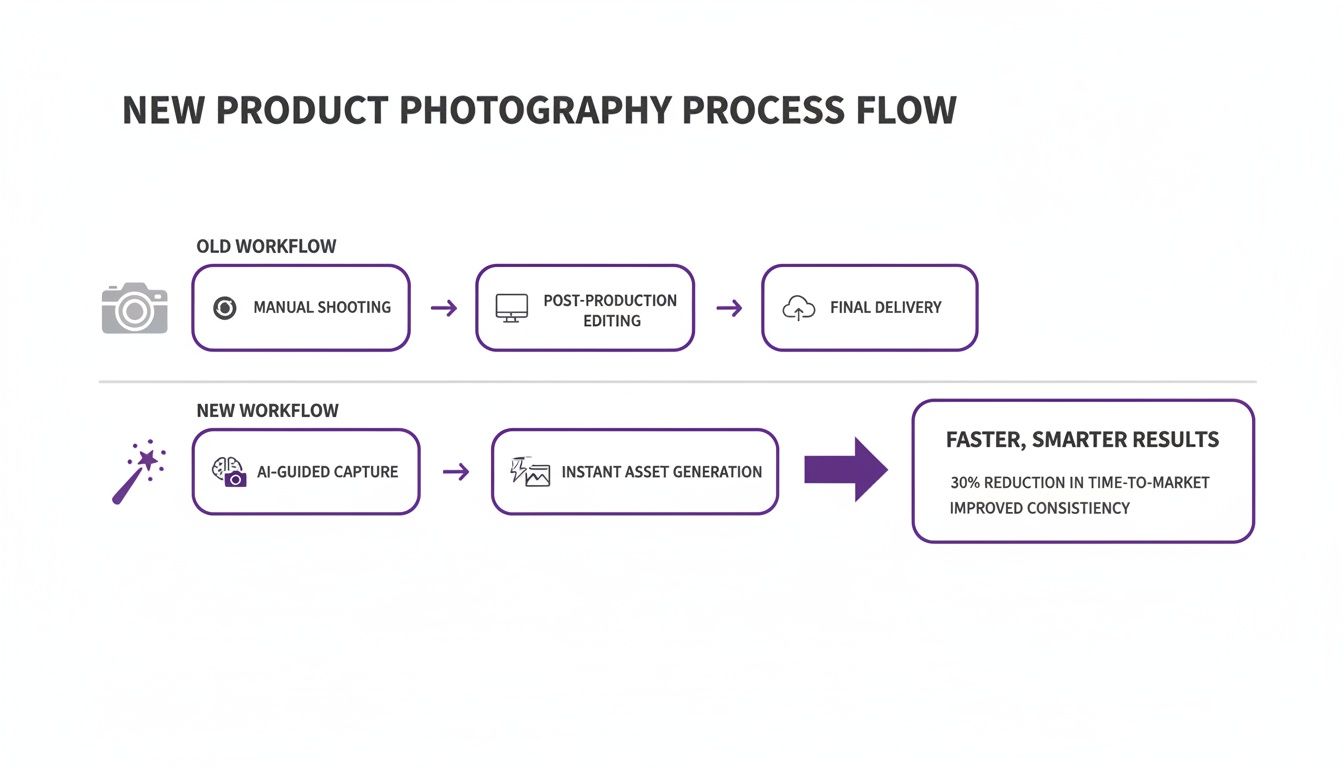
You can see right away how AI compresses a multi-step, weeks-long process into a single day's work. It completely cuts out major time and money sinks like booking models and scouting locations.
Embrace Automation and Agility
To truly modernize your operations, it's worth understanding what workflow automation entails because it's at the core of this new way of thinking. This isn't just about moving faster; it's about building an intelligent system that delivers tangible results:
- Unmatched Speed: Get a new product from a box to live on your site in a fraction of the time it used to take.
- Creative Freedom: Generate hundreds of on-model and lifestyle variations without the logistical nightmare of planning a reshoot.
- Significant Savings: Drastically cut costs on models, studios, photographers, and tedious retouching work.
This isn't about replacing photographers. It’s about augmenting what they can produce. You’re building a scalable system that gives you a powerful competitive edge, freeing up your team to focus on creative strategy instead of getting bogged down in production logistics.
Master the Smart Capture Process
The biggest mental shift in an AI-powered photography workflow is this: you’re no longer trying to capture the perfect final photo during the shoot.
Your new goal is to create a high-quality ‘base image’ — a clean, versatile digital asset that’s primed for endless creative remixes. This is the groundwork for your entire content engine.
This phase goes beyond a simple shot list. It demands a 'smart brief' that anticipates every asset you’ll need down the line. Are you making PDP images, social media ads, or marketplace listings? A smart brief plans for all of them, ensuring the base image you capture has all the right information for the AI to work its magic.
From Simple Shot to Smart Brief
Think of your base image as the master ingredient. Capturing a clean, consistent product shot is non-negotiable.
This doesn't mean you need an expensive studio setup. What you do need is a repeatable process. Look at brands like Allbirds — they've perfected this by standardizing their on-white captures, ensuring every shoe is shot from the same angles with the same lighting. This consistency creates the perfect foundation for AI-driven creative work.
A smart brief for a new hoodie, for instance, wouldn't just list "front, back, and detail shots." It gets more specific:
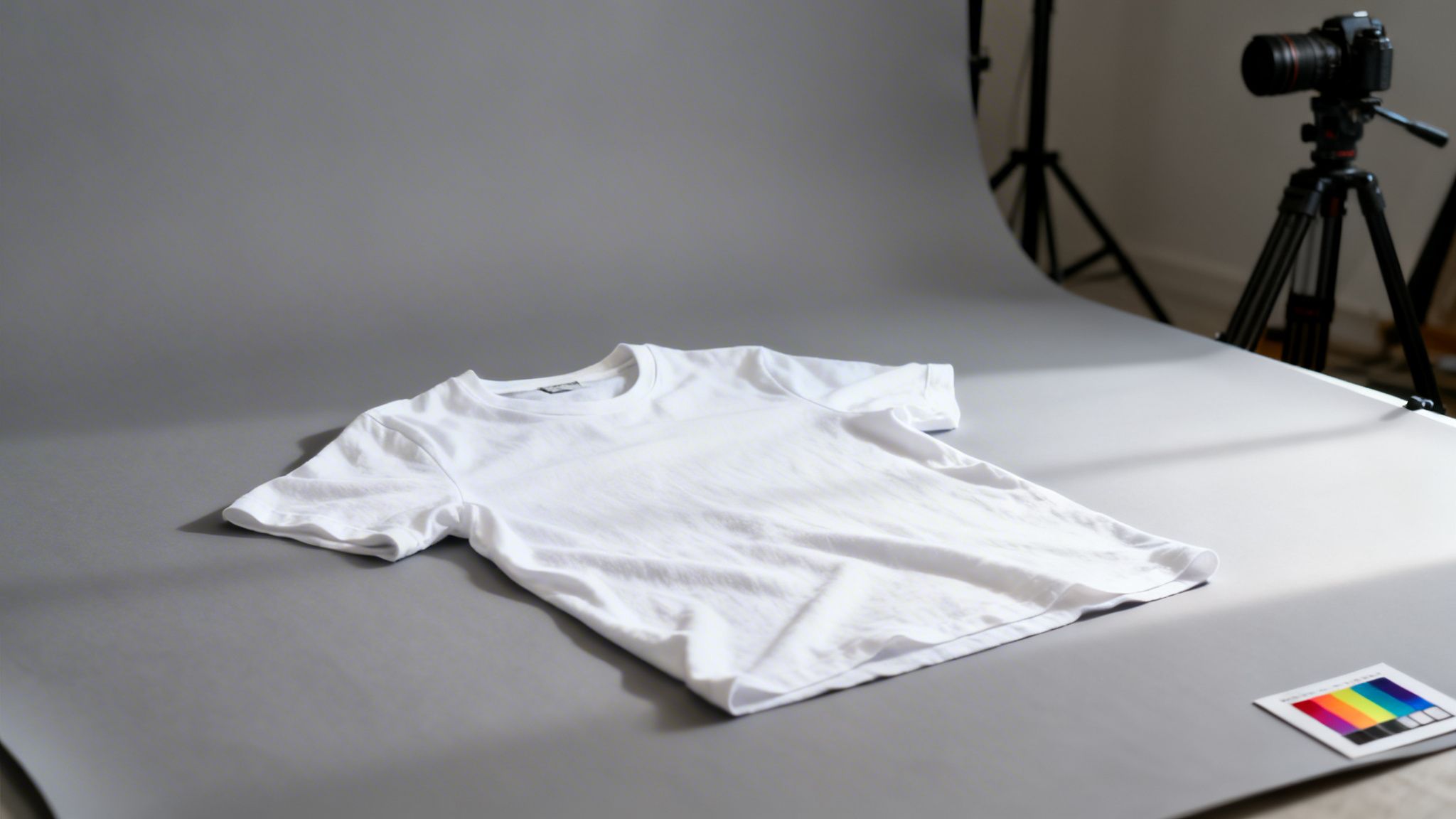
- Capture a flat lay on a neutral grey or white background, making sure no part of the garment is cropped out.
- Use diffuse, even lighting to get rid of harsh shadows and accurately show the fabric's true color and texture.
- Take a high-resolution detail shot of the logo, stitching, or any unique material.
- Make sure the garment is pristine — steamed and completely free of wrinkles or lint before shooting.
This level of detail gives the AI clean, rich data to work with when it starts generating on-model imagery or placing the product in a totally new scene.
Best Practices for Capturing the Base Image
Getting the capture process right is all about discipline and consistency, not expensive gear. A modern smartphone camera can deliver fantastic results if you stick to a few key principles. For a deeper dive, you can check out our full guide on the essential equipment for product photography.
Here are the non-negotiables for your capture setup:
- Standardized Lighting: Use one consistent lighting setup for all your products. A two-light configuration with softboxes is perfect for creating soft, even light that wraps around the product. This kills harsh shadows and keeps all the important texture details.
- Neutral Backgrounds: A mid-grey or off-white backdrop is your best friend. Pure white can sometimes trick cameras into underexposing your product, while a neutral grey gives you a great reference point for color correction.
- Preserve Texture and Drape: How a garment hangs is a huge part of its appeal. You need to capture clothing in a way that respects its natural drape. For example, shooting a silk shirt flat on a table won’t show its fluidity nearly as well as draping it over a simple form.
The most effective AI workflows start with the simplest inputs. A clean, well-lit image of a garment on a hanger against a grey wall is infinitely more valuable than a poorly lit lifestyle shot. The AI can add the model and the environment, but it can't fix a blurry, badly lit original.
By focusing on a disciplined, smart capture process, you create a foundational asset that can be endlessly remixed. This is how you build a powerful content engine that can churn out on-model shots, lifestyle scenes, and campaign visuals — all without booking a single traditional photoshoot.
How AI Turns 1 Photo Into 100+ Creative Assets
This is where the whole game changes. Once you have that clean, simple shot of your product, you can spin it into a full-blown campaign without ever booking a model or scouting a location. We’re talking about creative multiplication — turning a single studio photo into hundreds of on-brand assets.
The scale of this shift is massive. According to research, AI image generation tools create 34 million images daily. For fashion brands, this means an unprecedented opportunity to create content at the speed of culture.
From Product Shot to On-Model Reality
The first, and most powerful, move is to get your product on a model. AI platforms like Picjam can take your flat lay image and realistically drape it onto a huge variety of virtual models. The time and money you save are enormous.
Think about a brand like Everlane launching a new collection. Instead of the logistical nightmare of a multi-day shoot, they can upload their core product shots and generate hundreds of on-model variations in the time it takes to grab a coffee.
- Test on Different Body Types: See how your clothes actually fit on a diverse range of body shapes and sizes. This isn't just inclusive; it’s smart business.
- Match Models to Your Audience: Hand-pick virtual models whose style and vibe perfectly align with your target customer.
- Generate an Array of Poses: Create dynamic shots with models standing, sitting, or walking to inject life and context into your product pages.
This gives you all the creative firepower of a big-budget shoot without the crippling costs or scheduling headaches.
The real magic here is the speed of iteration. You can generate a full set of on-model images, get feedback, and then spin up a new batch with different models or poses almost instantly. Traditional photography just can't compete.
Create Immersive Lifestyle Contexts
Once you’ve got your on-model shots, the next step is putting them in places that tell a story. A clean white background is a must-have for product detail pages (PDPs), but it’s the lifestyle shots that build an emotional connection.
This is where AI background generation becomes your best friend. Forget about expensive location scouting or set design. Now, you can use text prompts to conjure up any scene you can dream of.
For a brand like Staud, which is all about a vibrant, aspirational look, this is a game-changer. They can take a single dress and, in minutes, create images of it:
- On a model wandering through a sun-drenched street in Italy.
- Inside a minimalist, architecturally striking art gallery.
- At a chic rooftop bar as the sun sets over the city.
Each background reinforces the brand’s story and helps the customer picture themselves in that world. You can even A/B test which scenes drive the most clicks and sales, all from your laptop. If you want to go deeper on using artificial intelligence for creative work, there’s a great guide on AI for content creation that’s worth a read.
Multiply Creative Angles and Variations
A solid product photography workflow needs variety. Customers want to see a product from every possible angle, in different lighting, with different styling. AI makes it almost trivial to generate this diversity from just one starting image.
With the right tools, you can create back views, side profiles, and detailed close-ups all from a single front-facing photo. This ensures your PDPs have complete visual coverage.
This is how you feed the modern marketing machine. You can build out a full suite of visuals for your website, social feeds, email blasts, and paid ads — all from that one initial capture.
This stage transforms your workflow from a slow, linear assembly line into a dynamic creative hub. It's how smart brands are building bigger campaigns, testing more ideas, and selling more products with a fraction of the old-school resources.
Polish and Perfect Every Image Before Publishing
You’ve just generated an incredible library of creative assets. That's a huge win, but it’s not the finish line. To actually move the needle on sales and build a cohesive brand, every last image needs to be flawless and perfectly tuned for the platform where it will live.
This final polish within your product photography workflow is what separates a decent campaign from one that truly performs.

This is your quality control stage, and it’s non-negotiable. A sloppy or inconsistent visual can kill brand trust in a heartbeat, so this is where you make sure every asset that reaches a customer is on-brand and technically sound.
The Quality Control Checklist for AI Assets
AI-generated images can be shockingly realistic, but the human eye is still the ultimate gatekeeper of quality. Before any image goes live, it needs to pass a quick but critical review.
Here’s what you or your team should be looking for:
- Garment Integrity: Does the fabric look real? Check that textures, prints, and seams are sharp and accurate. The clothing should drape naturally on the model’s body, without any weird digital stretching or artifacts.
- Lighting and Shadow Realism: The lighting on the model has to match the background. Look for consistent shadow direction and softness. A model lit from the right shouldn’t be casting a shadow to the left — it’s an instant giveaway.
- Brand Consistency: Does this image feel like your brand? Take a hard look at the model's pose, the environment, and the overall mood. If you're a minimalist, modern brand, a busy, rustic background just won't fly.
- Edge and Seam Perfection: Pay close attention to where the product meets the model or the background. Scan for any pixelation, halos, or unnatural blending that screams "this was made with AI."
The goal isn't to nitpick. It's about protecting the customer experience. A shopper who spots a weird digital glitch might start questioning the authenticity of the product itself. This quick QC step is your last line of defense.
Guarantee Sharpness for Every Zoom
On any modern e-commerce site, the zoom function is a crucial part of how people shop. They want to get right up close to inspect fabric and stitching. A blurry or pixelated image on zoom is a certified conversion killer.
This is where AI upscaling tools become incredibly useful. High-quality platforms like Picjam often include features that can increase an image’s resolution by 2x or more without sacrificing clarity. Running your final hero shots through an upscaler ensures they stay crisp and detailed.
It’s a simple step that gives your visuals the professional edge today’s online shoppers expect.
Exporting for Shopify, Amazon, and Instagram
Different platforms have different rules. An image optimized for an Instagram Story is useless for an Amazon A+ Content module. A one-size-fits-all approach to exporting will only hamstring your performance.
Your workflow needs to account for specific export settings for each channel.
Shopify & E-commerce PDPs: Square images (like 2048 x 2048 pixels) in JPEG or WebP format are usually your best bet. This size is big enough for a high-quality zoom but can still be compressed to keep page load speeds fast. If you're unsure, our guide on the perfect product image size for Shopify has you covered.
Amazon: Amazon plays by its own strict rules. Main images demand a pure white background, and file size needs to be optimized for lightning-fast loading. For fashion brands, great visuals are everything — pages with multiple high-quality images can see up to 9x more organic traffic. You can discover more about the impact of visuals on e-commerce to see just how critical this is.
Instagram & Social Media: Here, aspect ratios are king. You’ll want to export images in 1:1 (square) for grid posts, 4:5 (vertical) to take up more screen real estate in the feed, and 9:16 for Stories and Reels.
By tailoring your final assets for each channel, you maximize their impact and give your products the best possible chance to convert. It's this final, detail-oriented step that turns your generated images into true sales drivers.
Build a Scalable Content Engine (Not Just One-Off Shoots)
An effective product photography workflow shouldn't be a series of stressful, one-off projects. The real goal is to build a repeatable system that fuels your brand's growth — a content engine where production gets faster and more cost-effective over time.
Think of it like a flywheel. Once you get it spinning, you free up invaluable resources, letting you shift focus from tedious content logistics to high-impact brand strategy.
Create a Reusable Asset Library
The heart of any scalable content engine is a centralized, reusable asset library. Instead of treating the output from each photoshoot as disposable, you need to see every clean base image and AI-generated variation as a building block for the future.
This is exactly what platforms like Picjam are designed for. You can store your high-quality garment shots and pull from this library whenever you need fresh content. A single photo you took six months ago can be repurposed for a new campaign today, placed on a different model, or dropped into a new seasonal background.
- Organize by Product: Keep all base images and AI variations for a single SKU in one place.
- Tag for Searchability: Use tags for collections, seasons, and asset types (e.g., "PDP," "Instagram," "Ad Creative").
- Maintain Version Control: Easily track which assets were used in which campaigns, so you know what's fresh and what's been overused.
For a brand like Reformation, known for its rapid drops of new styles, this kind of system is a force multiplier. Instead of reshooting similar garments, their team can pull from an existing asset library, apply a new product to a consistent set of models and backgrounds, and have campaign visuals ready in hours.
This simple shift transforms your past work from a sunk cost into an active, valuable resource.
Power Rapid Creative Testing
One of the biggest wins from building a content engine is the ability to test creative ideas at lightning speed. When you can generate dozens of ad variations in minutes, you can run A/B tests that would have been impossible with traditional photography.
This system is perfect for figuring out what truly resonates with your audience before you commit a significant budget.
You can instantly get answers to questions like:
- Model Demographics: Does this product sell better on a Gen Z model versus a Millennial?
- Background Environments: Does an urban street-style setting outperform a minimalist studio shot for this particular jacket?
- Creative Concepts: Does a playful, vibrant ad get more clicks than a sophisticated, moody one?
This data-driven approach takes the guesswork out of content creation. You get real-world feedback that informs your entire marketing strategy, ensuring your budget is spent on visuals proven to perform.
Scale Content for Every Channel
The modern fashion brand needs to be everywhere, all at once. Your content engine has to support this, churning out assets optimized for product pages, social media, email marketing, and paid advertising. With creator ad spend projected to hit $37 billion in the U.S. by 2026, brands are under immense pressure to iterate faster than ever. You can read more about growing photography niches to see how this trend is shaping the industry.
An AI-powered workflow makes this scaling possible. The same on-model image can be instantly reformatted with different backgrounds and aspect ratios for an Instagram Story, a Facebook carousel ad, and a website banner. This agility is a game-changer for emerging brands that need to scale their marketing without high production costs.
By building this kind of scalable system, your product photography workflow evolves from a reactive necessity into a proactive strategic asset. It’s the engine that powers your brand’s growth, allowing you to produce more, test smarter, and ultimately sell more effectively across every single channel.

Takeaway
Shifting to a modern product photography workflow isn't about scrapping everything you do now, but about moving away from a rigid, expensive process.
Focus on the ‘Base Image’: Your primary goal in the studio is to capture one clean, perfectly lit, high-resolution shot of your garment. This is your master asset. Don't worry about the final composition; get the foundation right.
Use AI for Creative Multiplication: Take that single base image and use a platform like Picjam to generate hundreds of on-model and lifestyle variations. This is how you achieve scale without the cost and logistical pain of traditional photoshoots.
Build a Scalable System: Don't treat each project as a one-off. Organize your base images and AI-generated assets into a reusable library. This creates a content engine that gets more efficient over time, freeing your team to focus on strategy.
Curious how much your brand could save by switching to an AI-powered workflow? Use the Picjam savings calculator to compare your current photography costs and see the difference.

Picjam team
The Picjam team blends AI, product, and creative expertise to eliminate the cost and delay of traditional photography for modern eCommerce brands.

