The AI Clothes Generator Guide for Fashion Brands in 2026
Stop paying $2,000+ per photoshoot. Learn how AI clothes generators work, the three types you'll encounter, and why only one of them solves the ecommerce content production problem.
If your flat lay photos aren't converting, an AI clothes generator can put your actual products on a model — without booking a shoot, casting a model, or hiring a photographer.
As of 2026, the average fashion photoshoot in Australia costs $1,500–$3,000 per day — and that's before model fees, post-production, and the inevitable reschedule when a sample arrives late. AI clothing generators have made it possible for ecommerce brands to produce hundreds of on-model images for the price of a single shoot day. Search interest in this category grew over 200% between 2024 and 2026. But the category covers very different tools, and most brands end up with the wrong one.
This guide explains exactly what an AI clothes generator is, why there are three very different types (and which one actually drives ecommerce sales), and how to pick the right approach for your catalogue.
Table of contents
- What is an AI clothes generator?
- How AI clothes generators work
- The 3 types of AI clothes generators
- How to generate AI clothing photos: step by step
- What results can fashion brands actually expect?
- How Picjam generates on-model photos at scale
- Frequently asked questions
- Bottom line
What is an AI clothes generator?
An AI clothes generator is software that uses artificial intelligence to create professional images of clothing — as design concepts, virtual try-on outputs, or catalogue-ready on-model product photos — without a physical photoshoot.
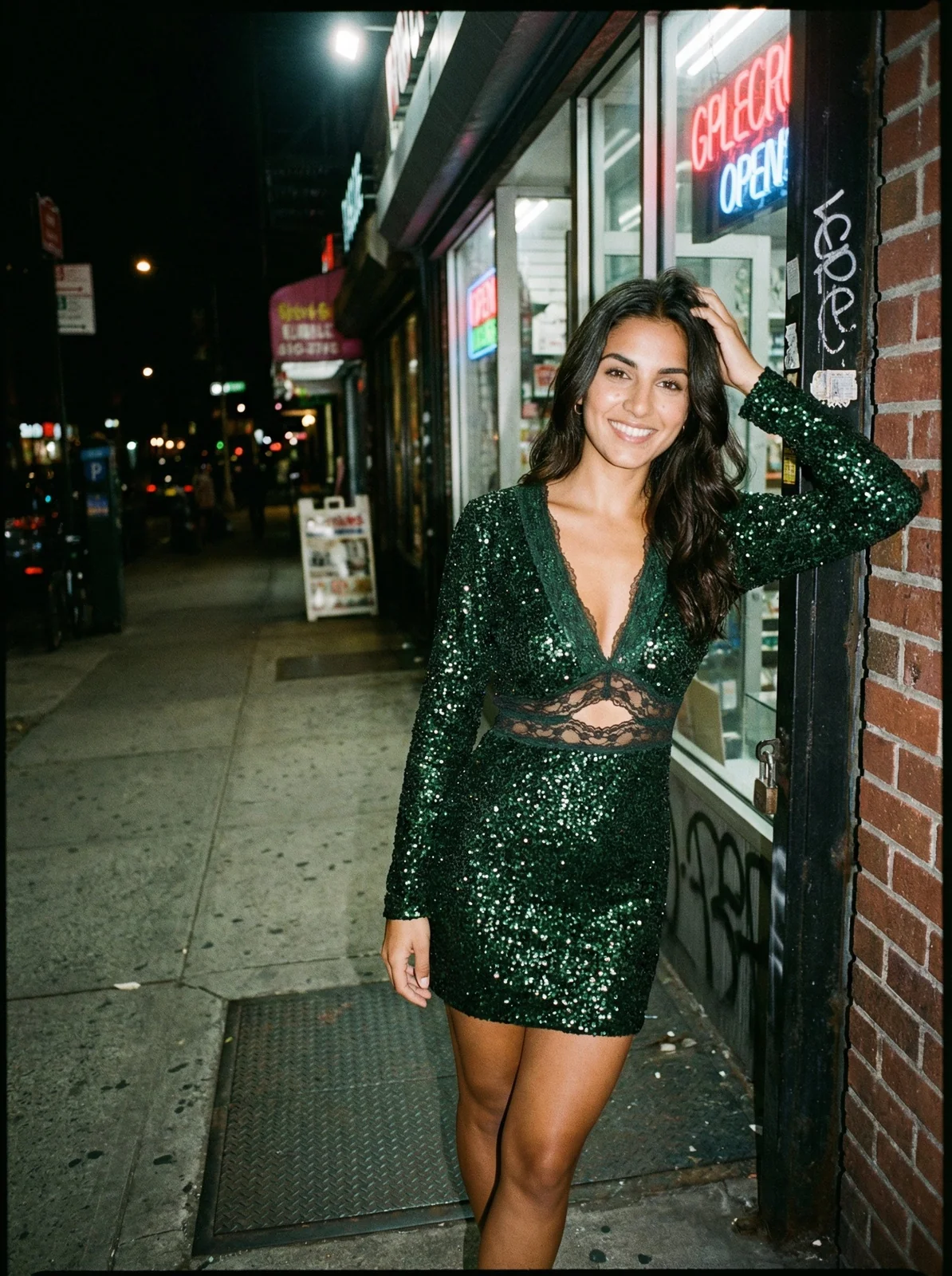
The category has expanded rapidly since 2023. Some tools generate new clothing designs from text descriptions. Others overlay clothes onto a shopper's selfie for a virtual try-on experience. The most commercially useful type for ecommerce brands takes a photo of your actual garment — a flat lay or ghost mannequin shot — and produces a realistic image of an AI model wearing it, ready to publish on your store immediately.
Understanding which type you need before you sign up for anything saves weeks of wasted time.
How AI clothes generators work
Most AI clothes generators for ecommerce use a combination of computer vision and diffusion models. Here's what happens when you upload a garment image:
- Garment analysis. The AI scans your clothing photo to identify construction details: fabric texture, hem placement, sleeve shape, and how the fabric drapes. Input image quality determines output quality — the AI can only work with what it can see.
- Model mapping. The garment's shape and proportions are mapped onto the selected AI model. The system adjusts for body type and pose to ensure the garment sits naturally rather than appearing pasted on.
- Texture and lighting synthesis. The AI renders the fabric under realistic lighting conditions, handling shadows, highlights, and material-specific properties like the sheen of satin vs. the matte finish of cotton.
- Final compositing. The rendered model is placed against your chosen background — studio white for marketplace listings, or a lifestyle scene for social content — and the final image is produced at catalogue resolution.
The whole process takes 20–45 seconds per image. That's the full workflow, from upload to download.

The 3 types of AI clothes generators — which one is right for your brand?
This is where most guides fall short. They list tools without explaining that "AI clothes generator" describes three completely different products with three completely different use cases. Picking the wrong type is the main reason brands get frustrated with AI clothing tools.
Type 1: Fashion design generators
Design generators create new clothing concepts from text prompts or sketches. You describe a garment — "relaxed-fit white linen shirt, mother-of-pearl buttons" — and the tool generates a visual of what that could look like.
Who this is for: Designers and product developers building new collections. The output is a concept rendering for manufacturer briefs or buyer presentations — not a product image for your Shopify listing.
Who this is not for: Ecommerce brands with existing garments who need content to sell them. The AI is generating a hypothetical garment, not photographing your actual product.
Type 2: Virtual try-on tools
Try-on tools let shoppers upload a selfie and see themselves wearing a specific product from your store. They're installed as a shopper-facing experience, not a content production tool.
The conversion data is compelling — some studies show 30–40% lower return rates when virtual try-on is available. But try-on tools don't solve the content volume problem. They require a shopper to participate. You can't take a try-on output and use it in your product listing, email campaign, or paid ads — it's personalised to that individual shopper.
Type 3: AI catalogue photo generators
This is the type that directly replaces traditional photoshoot production costs for ecommerce brands.
You upload a flat lay, ghost mannequin, or hanger photo of your actual product. The AI generates a professional on-model image of that exact garment, preserving fabric texture, drape, and construction details. You download it and go live on your store.
The critical distinction: Catalogue generators produce your content without any shopper participation. One generated image used everywhere: Shopify listing, Amazon, wholesale catalogue, paid ads, email campaigns.
When we built Picjam, we saw this mistake constantly. Brands would sign up for a design generator expecting it to help with product photography — then get frustrated when the output didn't look like their actual garments. The tools work exactly as designed. The problem is intent mismatch.
The math on catalogue generators is stark. A brand producing 50 SKUs per season needs around 150–200 images to cover multiple angles and colourways. At a traditional photography rate of $40–$80 per image, that's $6,000–$16,000 per season. With an AI catalogue photo generator at $0.50–$2.00 per image, the same output costs $75–$400. That's not a marginal saving — it's a structural change to how the business operates.
One of our customers, a Brisbane-based women's resort wear brand, had been alternating between a full photoshoot every other season and outsourcing images to a low-cost freelancer. Neither worked — their conversion rate on freelancer images was 30% lower than on their professional shoot images. After switching to Picjam, they now generate on-model images for every new arrival, same day the sample arrives. Monthly content output went from 20–30 images to 150+ without adding headcount.
That's the business case for Type 3. Not slightly better imagery — fundamentally different content capacity.
For more on how this specific workflow operates, see our guide to flat lay to model AI photography.
How to generate AI clothing photos for your catalogue: step by step
Once you've chosen an AI catalogue photo generator, the workflow is fast. Here's how it works with Picjam:
- Prepare your garment image. A flat lay, ghost mannequin, or hanger shot all work. Use clean lighting, a neutral background, and a wrinkle-free garment. A phone camera is fine — you don't need a DSLR.
- Upload to Picjam. Drag your garment image into the platform. You can batch-upload an entire season's catalogue at once.
- Select your AI model. Choose from a diverse library across body types, skin tones, and poses. No casting sessions or release forms required.
- Choose a background or scene. Studio white for marketplace listings. Lifestyle settings for social and editorial. Or brief the platform with a custom environment description.
- Generate and review. Multiple variations are produced in under 30 seconds. Select the best outputs and download at full resolution.
- Go live. Images are immediately ready for Shopify, Amazon, Etsy, paid ads, and wholesale catalogues. No editing required.
For a 50-piece catalogue, the full workflow takes roughly an hour — compared to two full days of studio scheduling, shooting, and post-production.
What results can fashion brands actually expect?
After working with 1,200+ clothing brands through Picjam, the pattern is consistent. Brands switching from traditional photoshoots to AI catalogue photography typically reduce per-image costs from $40–$80 down to $0.50–$2.00, and cut content production time by 70–90%.
The caveat is that output quality is directly tied to input quality. A wrinkled garment under poor lighting produces a mediocre AI output. A clean, well-lit flat lay on a neutral paper background produces an image that's genuinely difficult to distinguish from a studio shoot.
Getting the input right doesn't require expensive equipment. Natural window light, a piece of white foam board as a reflector, and a roll of neutral paper as a backdrop is enough. But you do need to get it right before expecting the AI to close the gap.
For a full breakdown of what professional product photography actually costs — and how AI changes the equation — see our product photography cost guide.
How Picjam generates on-model clothing photos at scale
Picjam is an AI fashion photography platform built specifically for clothing brands — not a general-purpose image generator. The entire workflow is optimised for garment catalogue production.
When you upload a flat lay to Picjam, the model reads the specific construction of your garment: how the fabric drapes, where seams sit, how the hem behaves. That's why Picjam images are used directly on Shopify listings without additional retouching. The platform also supports batch generation — you can run a full 50-piece catalogue overnight and have 200 on-model images ready for your next drop.
Pricing starts at $99/month on the Studio plan. Enterprise teams with high-volume catalogues can book a demo for tailored pricing. For a full comparison of what's included at each tier, visit our pricing page.
At $99/month generating 200 images per month, the per-image cost is under $0.50 — compared to $40–$80 with a traditional photographer. The breakeven point is around 10–15 images per month. Most active ecommerce brands cross that in a single session.
To see how AI fashion model generation compares across different tools and approaches, check our AI fashion model generator guide.
Try Picjam free — generate your first on-model clothing photo in under 2 minutes
Frequently asked questions
What is an AI clothes generator?
An AI clothes generator is software that creates professional images of clothing using artificial intelligence. For ecommerce brands, the most useful type takes a flat lay or ghost mannequin photo of an actual garment and generates a realistic on-model product photo — no photoshoot required. The term also covers design generators (which create new clothing concepts from text prompts) and virtual try-on tools (which let individual shoppers see themselves in products).
Is there a free AI clothes generator for clothing brands?
Several tools offer free tiers, but most apply watermarks or restrict output to resolutions that aren't usable on live store listings. Free tools are worth testing to confirm AI photography works for your product type. Running a full catalogue through a free tool isn't viable at commercial scale — most paid plans range from $23–$99/month, and the breakeven is typically 10–15 images per month.
What's the difference between an AI clothes generator and a virtual try-on tool?
An AI catalogue photo generator produces content you own and can publish everywhere — Shopify, Amazon, paid ads, email. A virtual try-on tool requires a shopper to upload a selfie; the output is personalised to that individual and isn't reusable as a product image. Both have legitimate uses, but they solve completely different problems.
How realistic are AI-generated clothing photos in 2026?
The best catalogue photo generators in 2026 produce images that are very difficult to distinguish from a traditional studio shoot, provided the input flat lay is high quality. Fabric texture, drape, and fit details are accurately preserved. The main visual limitation is unnatural hand or foot rendering in full-body shots — which is why most ecommerce brands frame above the knee for AI-generated listing images.
Can I use AI-generated clothing photos on Amazon listings?
Yes. Amazon's image guidelines require a white background for the main listing image and allow products on a model or mannequin — both of which AI catalogue generators handle natively. Several Picjam customers use AI-generated images as their primary Amazon listing photos with no issues.
What garment types work best with an AI clothes generator?
Structured garments — jackets, shirts, trousers, dresses with clean lines — produce the most accurate results. Highly textured items like heavy knits and thick fleece, and sheer or transparent fabrics, require higher-quality input images to render accurately. Accessories like hats and bags work best alongside a model reference image rather than as a standalone flat lay.
Bottom line
If you're a fashion ecommerce brand that needs more on-model content than your photoshoot budget can support, an AI catalogue photo generator is the fastest way to close that gap. The key is picking the right type — not a design generator, not a virtual try-on widget, but a platform that takes your actual garments and produces store-ready imagery at scale.
Picjam does exactly that. More than 1,200 clothing brands use it to produce on-model imagery without studio bookings, backed by a 4.3-star rating on Trustpilot and 4.7 stars on the Shopify App Store. Start with a single garment, see the result, then decide.
Try Picjam free — generate your first on-model clothing photo in under 2 minutes

Michael Pirone
Co-Founder