
How AI-Powered Ecommerce Photo Editing Services Cut Content Costs by 40%
Discover how top fashion brands use ecommerce photo editing services to cut costs and boost sales. Learn to choose the right features, pricing, and KPIs.
How to start saving money
Lorem ipsum dolor sit amet, consectetur adipiscing elit lobortis arcu enim urna adipiscing praesent velit viverra sit semper lorem eu cursus vel hendrerit elementum morbi curabitur etiam nibh justo, lorem aliquet donec sed sit mi dignissim at ante massa mattis.
- Neque sodales ut etiam sit amet nisl purus non tellus orci ac auctor
- Adipiscing elit ut aliquam purus sit amet viverra suspendisse potent i
- Mauris commodo quis imperdiet massa tincidunt nunc pulvinar
- Adipiscing elit ut aliquam purus sit amet viverra suspendisse potenti
Why it is important to start saving
Vitae congue eu consequat ac felis placerat vestibulum lectus mauris ultrices cursus sit amet dictum sit amet justo donec enim diam porttitor lacus luctus accumsan tortor posuere praesent tristique magna sit amet purus gravida quis blandit turpis.

How much money should I save?
At risus viverra adipiscing at in tellus integer feugiat nisl pretium fusce id velit ut tortor sagittis orci a scelerisque purus semper eget at lectus urna duis convallis. porta nibh venenatis cras sed felis eget neque laoreet suspendisse interdum consectetur libero id faucibus nisl donec pretium vulputate sapien nec sagittis aliquam nunc lobortis mattis aliquam faucibus purus in.
- Neque sodales ut etiam sit amet nisl purus non tellus orci ac auctor dolor sit amet
- Adipiscing elit ut aliquam purus sit amet viverra suspendisse potenti
- Mauris commodo quis imperdiet massa tincidunt nunc pulvinar
- Adipiscing elit ut aliquam purus sit amet viverra suspendisse potenti
What percentage of my income should go to savings?
Nisi quis eleifend quam adipiscing vitae aliquet bibendum enim facilisis gravida neque. Velit euismod in pellentesque massa placerat volutpat lacus laoreet non curabitur gravida odio aenean sed adipiscing diam donec adipiscing tristique risus. amet est placerat imperdiet sed euismod nisi.
“Nisi quis eleifend quam adipiscing vitae aliquet bibendum enim facilisis gravida neque velit euismod in pellentesque massa placerat”
Do you have any comments? Share them with us on social media
Urna ut fermentum imperdiet lacus, elementum etiam maecenas libero nunc, suspendisse massa, nisl, elit curabitur feugiat in quis ut nibh enim in tristique aliquam sed vitae dui, dis adipiscing pharetra aliquam turpis turpis nibh rhoncus enim, pellentesque leo laoreet neque in sed bibendum fermentum suspendisse tempus non purus adipiscing suscipit fringilla adipiscing convallis dolor nulla fermentum facilisis ullamcorper ut vehicula tortor libero metus donec velit, tristique fermentum, dictum euismod diam scelerisque enim non pharetra tristique lectus habitant pharetra est id
When the Danish fashion brand Ganni had to refresh its product listings, they were staring down a familiar problem: how to create thousands of consistent, high-quality images without a six-figure photoshoot budget. By turning to specialized ecommerce photo editing services that use AI, they managed to slash their image production time by 50%.
Ganni's challenge isn't unique. The gap between a product shot that sells and one that gets scrolled past is almost always closed in post-production. Top brands see professional photo editing not as a clean-up job, but as a core part of their sales machine.
This guide explains how AI platforms like Picjam are transforming the creative process for brands of all sizes. We’ll explore the features that elevate your visuals from "good enough" to "add to cart," helping you select the right partner.
How Modern Photo Editing Drives Sales, Not Just Polish

Not long ago, "editing" meant outsourcing images for basic background removal or color correction. While those tasks are still crucial, they're now just the price of entry.
The real win comes from services that can turn a single product photo into an entire visual campaign.
This is where AI is rewriting the rules for fashion content — both creatively and financially. A McKinsey report found that fashion brands using AI in their creative pipelines can cut content production costs by up to 40%.
That’s not a small efficiency gain; it’s a total shift in how a brand can operate.
For a growing brand like a small Shopify store, the ability to generate 10 on-model variations from a single shirt photo in minutes — instead of booking a 10-person photoshoot — is game-changing. It means you can test more, launch faster, and reallocate budget from production to marketing.
As you compare options, zero in on the features that will directly boost sales and efficiency. The best ecommerce photo editing services have moved beyond simple touch-ups, offering AI-driven tools that were science fiction just a few years ago.
Here's what should be on your checklist:
- AI Model Generation: Show your apparel on a diverse range of virtual models without the sky-high costs of a traditional model shoot. Big players like Levi's are already using this to improve inclusivity and connect with a broader customer base. Imagine showing a new dress on 5 different body types instantly.
- Automated Backgrounds: Instantly place your products into on-brand lifestyle scenes. This lets you create an endless supply of visuals for social media, ads, and your product pages without a single location shoot. A plain white t-shirt, for example, can be visualized in a Parisian café, a minimalist loft, or a sunny beach scene.
- Image-to-Video Creation: The ability to turn your static product shots into short, engaging videos can increase the time shoppers spend on your product pages and give your conversion rates a bump.
The Features That Define Modern Fashion Photo Editing

The world of ecommerce photo editing services has split in two. On one side, you have the basic, commodity-level retouching that everyone expects. On the other, you have editing that creates a competitive advantage.
Of course, the basics are still absolutely critical. Flawless background removal and perfect color correction are the price of entry for selling on marketplaces like Amazon or premium platforms like Net-a-Porter, which have notoriously strict image standards.
Mastering The Basics
Before you even think about the fancy stuff, you have to make sure your editing partner can nail the fundamentals. These are the edits that build a clean, trustworthy catalog and keep your return rate down.
- Flawless Background Removal: This is non-negotiable. Cleanly isolating your product is the only way to get a uniform look across your site and meet marketplace requirements.
- Accurate Color Correction: A study found that 85% of shoppers cite color as the main reason they buy a product. If the shade of that dress is even slightly off on-screen, you’re not just disappointing a customer — you’re inviting a return.
- Shadow & Reflection Management: This small detail separates amateur shots from professional ones. A good service can add natural drop shadows for depth or expertly remove the glare on tricky materials like patent leather or sequins.
These features create a baseline of professionalism. But the brands pulling ahead are looking beyond cleanup to create content that actually works for them.
The AI-Powered Features That Drive Growth
This is where the game is changing. The best editing services have moved beyond just fixing photos and are now using AI to create entirely new marketing assets from your existing shots. It’s a massive time and money saver.
When Levi's started testing AI-generated models, they weren't just cutting photoshoot costs. They suddenly had the ability to show their jeans on a much wider range of body types, making their products feel more inclusive and relatable to a global audience. This is the real power of AI — it delivers both efficiency and connection.
Essential vs Advanced Editing Features Comparison
A standard service handles the cleanup. An advanced service, powered by AI, becomes a content creation engine. This table breaks down the key differences.
Think about how these AI-powered features could change your own workflow:
- On-Demand AI Models: Imagine generating a full on-model photoshoot in minutes, without booking a studio or a model. Platforms like Picjam let you place your apparel on a diverse roster of virtual models, instantly showing fit and style for any customer you want to reach.
- AI Scene Generation: That plain white background is fine for your product page, but it's boring on social media. AI can place your product in countless lifestyle scenes — a minimalist loft, a beachside cafe — giving you a deep library of content for ads and organic posts.
- Intelligent Upscaling: Make sure your images look crisp and premium on every device, from a tiny phone screen to a massive desktop monitor. AI upscaling preserves texture and detail without that crunchy, over-sharpened look.
- Image-to-Video Creation: Turn your static product shots into short, engaging videos. This is perfect for spicing up your product detail pages (PDPs) and grabbing attention in social feeds. It's a simple way to boost engagement and time-on-page.
How AI Trims Photoshoot Budgets into Growth Capital
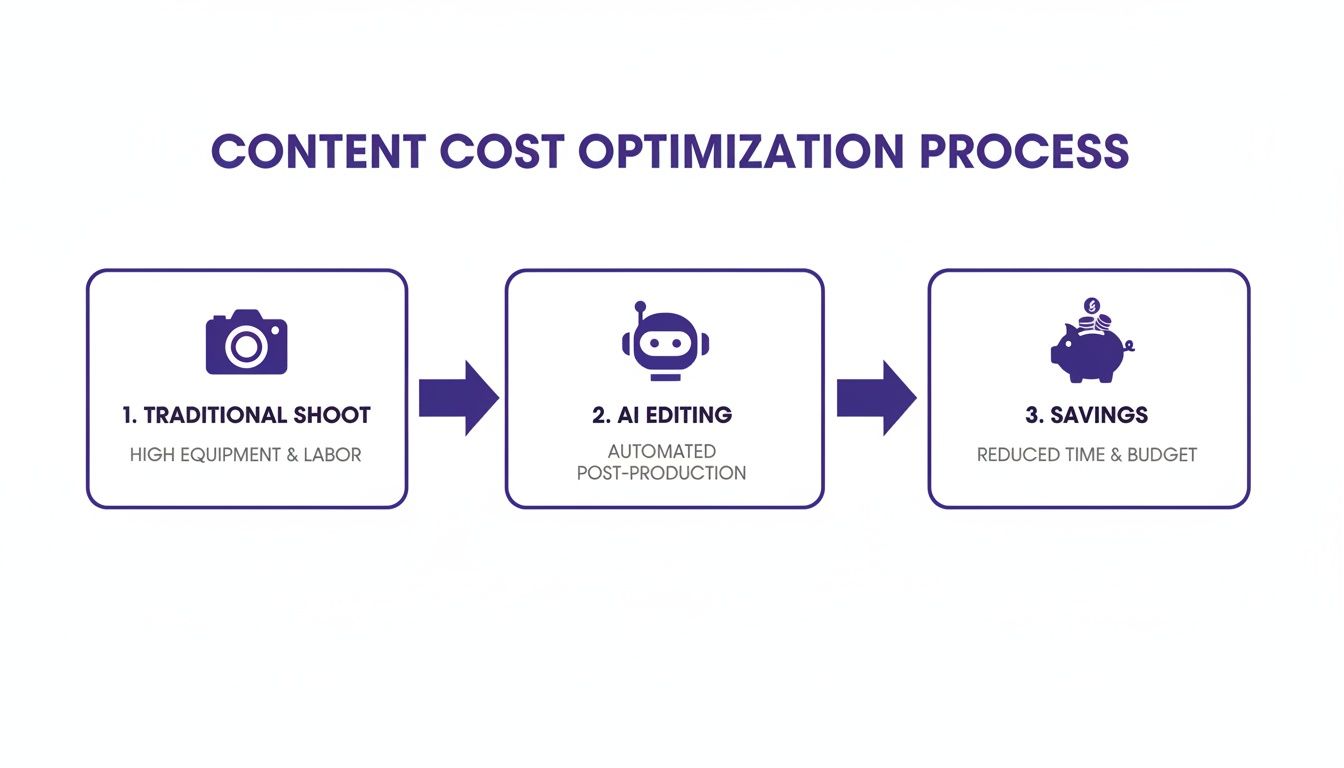
The cost of a traditional photoshoot adds up fast — you've got studio rentals, model fees, stylists, photographers, and seemingly endless post-production cycles. It's a huge line item.
Think about a brand like Zara, built on speed and a constant flow of new styles. Instead of staging massive, expensive shoots for every new drop, they can use AI to generate dozens of on-model and background variations from a single product shot. This is how you scale visual assets without scaling your budget.
From Photoshoot Fees to Marketing Fuel
The biggest savings come from cutting the most expensive parts of a photoshoot right out of the equation. This is exactly where AI-powered ecommerce photo editing services come in.
- Model Fees: Forget booking multiple models for a full day. With AI, you can generate an endless variety of virtual models on demand. That means no more model fees, booking logistics, or usage rights. For a small brand, this saving alone can be thousands of dollars per shoot.
- Location & Studio Costs: Need a Parisian street scene? A minimalist loft? Generating that background with AI costs practically nothing. It completely replaces expensive location scouting, permits, and studio rentals.
- Post-Production Cycles: Traditional retouching has always been a major bottleneck. A platform like Picjam can take a basic product photo and turn it into a complete, campaign-ready photoshoot in about a minute.
When you're this efficient, the money once poured into repetitive production can be funneled into marketing, product development, or customer acquisition. You're essentially turning a cost center into an engine for growth.
Multiplying Assets Without Multiplying Effort
The real magic of AI here is how it lets you scale your creative output from a single starting point. One clean product photo — often shot in-house with a simple setup — can become the seed for an entire visual campaign.
A single image can be transformed into dozens of unique assets: on-model shots for your product page, lifestyle images for social media, clean background versions for marketplace listings, and even short videos for ads.
This one-to-many approach delivers incredible value. You can explore how to structure these edits by looking into different ecommerce image editing services and case studies like these detailing the impact of an AI Beauty Assistant, which show how technology drives savings in other visual-heavy industries.
Structuring Your Workflow for Maximum Efficiency
Slotting a new service into your operations shouldn’t feel like open-heart surgery. With the right game plan, you can build a seamless process with your photo editing partner that pushes both speed and quality to the max.
A sloppy handoff is the number one reason for delays and inconsistent results. If you're a fast-fashion brand like Shein trying to get new arrivals online in 24 hours, you just can't afford that kind of confusion.
Establishing a Clear Asset Handoff
The best ecommerce photo editing services run on clarity. Before uploading an image, lock in a rigid file naming convention and folder structure. This small step cuts out the endless back-and-forth and makes sure the right edits get applied to the right products.
A simple, bulletproof naming system might look something like this: Brand_SKU_Angle_Version.jpg. For example, Picjam_T001_Front_Raw.jpg. That little bit of metadata tells your editing partner everything they need to know at a glance.
Next, get your files sorted into logical folders before you upload:
- Ready for Editing: All your new, raw images ready to be worked on.
- In Progress: This is where your service provider will do their magic.
- Needs Review: The drop-off point for your team to run quality control.
- Approved & Final: The final home for all your polished, web-ready assets.
This basic structure creates a workflow that's predictable, transparent, and easy for anyone on your team to follow.
Defining SLAs and Quality Control
Once you have your structure down, it's time to define your expectations with a Service Level Agreement (SLA). This document needs to clearly spell out turnaround times. A professional service should be able to deliver standard edits within 24 hours.
Your QC checklist is your last line of defense before an image goes live. It ensures every visual asset meets your brand standards and accurately represents the product, which is critical for minimizing returns.
Your QC checklist should have a few non-negotiable checkpoints:
- AI Artifact Check: Scrutinize any AI-generated backgrounds and model swaps. Look closely for any visual glitches, weird blurring, or unnatural-looking artifacts.
- Color Accuracy: Put the edited image side-by-side with the physical product. Are the colors true-to-life? This is crucial.
- Product Detail Preservation: Make sure that unique textures, seams, and delicate embellishments are still sharp and unaltered. For more tips, check our guide on how to take a product picture.
- Consistency Across Batch: Pull up all the images from a single order. Do they all have consistent lighting, alignment, and cropping? They absolutely should.
By building a solid workflow, you turn your editing service from just another vendor into a true operational partner — one that helps you get high-quality images to market faster than ever.
How to Measure the True ROI of Your Product Imagery
Beautiful product images are great, but they’re only half the battle. If those visuals don’t translate into real business results, they’re just expensive decorations. To prove the ROI of your investment in ecommerce photo editing services, you must track the KPIs that matter to your bottom line.
Forget vanity metrics like "likes." We need to get serious about what moves the needle: conversion rates, add-to-cart rates, and especially a reduction in returns. Up to 25% of returns happen because the product simply didn't match the photo. Accurate, professional imagery is your first line of defense.
Setting Up A/B Tests That Deliver Answers
The single best way to measure the impact of your imagery is through A/B testing. This isn't guesswork; it's about getting concrete data on what visuals convince your customers to buy. Brands like ASOS are masters of this, constantly testing image formats to see what resonates.
A simple but incredibly powerful test for any fashion brand is to pit an AI-generated on-model image against a standard flat-lay.
Here’s how you can run that test:
- Pick Your Product: Choose a solid mid-range product where a lift in sales will be easy to spot.
- Create Your Variants: Take your existing flat-lay and use a tool like Picjam to generate a high-quality on-model shot. The goal is to make the presentation style the only variable.
- Split Your Traffic: Use your ecommerce platform’s built-in A/B testing feature. Send 50% of visitors to the flat-lay (your Control) and the other 50% to the new on-model image (your Variant).
- Measure and Analyze: Let the test run for at least 2 weeks, or until you have enough data to be statistically confident. Track conversion rates, add-to-cart clicks, and time on page for both versions.
You can generate a whole range of model and background variations for a single product, which makes creating assets for these kinds of tests incredibly easy.
This isn't just about model vs. flat-lay. You can test different model ethnicities, various backgrounds, and unique styling to pinpoint what truly connects with your target audience. You might discover that a lifestyle background bumps up add-to-cart rates by 15% compared to a plain white one. You can also dial in your images for specific marketplaces; our guide on Amazon product image requirements is a great resource.
The KPIs That Matter Most
When you’re digging through your A/B test results and overall site analytics, keep your eyes on these critical metrics:
- Conversion Rate: This is the ultimate test. Did the new imagery convince more people to actually complete a purchase?
- Add-to-Cart Rate: A fantastic indicator of purchase intent. It shows you which images are doing the best job of getting customers over that first hurdle.
- Return Rate: Are fewer people sending items back because they "don't match the description"? This KPI is a direct reflection of your image accuracy.
- Time on Page: Are people spending more time on product pages with richer, more dynamic visuals? This signals higher engagement.
Takeaway
- Audit Your Photoshoot Costs: Pinpoint your top 3 content creation expenses. Are they model fees, studio rentals, or retouching hours? Now, imagine how an AI platform could shrink or even eliminate them.
- Start with One Product: Grab a simple flat-lay photo of one of your products. Use a tool like Picjam to generate 5 different on-model and background variations. Compare the cost and time to what a traditional shoot would have demanded.
- Run a Simple A/B Test: This week, pick one product and test an AI-generated on-model image against your current flat-lay. Keep a close eye on the add-to-cart rate.
Putting It All Into Practice
Alright, let's turn all this theory into action. This is where the rubber meets the road — moving from reading this guide to actually transforming your content production.
Your Quick-Start Onboarding Plan
Ready to get moving? Here’s a simple, three-part plan to get you started.
First, prep your assets. Grab 3 different products from your catalog. Shoot them as clean, well-lit flat-lays or on a ghost mannequin. These will be the source files for everything that comes next.
Next, generate your first AI photoshoot. Upload those base images into Picjam and start experimenting. Create 5–10 different on-model and lifestyle variations for each of the three products. Play around with different looks and settings.
Finally, launch a small A/B test. This is the most important part. Pick one product and run its best new AI-generated image against the old one on your product page. Let it run for one week and keep a close eye on the add-to-cart rate. That single number will tell you everything you need to know.
Curious about the real savings? Use our savings calculator to see exactly how your current photography costs stack up against Picjam. You might be surprised by how much you could be reinvesting into growth.
Your Questions, Answered
Stepping into the world of AI photo editing can bring up a lot of questions, especially for brands used to traditional photoshoots. Let's tackle some of the most common concerns we hear from fashion ecommerce leaders.
Can AI Models Actually Look Realistic Enough for My Brand?
This is the big one. The realism you see in modern AI isn't magic — it's the result of advanced neural networks trained on millions of high-resolution photos of real people. The systems learn the tiny details that make an image feel authentic: natural skin textures, subtle flyaway hairs, and genuine expressions.
Platforms like Picjam take this a step further by giving you control. You can fine-tune ethnicity, age, and body type to generate models that truly reflect your brand's specific aesthetic and target customer. The secret, as always, is starting with a great product photo. A high-quality input image is the foundation for a hyper-realistic result.
Will Using AI for Product Photos Hurt My Brand's Authenticity?
Quite the opposite. When you use it thoughtfully, AI can actually boost your brand's authenticity. It gives you the power to showcase your apparel on a diverse lineup of models that would be logistically complicated or financially out of reach with traditional photoshoots. This kind of inclusivity makes your brand far more relatable to a wider audience.
Authenticity isn't about shunning technology. It's about representing your product honestly and building a genuine connection with your customers. AI is just another tool to help you do both, but at a massive scale.
What's the Real Turnaround Time for AI Photo Editing?
This is where AI completely changes the game. Traditional retouching for a batch of images can easily take anywhere from 24 to 72 hours. That's a few days of waiting before you can even think about launching a new product.
An AI platform like Picjam, on the other hand, operates in a different league. It can generate a complete, on-brand photoshoot from a single product image in about a minute. That includes creating the model, placing the clothing perfectly, and generating a custom background. For brands looking to move fast, this speed is a massive advantage.
Ready to see what this could mean for your bottom line? Compare your current photography costs against our AI solution with the Picjam savings calculator and see how much you could reinvest back into growth.

Picjam team
The Picjam team blends AI, product, and creative expertise to eliminate the cost and delay of traditional photography for modern eCommerce brands.

