
Boost Sales with AI Model Swaps: How Fashion Brands Cut Photoshoot Costs
Explore ai model swap to turn apparel photos into high-converting campaigns. Learn cost-saving, scalable strategies that boost sales and engagement.
When Levi's tested AI-generated models for their spring collection, they unlocked a new level of campaign agility. For any fashion brand, the cost of a single product photoshoot can easily spiral into the thousands. An AI model swap transforms that entire process, shrinking it from weeks to minutes and cutting the need for photographers, studio rentals, models, and travel budgets.
How AI Model Swaps Cut Zara's Content Costs
So how does it work? The technology digitally drapes your apparel — shot on a mannequin or even just laid flat — onto a stunningly realistic virtual model.
Platforms like Picjam have streamlined this, allowing brands to generate entire on-model photoshoots without ever picking up a camera. The result is studio-quality imagery at a fraction of the cost.
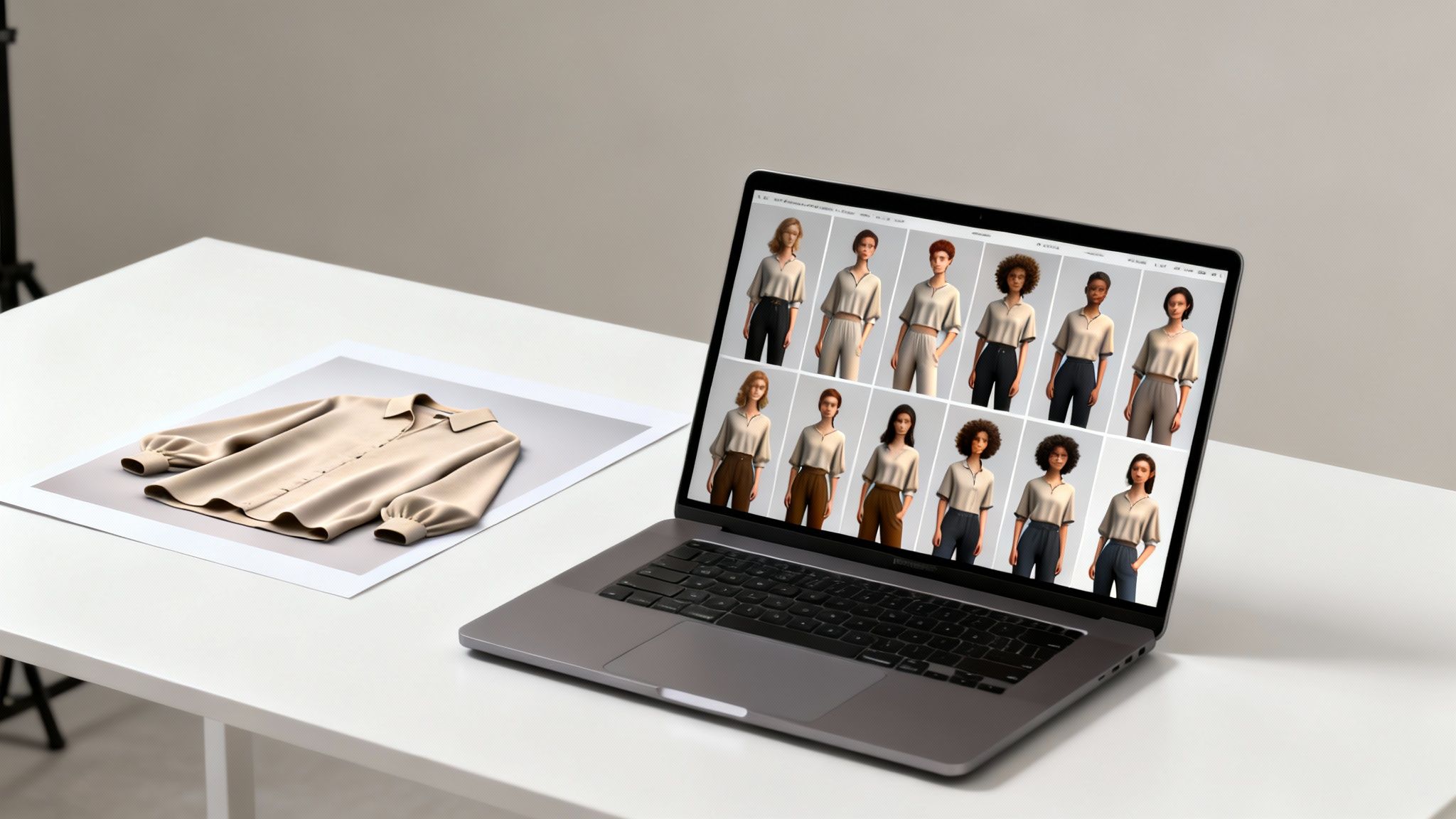
The immediate win here is pure agility. Imagine testing a new collection on 10 different models in under an hour to see which look resonates with your target audience. This isn't hypothetical; it's the new reality for smart content creation.
Slash Traditional Production Timelines
Fashion giants like Zara and H&M operate on tight seasonal schedules where speed to market is critical. A conventional photoshoot can mean weeks of planning: booking models, scouting locations, hiring a full crew, and wading through post-production.
A McKinsey report found that AI can speed up content creation by as much as 70%.
AI model swaps collapse the timeline from weeks into minutes. Take a simple photo of a new sweater on a mannequin, and moments later, have dozens of on-model shots ready for your e-commerce store and social media.
For a deeper dive into this workflow, check our guide to AI for clothing product photos.
Expand Creative Possibilities Affordably
Consider a brand like Ganni, famous for its bold and inclusive marketing. For a smaller brand to replicate that diverse look, the cost of shooting with a wide range of models would be astronomical. AI model swaps tear down that barrier.
Now, a single product image can be endlessly repurposed, creating a massive library of assets that speak to different customer demographics.
- Test diverse model representations without holding another casting call.
- Generate location-specific content by dropping models into AI-generated scenes.
- Create dozens of A/B test variations for ad campaigns to pinpoint which model drives conversions.
This is the creative firepower once reserved for brands with seven-figure marketing budgets. The savings on photographers, stylists, and travel can be reinvested into growth.
Preparing Your Photos for a Perfect AI Model Swap
The final quality of any AI model swap depends on the source images. Think of it like cooking — even the best chef can't make a masterpiece with poor ingredients.
A flawless AI-generated image requires a clean photo to start. The good news? You don't need a high-end studio. A simple flat-lay shot on a clean, neutral background can work wonders.
What really matters is lighting. Aim for soft, diffused, and even light across the entire garment. Harsh shadows or bright hotspots can confuse the AI and misinterpret the fabric's texture. The goal is to show the product clearly and honestly.
Best Practices for Capturing Apparel
For a tool like Picjam to work its magic, the AI needs a clear understanding of the garment's shape. Your initial photography sets the stage for everything that follows. Our guide to how to shoot product photography covers all the essentials for getting the best source image.
A few simple rules will immediately elevate your results:
- Shoot straight-on. Always capture the garment from a direct, front-facing angle. Avoid artistic perspectives for your source file, as this makes it harder for the AI to map the clothing realistically.
- Minimize wrinkles. While the AI is smart, major wrinkles can distort the product's shape. A quick steam or press beforehand makes a huge difference.
- Capture the whole item. Make sure the entire garment is visible in the frame. Nothing should be cropped out. This gives the AI the data it needs to generate a believable fit.
Following these steps ensures the technology can accurately trace the apparel's silhouette, preserving your design and intended fit.
"We cut our AI processing time by 30% just by standardizing our initial flat-lay photography. It's a simple change that saves us hours every week."
— Founder of an emerging apparel brand
Essential Photo Preparation Checklist
Before you upload, a quick technical check can prevent common errors and keep your workflow smooth. Here's a quick-reference table.
Achieve a Natural Fit: Directing Your Virtual Photoshoot
With your product photos prepped, it's time to step into the role of a virtual art director. Running an AI model swap is a creative process. Your goal is to make the final image look completely authentic by focusing on the garment's fit, the model's pose, and the lighting.
This approach is catching on fast. The market for AI face swap software, which powers these model swaps, was worth USD 1.59 billion in 2023 and is expected to hit USD 2.3 billion by 2031.
According to research from Verified Market Research, e-commerce brands on platforms like Amazon and Etsy are driving this growth, seeking to create diverse, on-model photos without the massive overhead.
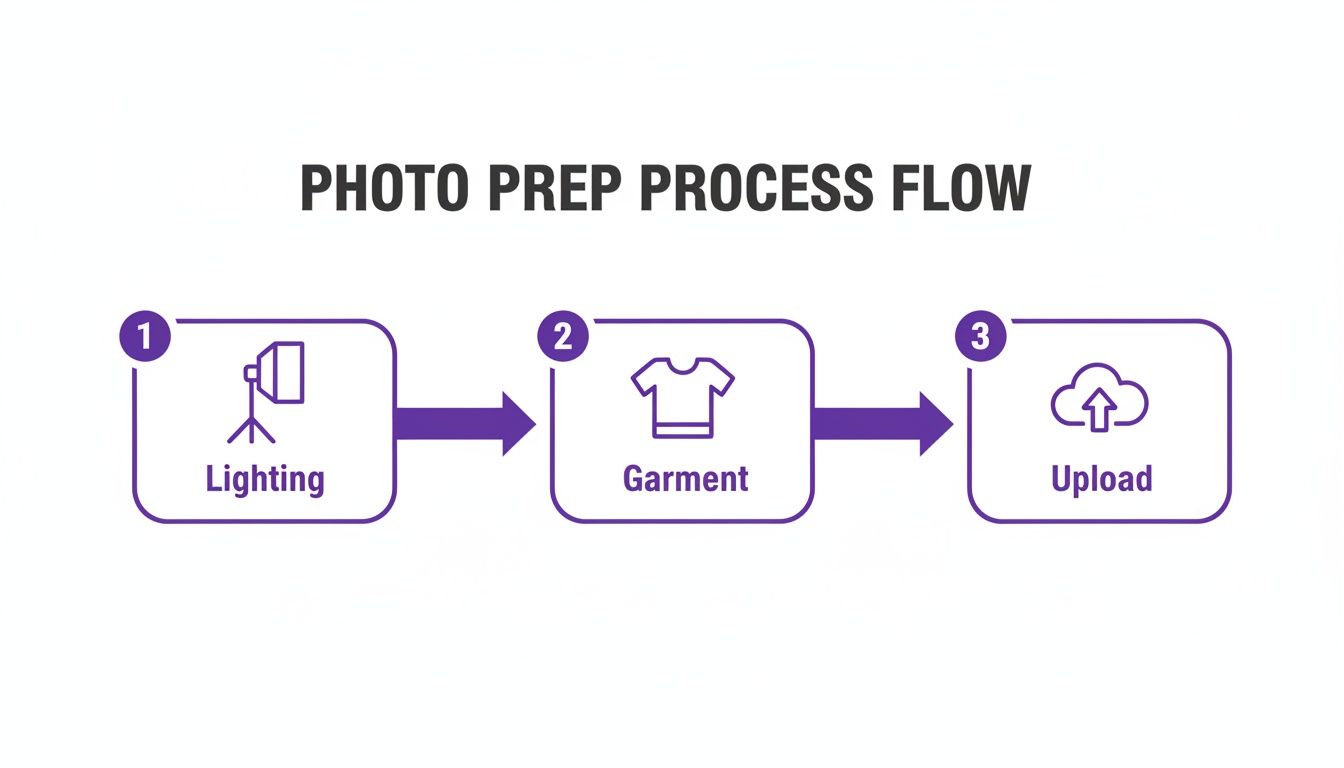
This workflow shows that a natural-looking swap is built on a strong foundation. Every step, from lighting to upload, sets the stage for a high-quality outcome.
Match Pose and Lighting to Your Garment
The model's pose must complement the clothing's style and purpose.
Think of a brand like Lululemon. They use active, dynamic poses to show off the stretch and performance of their athletic wear. A flowing dress from a brand like Reformation, on the other hand, needs an elegant, graceful stance to highlight its drape.
You're not just putting a shirt on a person; you're telling a story about how that shirt feels and moves.
The ability to instantly test a single blazer on 10 different models, each with a unique pose, gives us unparalleled creative control. We can align the final image perfectly with our campaign's mood board, something that used to require extensive casting and reshoots.
Lighting is the final, make-or-break element. The best AI tools let you match the lighting on your virtual model to the lighting in the original product shot. If you shot your garment under soft, diffused studio lights, the model needs to look like they're in that same environment. This cohesion sells the illusion.
Of course, final tweaks often happen in post-production. For a deeper dive, check out our guide on how to add a background in Photoshop, which has techniques perfect for polishing AI-generated images.
Turn One Photo into a Multi-Angle Campaign
A single, static product photo no longer cuts it. Shoppers expect to see a garment from every angle before adding it to their cart. This is where an AI model swap becomes a campaign-generation tool, all from one image.
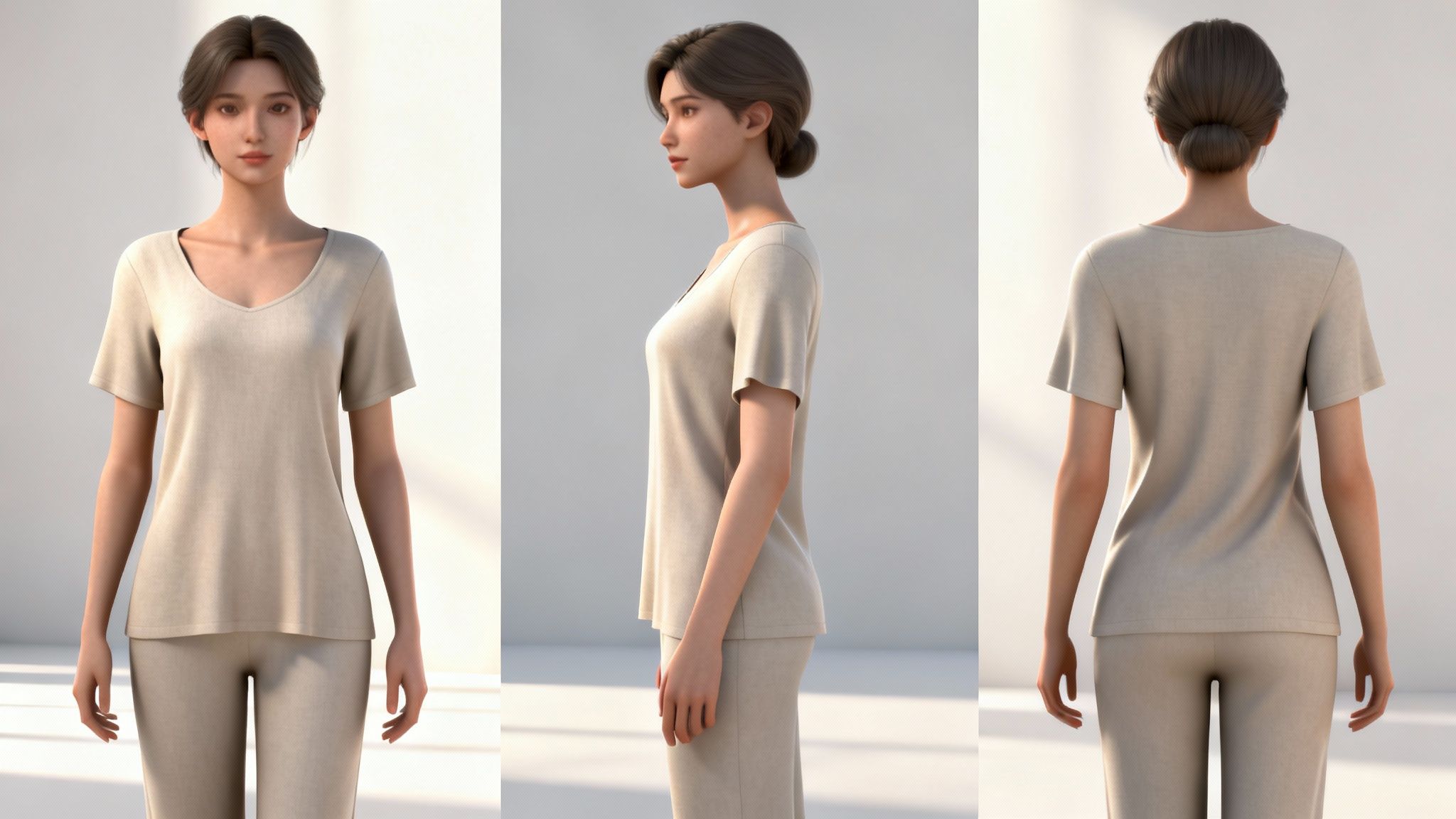
With this tech, you can take one solid on-model photo and instantly generate a series of shots — side views, three-quarter angles, and even the back of the garment. This gives customers the complete picture they need on a modern product page.
The market for this technology is projected to jump from USD 857.1 million in 2025 to USD 7,272.8 million by 2031. This isn't just hype; it's a direct response from creative directors who need to generate diverse photoshoots without the traditional time and expense.
From Static Images to Dynamic Motion
So you've turned one photo into a set of product shots. What's next? You make it move.
The true value of a single AI-generated image goes beyond your product detail page. The next step is transforming that static asset into motion.
Platforms like Picjam can take a still photo and animate it, creating a subtle video clip perfect for social media ads and stories. Imagine a boutique brand like Sézane creating an entire "lookbook" video for Instagram Reels, all starting from one flat-lay photo of a new blouse.
Suddenly, you're unlocking massive savings:
- No videography costs: No need to hire a videographer, rent gear, or book expensive studio time.
- Create content in minutes: Produce high-quality video ads in a fraction of the time it used to take.
- Maximize asset value: That single source image can now populate your entire marketing funnel, from the PDP to paid social ads.
This changes the game. Your content workflow becomes a scalable system for generating an entire campaign's worth of visual assets. If you're curious about creating the models themselves, we have a guide on how to generate AI models for clothing.
By 2026, 80% of creative teams will use generative AI daily. It's not about replacing people; it's about giving them a co-pilot to bring their vision to life faster and at a much bigger scale.
Turn New Images into E-commerce Gold
Getting a great photo from an AI model swap is a win, but it's not the finish line. The next step is turning that image into a sales-ready asset tuned for e-commerce. This is where smart post-production transforms a cool visual into a conversion driver.
First, a final quality check is non-negotiable. Even the best AI outputs can have tiny imperfections. AI-native cleanup tools, like those in platforms like Picjam, let you make precise edits quickly. From there, upscaling creates crisp, high-resolution images that look sharp on any device.
Get Found with Smarter Image SEO
Once your images are flawless, the game shifts to discoverability. Strong image SEO is more than just alt text. Modern AI tools can analyze your product and the AI model to suggest tailored SEO keywords. This helps your product climb the ranks on marketplaces like Amazon and in Google Images.
This isn't just a neat trick. The AI model swap market is on track to hit USD 47 billion by 2026, with 88% of marketers already using AI. For online retailers, showing diverse models in realistic scenes is boosting engagement by 40–50% on product pages.
Streamline Your Workflow with Automation
The last piece is building a smooth pipeline from creation to conversion. You need a system that turns a product shot into a polished, SEO-optimized asset live on your store in minutes.
A solid workflow looks like this:
- Final Color Checks: After the swap, ensure colors are accurate. Precise color representation in product images is essential for avoiding returns and building customer trust.
- Automated Tagging: Let AI generate product tags based on image content, saving you hours of manual data entry.
- Direct-to-Platform Syncing: Push finished assets directly to your Shopify, BigCommerce, or Amazon listings without downloading and re-uploading files.
By systematizing these final steps, you build an efficient content engine that directly fuels visibility and sales.
Your Plan for Adopting AI Model Swaps
Let's move from theory to reality. Implementing AI model swaps requires a smart, straightforward game plan. This is your roadmap to integrating this tech and seeing a real return on investment without overhauling your entire workflow.
First, establish a baseline. Dig into your current content production costs — photographers, models, studio rentals, travel, and post-production. Vogue Business has noted that brands are flocking to AI for this very reason: to slash these exact expenses. Auditing your spending pinpoints where you can save money, fast.
Start with a Low-Risk Pilot Program
Once you know your numbers, you can roll out a small pilot program to prove the concept. You don't need to go all-in at once.
- Pick 3–5 of your hero products. Start with your bestsellers, not obscure, low-stock items.
- Run them through the process. Use a platform like Picjam to generate a handful of on-model images for each piece. Experiment with different models, poses, and backgrounds.
- Build a small asset library for testing. Use the new images to run A/B tests on social media ads or to personalize email campaigns. See what resonates with your audience.
Frequently Asked Questions
It's smart to ask questions when adding a new tool to your workflow. Here are some of the most common ones we hear from brands.
Will an AI Model Swap Look Fake?
This is a fair question, but with today's technology, realism is a key focus. High-quality AI platforms obsess over details — fabric texture, subtle shadows, and how a garment drapes naturally.
The trick is to provide a clean, well-lit product photo. When you nail that first step, the final image is often indistinguishable from a traditional photoshoot.
Can I Use AI for Any Type of Clothing?
For the core of most apparel brands — t-shirts, dresses, sweaters, pants, and jackets — this technology is a game-changer. An AI model swap will deliver excellent results for the vast majority of your inventory.
While the AI improves daily, some highly complex or sheer garments might require minor post-production tweaks to get the look just right.
How Does AI Affect Brand Authenticity?
Authenticity isn't about how you create your visuals; it's about aligning those visuals with your brand's identity. AI actually gives you more control to do exactly that.
Instead of being limited to the models available on a single shoot day, you gain a nearly endless roster. You can select virtual models who genuinely reflect your target audience.
A brand like Savage X Fenty, which built its empire on inclusivity, can use this tech to showcase products on an even more diverse range of body types and ethnicities, scaling its brand message and connecting with a broader customer base.
Takeaway
- Start with an Audit: Before you begin, calculate your current photoshoot costs. Knowing your baseline is the first step to measuring the significant savings AI can deliver.
- Run a Pilot Program: Test an AI model swap on 3–5 of your bestselling products. Use the results to run A/B tests on social media or in email campaigns to gather data on what resonates with your customers.
- Focus on Authenticity: Use the technology to create visuals that truly reflect your brand's diverse audience. Authenticity comes from representation, and AI makes that more accessible than ever.
Curious how much your brand could save? Compare your current photography costs with Picjam's AI studio using our savings calculator.

Picjam team
The Picjam team blends AI, product, and creative expertise to eliminate the cost and delay of traditional photography for modern eCommerce brands.

