
How to Make a White Background for Pictures: A Fashion Brand's Guide
Learn how to make a white background for pictures with our guide. We compare DIY, studio, and AI methods for clean, professional fashion product photos.
How to start saving money
Lorem ipsum dolor sit amet, consectetur adipiscing elit lobortis arcu enim urna adipiscing praesent velit viverra sit semper lorem eu cursus vel hendrerit elementum morbi curabitur etiam nibh justo, lorem aliquet donec sed sit mi dignissim at ante massa mattis.
- Neque sodales ut etiam sit amet nisl purus non tellus orci ac auctor
- Adipiscing elit ut aliquam purus sit amet viverra suspendisse potent i
- Mauris commodo quis imperdiet massa tincidunt nunc pulvinar
- Adipiscing elit ut aliquam purus sit amet viverra suspendisse potenti
Why it is important to start saving
Vitae congue eu consequat ac felis placerat vestibulum lectus mauris ultrices cursus sit amet dictum sit amet justo donec enim diam porttitor lacus luctus accumsan tortor posuere praesent tristique magna sit amet purus gravida quis blandit turpis.

How much money should I save?
At risus viverra adipiscing at in tellus integer feugiat nisl pretium fusce id velit ut tortor sagittis orci a scelerisque purus semper eget at lectus urna duis convallis. porta nibh venenatis cras sed felis eget neque laoreet suspendisse interdum consectetur libero id faucibus nisl donec pretium vulputate sapien nec sagittis aliquam nunc lobortis mattis aliquam faucibus purus in.
- Neque sodales ut etiam sit amet nisl purus non tellus orci ac auctor dolor sit amet
- Adipiscing elit ut aliquam purus sit amet viverra suspendisse potenti
- Mauris commodo quis imperdiet massa tincidunt nunc pulvinar
- Adipiscing elit ut aliquam purus sit amet viverra suspendisse potenti
What percentage of my income should go to savings?
Nisi quis eleifend quam adipiscing vitae aliquet bibendum enim facilisis gravida neque. Velit euismod in pellentesque massa placerat volutpat lacus laoreet non curabitur gravida odio aenean sed adipiscing diam donec adipiscing tristique risus. amet est placerat imperdiet sed euismod nisi.
“Nisi quis eleifend quam adipiscing vitae aliquet bibendum enim facilisis gravida neque velit euismod in pellentesque massa placerat”
Do you have any comments? Share them with us on social media
Urna ut fermentum imperdiet lacus, elementum etiam maecenas libero nunc, suspendisse massa, nisl, elit curabitur feugiat in quis ut nibh enim in tristique aliquam sed vitae dui, dis adipiscing pharetra aliquam turpis turpis nibh rhoncus enim, pellentesque leo laoreet neque in sed bibendum fermentum suspendisse tempus non purus adipiscing suscipit fringilla adipiscing convallis dolor nulla fermentum facilisis ullamcorper ut vehicula tortor libero metus donec velit, tristique fermentum, dictum euismod diam scelerisque enim non pharetra tristique lectus habitant pharetra est id
For fashion brands, a pure white background isn’t just a clean look — it's a powerful sales tool. When a luxury brand like Net-a-Porter enforces white backgrounds for its product listings, it’s because this approach strips away all distractions, making the product the hero. Getting that look comes down to three paths: shooting it perfectly in-camera, fixing it in post-production, or using AI to streamline the entire process. This guide covers how to make a white background for pictures, focusing on the methods that deliver speed and savings.
Why a White Background Drives 30% Higher Conversions
A pure white background is a core conversion tool for any modern fashion brand. It creates a consistent, professional experience that builds trust and lets shoppers see the true colors and textures of garments without visual noise.

Clarity That Converts
In fashion e-commerce, clarity drives conversion. When a customer can focus completely on the fit, fabric, and details, their confidence to purchase skyrockets.
That’s why a perfect RGB (255, 255, 255) white background has become the non-negotiable standard for product display pages (PDPs).
Consider the visual strategy of ASOS. Its endless scroll of products, each isolated against the same crisp white, creates a seamless shopping experience.
This visual uniformity makes it easy to compare items and focus on what matters — the product itself. The numbers back this up, with some reports showing that listings with pure white backgrounds see up to 30% higher conversion rates.
The Hidden Costs of Traditional Methods
For years, achieving this look was expensive. Brands had to book studio time, manage complex lighting, and sink hours into manual editing.
This is where AI-powered platforms like Picjam are creating a new standard.
Instead of slow, costly photoshoots, brands can now generate perfect, on-brand product images in seconds, saving thousands in production costs and accelerating speed-to-market.
How Emerging Brands Can DIY a White Background
You don't need a massive studio budget to get a clean white background. For emerging brands, a scrappy, do-it-yourself approach can deliver surprisingly professional results.
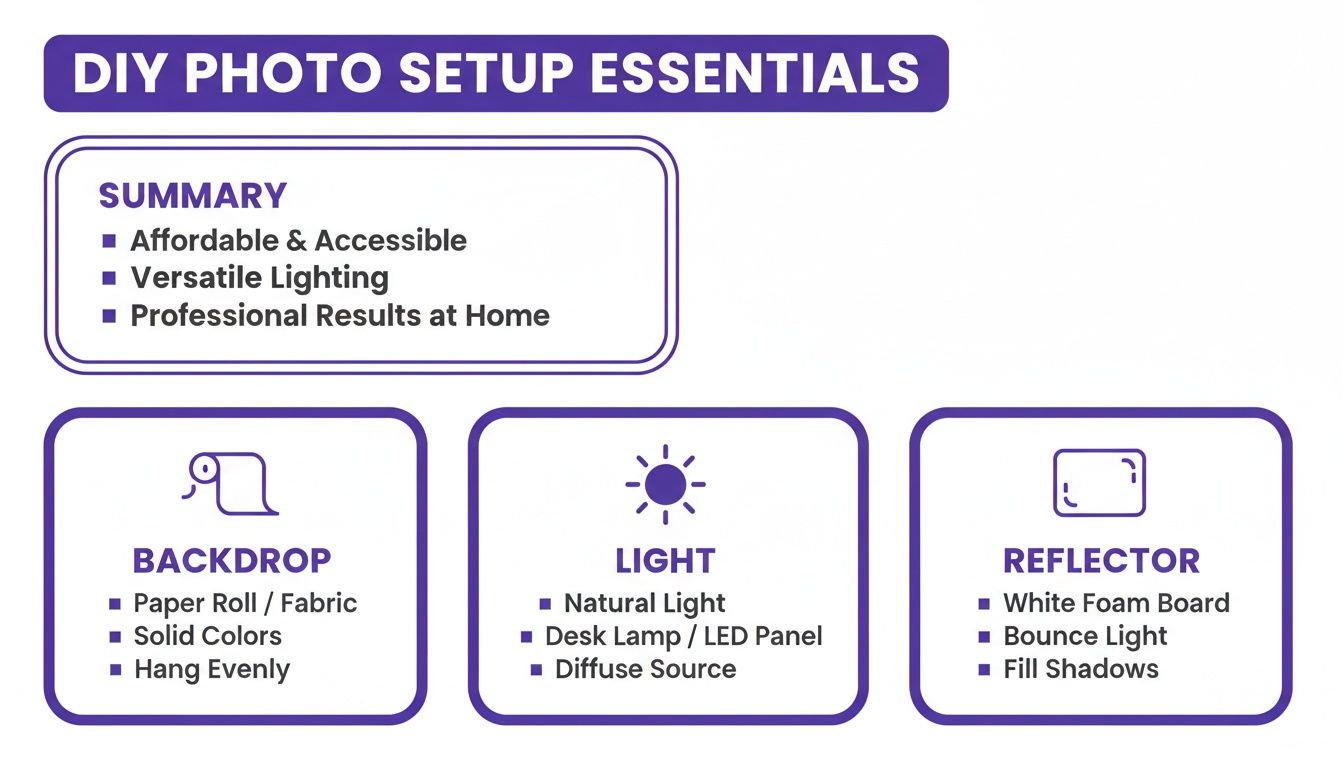
The foundation of this setup is a simple roll of seamless white paper. Clamp it to a stand or tape it to a wall, letting it curve down onto the floor to create an "infinity cove" look that eliminates harsh lines.
Mastering Light on a Budget
Lighting is what separates an amateur photo from a professional one. You can get fantastic results for free using natural light.
Set up near a large window on an overcast day for soft, diffused light that minimizes harsh shadows.
To elevate your shot, use a piece of white foam core as a reflector. Position it opposite the window to bounce light back onto the garment, filling in dark spots for a more even exposure.
Smartphone and Camera Settings
A few quick adjustments will get you closer to a perfect shot, saving editing time.
- Exposure: Nudge your exposure compensation up to +0.3 to +0.7. This pushes the background closer to pure white without blowing out product details.
- White Balance: Manually set your white balance to match your light source (e.g., "Daylight" or "Cloudy") to ensure your whites are truly white.
- Low ISO: Keep your ISO at 100 or 200 to avoid digital noise, which can make a smooth background look muddy.
This method is how brands like Allbirds built an authentic feel before scaling up. The trade-off is time — you'll spend more hours correcting inconsistencies.
If you want more control, our guide on using a light box for product photography is a great next step.
How Zara Streamlines Shoots in a Professional Studio
When you’re ready to scale, the professional studio is where you forge consistency and quality. This is how established brands like Zara create that perfectly even, pure white background across thousands of products.
A pro setup often uses a permanent cyclorama wall, or ‘cyc wall.’ This solid, curved surface creates an "infinity" effect, making it the ultimate foundation for a clean, endless white void.
The Power of Controlled Lighting
A studio gives you total control. The go-to method is a three-point lighting system.
- Key Light: The main, brightest light source.
- Fill Light: A softer light placed opposite the key light to "fill in" shadows.
- Backlights: One or more lights aimed at the white background, making it brighter than the product. This creates a pure white look straight out of the camera.
This infographic breaks down the core components you can borrow for a home rig.
Streamlining the Workflow
Professional studios rely on strobes for powerful, consistent light and softboxes to diffuse it, preventing harsh shadows.
Another critical piece is tethered shooting, where the camera is plugged into a computer so each photo appears instantly on a large monitor.
This allows for real-time tweaks to lighting, styling, and camera settings, boosting efficiency.
Of course, this approach comes with a hefty price tag. For a deeper look, check out our guide on what to expect from an e-commerce studio shoot.
How Post-Production Adds 30 Minutes Per Image
Even with a perfect studio setup, post-production is where good photos become great. This cleanup stage has traditionally been a manual task that adds significant time and cost to every product shot.
The goal is a pure white background — RGB (255, 255, 255) — without making the product look pasted-on.
Tools like Adobe Photoshop have long been the standard. Editors would meticulously trace a product’s outline with the Pen Tool to create a precise clipping path, isolating it from its background.
This work demands precision. A sloppy cutout leaves jagged edges that signal a lack of professionalism and can erode customer trust.
Achieving a True White Finish
Once cut out, the background needs to be perfected. This is usually handled with Photoshop’s Levels or Curves tools.
An editor will "push" the whites until the background reads as pure, but must be careful not to overexpose the product and wash out its detail. It’s a delicate balancing act.
This manual process is a huge operational cost. The traditional workflow of complex lighting and manual Photoshop editing can take 15–30 minutes for a single image.
"Every minute a designer spends on manual background removal is a minute not spent on creative work that actually grows the brand. It’s a hidden cost that adds up incredibly fast."
This is where AI platforms are changing the game. Instead of a designer losing half an hour on one photo, AI can automate the entire thing, generating a flawless white background in seconds.
How AI Cuts Content Production Costs by 60%
The old-school way of shooting and editing product photos is a grind. AI-powered platforms are designed to cut out the manual labor and high costs of traditional workflows.

With this approach, you can upload a photo taken on any background. The tech instantly finds the product, strips away the background, and drops in a studio-quality white one. It’s a new way to think about how to make a white background for pictures.
From Hours of Editing to Seconds of Processing
Consider a fast-growing DTC brand like Reformation. Instead of juggling photoshoots and waiting days for retouched images, they could generate hundreds of marketplace-ready product shots in minutes.
By eliminating physical studios, expensive gear, and hours of editing, brands can slash content production costs.
Across the industry, brands using AI report a 60% reduction in production costs, with image turnaround times dropping from hours to just 60 seconds per image.
Turning Bottlenecks Into Advantages
AI workflows excel at handling tricky details like fine hair, delicate lace, and sheer fabrics.
This isn't just about swapping out a background; it's about turning your entire content strategy from a production bottleneck into a real competitive advantage. Speed and quality are no longer a trade-off.
This gives fashion brands new agility to test product shots on their site or in ad campaigns almost instantly. And if you're still perfecting your setup, our guide on the right backdrop for product photography can help.
Takeaway
- Prioritize a Pure White Background: An RGB (255, 255, 255) background is a non-negotiable standard for driving conversions in fashion e-commerce. It eliminates distractions and builds trust.
- Start with Smart Lighting: Whether you’re using natural window light or a full studio setup, controlling your light source is the key to creating a clean look in-camera and minimizing post-production work.
- Adopt AI to Scale: AI-powered tools eliminate the time and cost of manual editing, reducing production expenses by over 60% and cutting turnaround times from hours to seconds. This allows brands to get products to market faster.
The Smart Move Is AI
This brings us to the most important point: AI-powered workflows give modern brands a massive advantage in speed, consistency, and cost. Tools like Picjam prove you no longer have to choose between quality and speed.
The real shift here is that AI isn't just about cutting out tedious tasks. It's about opening up new creative avenues. Brands can now generate entire on-brand photoshoots in minutes and scale marketing without the huge overhead.
Wondering what that looks like for your bottom line? Our savings calculator gives you a clear estimate based on your current production volume.
This isn’t just about saving money. It's about turning your content creation from a necessary expense into a strategic asset.
Ready to see how much you could save on product photography? Run the numbers with the Picjam savings calculator and compare your current costs to an AI workflow.

Picjam team
The Picjam team blends AI, product, and creative expertise to eliminate the cost and delay of traditional photography for modern eCommerce brands.

