How Before and After Images Can Cut Fashion Content Costs by 90%
Discover how AI-powered before and after images can elevate your brand and boost sales. Learn to create high-converting visuals for your apparel business.
How to start saving money
Lorem ipsum dolor sit amet, consectetur adipiscing elit lobortis arcu enim urna adipiscing praesent velit viverra sit semper lorem eu cursus vel hendrerit elementum morbi curabitur etiam nibh justo, lorem aliquet donec sed sit mi dignissim at ante massa mattis.
- Neque sodales ut etiam sit amet nisl purus non tellus orci ac auctor
- Adipiscing elit ut aliquam purus sit amet viverra suspendisse potent i
- Mauris commodo quis imperdiet massa tincidunt nunc pulvinar
- Adipiscing elit ut aliquam purus sit amet viverra suspendisse potenti
Why it is important to start saving
Vitae congue eu consequat ac felis placerat vestibulum lectus mauris ultrices cursus sit amet dictum sit amet justo donec enim diam porttitor lacus luctus accumsan tortor posuere praesent tristique magna sit amet purus gravida quis blandit turpis.

How much money should I save?
At risus viverra adipiscing at in tellus integer feugiat nisl pretium fusce id velit ut tortor sagittis orci a scelerisque purus semper eget at lectus urna duis convallis. porta nibh venenatis cras sed felis eget neque laoreet suspendisse interdum consectetur libero id faucibus nisl donec pretium vulputate sapien nec sagittis aliquam nunc lobortis mattis aliquam faucibus purus in.
- Neque sodales ut etiam sit amet nisl purus non tellus orci ac auctor dolor sit amet
- Adipiscing elit ut aliquam purus sit amet viverra suspendisse potenti
- Mauris commodo quis imperdiet massa tincidunt nunc pulvinar
- Adipiscing elit ut aliquam purus sit amet viverra suspendisse potenti
What percentage of my income should go to savings?
Nisi quis eleifend quam adipiscing vitae aliquet bibendum enim facilisis gravida neque. Velit euismod in pellentesque massa placerat volutpat lacus laoreet non curabitur gravida odio aenean sed adipiscing diam donec adipiscing tristique risus. amet est placerat imperdiet sed euismod nisi.
“Nisi quis eleifend quam adipiscing vitae aliquet bibendum enim facilisis gravida neque velit euismod in pellentesque massa placerat”
Do you have any comments? Share them with us on social media
Urna ut fermentum imperdiet lacus, elementum etiam maecenas libero nunc, suspendisse massa, nisl, elit curabitur feugiat in quis ut nibh enim in tristique aliquam sed vitae dui, dis adipiscing pharetra aliquam turpis turpis nibh rhoncus enim, pellentesque leo laoreet neque in sed bibendum fermentum suspendisse tempus non purus adipiscing suscipit fringilla adipiscing convallis dolor nulla fermentum facilisis ullamcorper ut vehicula tortor libero metus donec velit, tristique fermentum, dictum euismod diam scelerisque enim non pharetra tristique lectus habitant pharetra est id
When the sustainable fashion brand Allbirds wanted to showcase its new Wool Runner collection, they didn't just need clean product shots; they needed to show the shoes in urban, outdoor, and casual settings. A few years ago, that meant multiple expensive photoshoots. Today, it means creating compelling before and after images with AI, transforming a single photo into a global campaign in minutes.

This shift is more than a trend; it's a fundamental change in content economics. The global market for AI-generated visuals is projected to hit $6.12 billion by 2029, according to a recent AI market trends report{:target="_blank"}. Platforms like Picjam are at the forefront, enabling brands to produce entire catalogs for under $100 — a process that traditionally costs thousands.
How AI Slashes Photoshoot Costs and Timelines
The gap between a simple product shot and a high-impact lifestyle image used to be filled with huge costs and long timelines. A traditional photoshoot costs brands an average of $5,000 to $15,000 and often takes 4–8 weeks from booking to final image delivery.
AI-powered workflows flip that script. Brands using AI-generated fashion photography are cutting costs by up to 90% and creating entire campaigns in minutes, not months.
From Static Photos to Dynamic Campaigns
This is about more than just saving money — it’s a strategic advantage. Global players like Zara have always understood that showing products in multiple contexts drives sales. Now, emerging brands can execute the same strategy without the massive budget.
The core idea is to take a single, sterile 'before' shot (like your product on a mannequin) and instantly generate dozens of 'after' scenarios.
- Diverse Models: Instantly place your apparel on models of different ethnicities, ages, and body types.
- Lifestyle Contexts: Swap a studio backdrop for a Parisian street or a sun-drenched beach.
- Campaign Agility: Create assets for social media, email campaigns, and product pages simultaneously.
A strong before-and-after sequence is also perfect source material for scroll-stopping short-form video ads{:target="_blank"}. This is how modern brands build a future where content creation is fast, affordable, and endlessly creative.
How to Plan Visuals That Actually Convert
Great before-and-after images start with a clear strategy. The process hinges on how well you plan your 'before' canvas and map out your 'after' vision.
Your 'before' image is the most critical piece. This is your clean, perfectly lit product photo, usually shot on a mannequin or simple background. Think of it as your master digital asset; its quality dictates the potential of every AI transformation. A high-resolution base image is non-negotiable.
Perfecting the 'Before' Shot for AI
To get this right, treat your initial product photography with care. Investing time here saves headaches later. For a deeper dive, learn more about how to take a product picture that sets you up for success.
A few keys to a strong 'before' image:
- Consistent Lighting: Use soft, diffused light to avoid harsh shadows that can confuse AI algorithms.
- Clean Background: A neutral backdrop makes it easy for AI to isolate the product for new scenes.
- Multiple Angles: Capture front, back, and detail shots to give you more source material to work with.
Mapping Your 'After' Vision
Once your 'before' shot is locked, map out the 'after' vision. The goal is to tell a story that resonates with a specific audience. Who are you trying to reach?
For example, a boutique activewear brand like Alo Yoga might create two distinct visual paths. One could feature gritty, urban visuals for high-energy Instagram ads. The other could focus on serene studio shots for their product pages, reinforcing a sense of premium quality.
By planning your model demographics, background environments, and styling choices upfront, you create a cohesive visual narrative. This ensures every 'after' image feels intentional and aligned with your brand's identity.
This planning stage is where you decide if your model is sipping coffee in Milan or stretching in a minimalist loft. It’s how you make sure every asset speaks directly to your ideal customer.
Creating Your Transformation With AI in Minutes
With your strategy set, you can turn a simple product photo into a full campaign. Here’s how apparel brands use AI platforms like Picjam to slash costs and get to market faster.
The process is surprisingly simple. You start with your best 'before' image — usually a clean product-on-mannequin (POM) shot or a flat lay. From there, you generate 'after' versions that bring your creative vision to life without a reshoot.
From a Single Photo to a Full Campaign
With a few clicks, you can swap backgrounds, taking your product from a studio to a sun-drenched street in Milan. You can experiment with different model poses or adjust the lighting to capture a golden-hour glow.
Of course, the apparel must look right on the models. A huge piece is ensuring the garment drapes realistically across diverse AI-generated bodies. Our guide on AI body swapping for apparel breaks down how you can achieve a perfect, believable fit on any virtual model.
This approach organizes your creative process, moving from concept to polished asset.
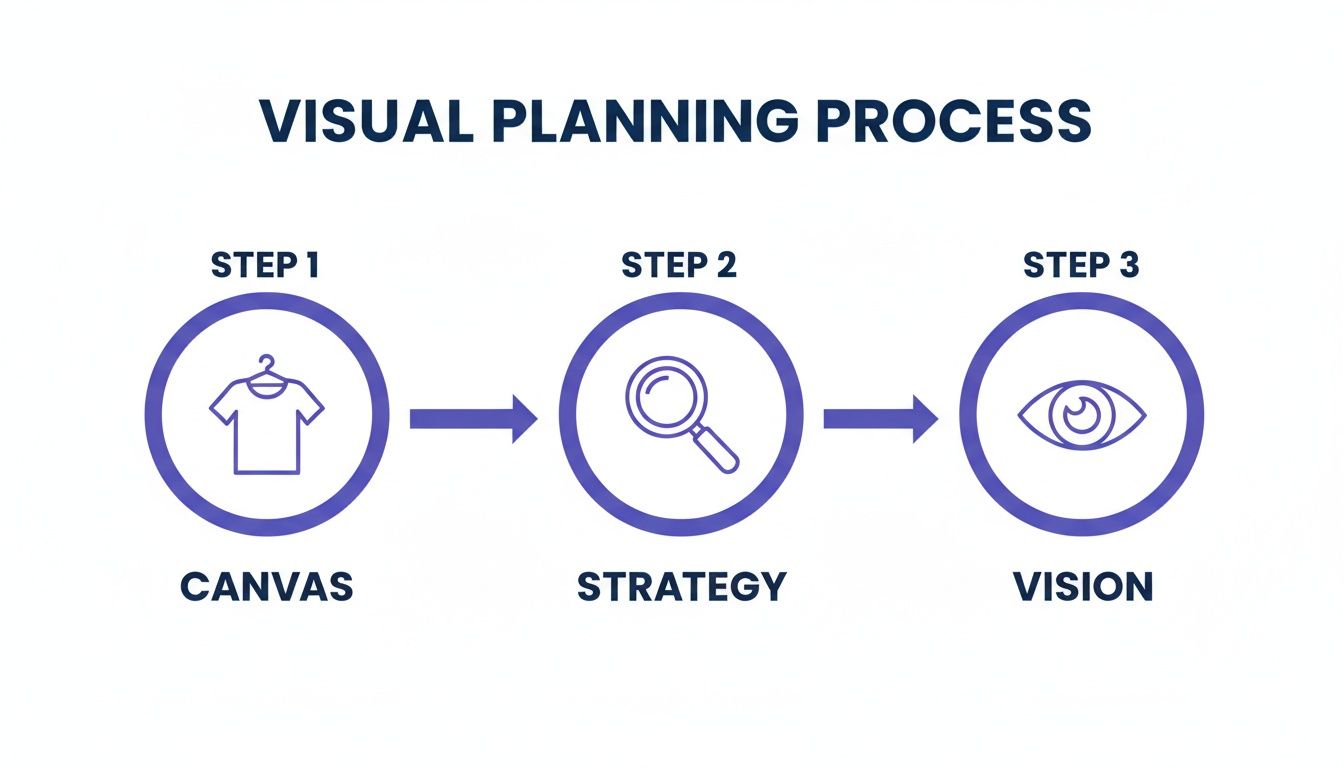
The big takeaway is how a strong starting point ('before' photo) and a clear strategy directly fuel a powerful brand vision.
Preserving Product Integrity in Every Shot
A common question is whether AI will alter the product itself. The answer is no. Sophisticated platforms let you "lock" your product, ensuring details like fabric texture, logos, and patterns are preserved.
Think about a brand like Allbirds. Their unique wool texture is everything. Using this AI workflow, they could generate countless lifestyle shots while guaranteeing that signature texture remains perfectly intact in every 'after' image.
"The savings are substantial," notes a stylist for a major eCommerce brand. "Thousands in cost and weeks in production time are cut from the content cycle, allowing us to be more agile and responsive to market trends."
This means your team can test creative concepts, refresh product pages with seasonal imagery, and keep social media feeds full — all without the logistical headaches of a physical photoshoot.
AI Workflow vs. Traditional Photoshoot: The Cost Breakdown
When you see the two approaches side-by-side, the difference in speed and cost becomes incredibly clear. The AI workflow is all about rapid, low-cost iteration.
While traditional photoshoots still have their place, the efficiency of an AI-powered workflow gives eCommerce teams a powerful advantage in a fast-moving market.
The Measurable Impact on Sales and Returns
Beautiful visuals are great, but measurable results are what matter. The real magic of high-quality before and after images is their direct impact on your bottom line.
When you show a product in context — on a model, in a relatable lifestyle setting — you help customers see themselves wearing your apparel. Just look at a giant like ASOS{:target="_blank"}; they built an empire by showing every product on multiple models in varied, real-world settings.
Turning Visuals into Conversions
That strategy used to be reserved for retailers with massive budgets. Not anymore. To see how an AI-driven visual upgrade can fuel growth, check out how one brand achieved tangible results in the Twelve Twenty case study.
According to McKinsey, visuals account for 93% of a customer's first impression. On platforms like Instagram, scroll-stopping before-and-after demos can convert 3 times better than static images. The trend is clear, as shown by the explosive growth of AI's influence in the fashion market{:target="_blank"}.
More Than Just Clicks: Reducing Return Rates
The benefits don’t stop at checkout. Using AI-generated images to set realistic expectations can slash your return rates.
When a customer sees how a garment fits on a model with a similar body type, they make a more informed purchase. That means higher satisfaction and fewer costly returns — a crucial saving that directly impacts profitability.
- Boosting Ad Performance: Dynamic, contextual images grab attention and drive a higher return on ad spend (ROAS).
- Increasing Click-Through Rates: Compelling lifestyle shots encourage more clicks and deeper catalog exploration.
- Improving Marketplace Rankings: For Amazon sellers, AI-optimized images can improve search rankings and organic traffic.
Investing in a smart before and after image strategy is a direct investment in your brand’s growth and financial health.
How to Present Your Images for Maximum Effect
How you arrange your before-and-after images is as important as their quality. The goal is to make the product's value jump off the screen.
For your product detail pages (PDPs), a carousel is your best friend. Always lead with the clean ‘before’ shot to set a clear baseline. Then, follow it with several ‘after’ lifestyle variations. This approach shows the product not just as an item, but as part of a life your customer wants to live.
Tailoring Layouts for Different Channels
You can't just copy and paste your layout strategy across every platform. What works on a PDP won't necessarily stop the scroll on a crowded social feed.
For Product Pages: A side-by-side comparison or carousel lets customers explore details. A brand like Everlane{:target="_blank"} could show a basic studio photo of a sweater, then follow it with AI-generated images of models wearing it in a cozy café.
For Social Media: Attention is fleeting. Create short videos or animated GIFs showing a quick transition from the static 'before' photo to a dynamic 'after' scene. This is highly effective for Instagram or TikTok.
This multi-format approach ensures your visuals are always optimized for the channel.
Crafting Compelling Copy
Your visuals need a narrative partner. The right copy directs the customer’s focus and highlights the transformation you want them to see.
"The copy isn't just a caption; it's a guided tour of the image," notes a senior marketer at a fast-growing DTC brand. "We tell them what to notice — the way the fabric moves, the confidence in the model's pose. We connect the visual to an emotion."
Instead of a generic "New arrivals!" caption, try something like: "From our studio to your life. See how our classic trench (before) transforms into your go-to layer for any adventure (after)."
The Importance of Transparency
As you mix in AI-generated models and scenes, transparency is paramount. Being upfront about your use of AI isn't a weakness; it's a sign of confidence.
A simple disclaimer like, "Model and scene are AI-generated to show product in a real-life context" builds credibility. This small act of honesty future-proofs your brand and reinforces an authentic relationship with your audience.
Your Action Plan for Immediate Impact
Let's move this from theory to your to-do list. This is a clear plan for creating powerful before and after images that you can start on today.
The first move? Go through your existing product photos to find your strongest ‘before’ shots — those clean, well-lit images that will serve as the perfect canvas.
Next, pick one measurable goal. For example, focus on boosting the conversion rate for one of your hero products. A brand like Reformation, which has a clear aesthetic, could take a new dress and use AI to instantly generate three distinct 'after' images to test on the product page.
By focusing on a single product and testing a few targeted variations, you create a low-risk, high-reward scenario. You gather valuable customer data while simultaneously creating fresh content.
Finally, look at the numbers. The real game-changer with an AI workflow is the money you save. The difference can be staggering. Use the link below to see how the cost of your last campaign stacks up against a modern, AI-powered workflow.
Takeaway
- Audit Your ‘Before’ Shots: Identify your 5–10 best, high-resolution product photos on a clean background. These are your most valuable assets for starting your AI content generation.
- Create 3 ‘After’ Variations: Pick one hero product and use an AI tool to generate 3 distinct lifestyle scenes for it. Test them on your product page to see which context resonates most with your audience.
- Calculate Your Potential Savings: Use an AI cost calculator to compare the price of your last photoshoot to the cost of an AI-powered workflow. Reinvest the savings into ad spend or product development.
Ready to see how the numbers stack up for your brand? Compare your costs with Picjam’s savings calculator.{:target="_blank"}

Picjam team
The Picjam team blends AI, product, and creative expertise to eliminate the cost and delay of traditional photography for modern eCommerce brands.