Sunglasses Product Photography: Reflections, Tint & Scale
Sunglasses product photography: reflection control, lens tint, on-face scale, tabletop setup, variants, mistakes and FAQs for ecommerce.
Short answer: To photograph sunglasses for ecommerce, use a clean packshot on white or light grey, control reflections with a large soft light and black cards, shoot front, three-quarter, side and temple detail, then add an on-face or ghost-mannequin view so buyers can judge scale.
Sunglasses are small, glossy and full of curved glass, so they pick up every light and every bit of room clutter. This guide covers the sunglasses product photography shot list, reflection control, lens tint and transparency, on-face scale, a simple tabletop setup, common mistakes and ideas that sell eyewear online.
- The sunglasses shot list
- Controlling reflections
- Lens tint, mirror and clarity
- On-face and scale
- A simple tabletop setup
- Colourways and variants
- Acetate, metal and mixed materials
- Common mistakes
- Sunglasses photography ideas
- Skip the shoot
- FAQs
The Sunglasses Product Photography Shot List
- Front hero. Frames square to the camera on a clean background, lenses clear enough to read tint.
- Three-quarter. Shows curve, hinge and arm thickness.
- Side profile. Temple shape and length.
- Open temples from above or a slight top view for the full silhouette.
- Detail: hinge, logo mark, nose pads and tip ends.
- On-face or bust. Scale against a face or mannequin head.
- Folded pack if the product ships folded or in a compact case.
- Case and accessories when they are part of the offer.
Related reading: product photography angles, how to photograph jewellery for other small reflective goods, and white background product photography.

How to Control Reflections on Sunglasses
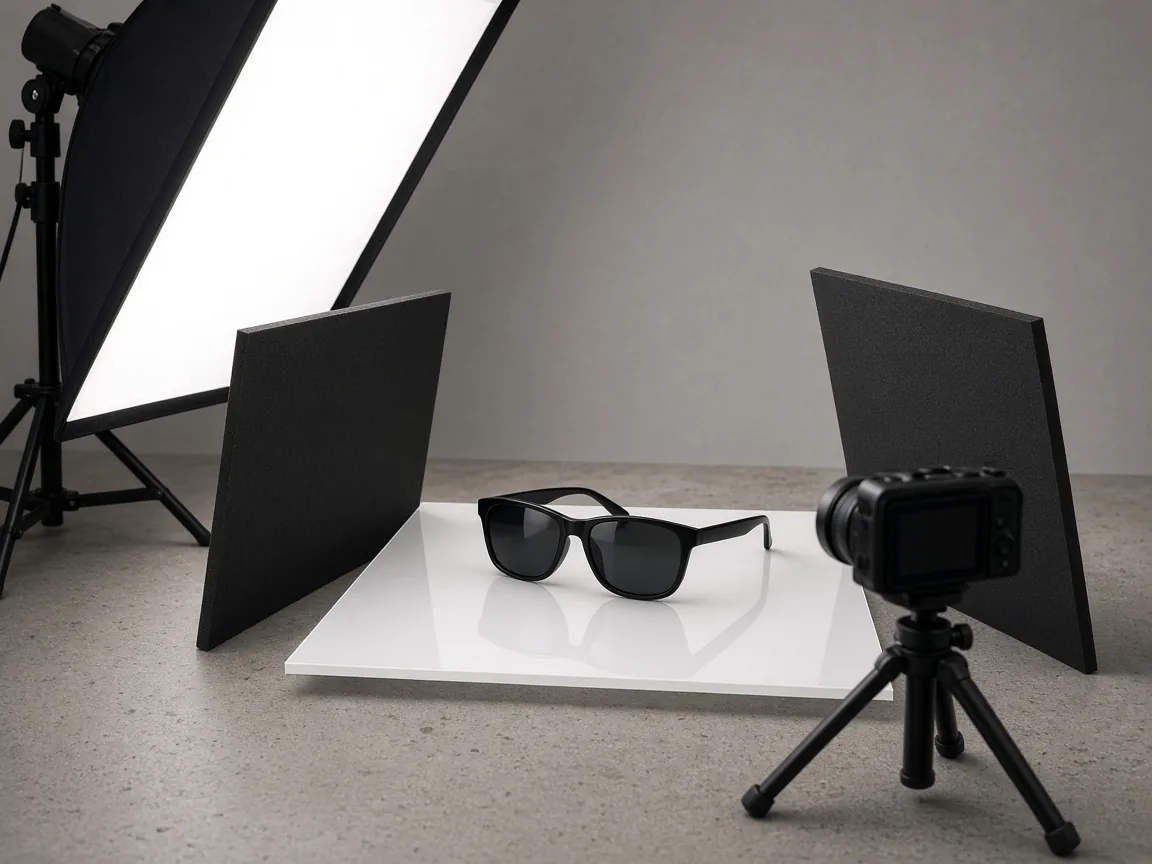
- Make the light big. A large softbox or diffused window creates one smooth highlight instead of hot dots.
- Build a tent of white and black cards. White cards fill; black cards carve dark edges into shiny acetate and metal.
- Hide the camera behind black card with only the lens peeking through.
- Clean every lens and frame before you shoot; dust becomes permanent in specular highlights.
- Lock the set. Once the reflection looks right, tape light and card positions so every SKU matches.
Lens Tint, Mirror and Clarity
Buyers zoom lenses. Expose so the tint is honest and the frame edges stay sharp.
| Lens type | Watch for | Working approach |
|---|---|---|
| Dark tint | Lenses falling to black with no shape | Add a soft fill card in front; keep a gentle gradient, not a blown mirror |
| Light or photochromic | Looking clear when the retail pair is tinted | Match the in-hand product under the same light |
| Mirror / flash lens | Reflecting the room and the photographer | Surround with seamless paper so the reflection is a clean colour field |
| Clear demo lenses | Looking like prescription fashion frames | Say so in the listing if the sellable pair differs |

On-Face and Scale
A perfect packshot still leaves shoppers guessing width. Add one of:
- Model or virtual model with a straight-on portrait crop.
- Mannequin head or bust for a consistent catalogue look.
- Hand hold for lifestyle, if it matches your brand.
Keep the face crop consistent across the range so shoppers can compare sizes. For apparel-adjacent on-model work, see the AI virtual model tool.
A Simple Tabletop Setup
- Table and sweep in white or light grey.
- One large soft light above and slightly in front, or a window with diffusion.
- Black cards left and right to define acetate edges.
- Tripod at lens height, centred on the bridge.
- Macro or short telephoto so the frame fills without distortion.
- Blow bulb or cloth for last-second dust.

Colourways and Variants
Shoot every frame colour and lens option on the same set, crop and reflection style. If a SKU only differs by lens tint, keep the camera locked and swap the pair so the gallery feels like one brand.
Acetate, Metal and Mixed Materials
- Acetate: show colour depth and polish with a long, soft highlight; black cards keep edges from melting into a white sweep.
- Metal: watch for secondary reflections from table legs and monitors; a paper tunnel keeps chrome readable.
- Mixed materials: expose for the brighter metal first, then add fill so dark acetate still shows detail.
- Translucent frames: put a gentle gradient behind the temples so clear plastic does not vanish.
Keep one lighting recipe for the whole eyewear line so a metal aviator and a chunky acetate square still feel like one brand.
Common Sunglasses Photography Mistakes
- Room reflections and phone screens in the lenses.
- Crooked bridges that make the pair look damaged.
- No on-face or scale shot.
- Over-retouched lenses that hide the real tint.
- Inconsistent crops between colourways.
Sunglasses Photography Ideas
- Hard sun with a controlled mirror reflection of sky (not clutter).
- Flat lay with case and cleaning cloth for gift SKUs.
- Macro of hinge engineering for premium metal frames.
- Same model wearing two sizes to explain fit.
- Lifestyle crop where the frames stay the sharpest element.
Skip the Shoot
If you already have a clean product photo, Picjam can help you build packshots, lifestyle frames and on-model views, with no prompts to learn. Free to start (two free turns). Start at the AI product photography and packshot generator.

Frequently Asked Questions
How do you photograph sunglasses for ecommerce?
Use a clean packshot with controlled reflections, then capture front, three-quarter, side and detail angles, plus an on-face or bust shot for scale. Keep lighting and crops identical across colourways.
How do you photograph sunglasses without reflections?
You rarely remove every reflection. Shape them: use a large soft light, surround the pair with white or black cards, hide the camera, and keep the reflection as a smooth field instead of a busy room.
Should sunglasses product photos be on a model?
Include at least one on-face or mannequin shot so buyers can judge size. Keep a clean packshot as the main grid image for consistency.
What background is best for sunglasses photography?
White or light grey sweeps work for most catalogues. Darker backgrounds can suit glossy black acetate if you still separate the frame with careful edge light.
How many photos does a sunglasses listing need?
Plan for front, three-quarter, side, one detail, on-face or bust, and the case if it is included. Add extra frames for each colour and lens option.
Can AI help with sunglasses product photography?
Yes for extending galleries from a real product photo into clean packshots, lifestyle scenes and on-model views. Keep lens tint and frame geometry true to the physical pair.

Picjam team
The Picjam team blends AI, product, and creative expertise to eliminate the cost and delay of traditional photography for modern eCommerce brands.