
Content queue3 clips ready
MONFit checkReady
WEDStreet styleReady
FRIProduct detailReady
KEEP THE FEED MOVING
Keep the feed moving
Fresh clips for TikTok, Reels and paid social, without waiting for another shoot.
Placeholder copy from marketing. Make try-on, fit-check and street-style clips from images you already have. No creators to brief, no reshoots.
Fresh clips for TikTok, Reels and paid social, without waiting for another shoot.
Turn generated or uploaded product images into short video, no new shoot required.
Keep the same model, garment details and visual style across every product clip.
Every clip below was made from the single photo at the top. No reshoot, no creator, no extra styling.
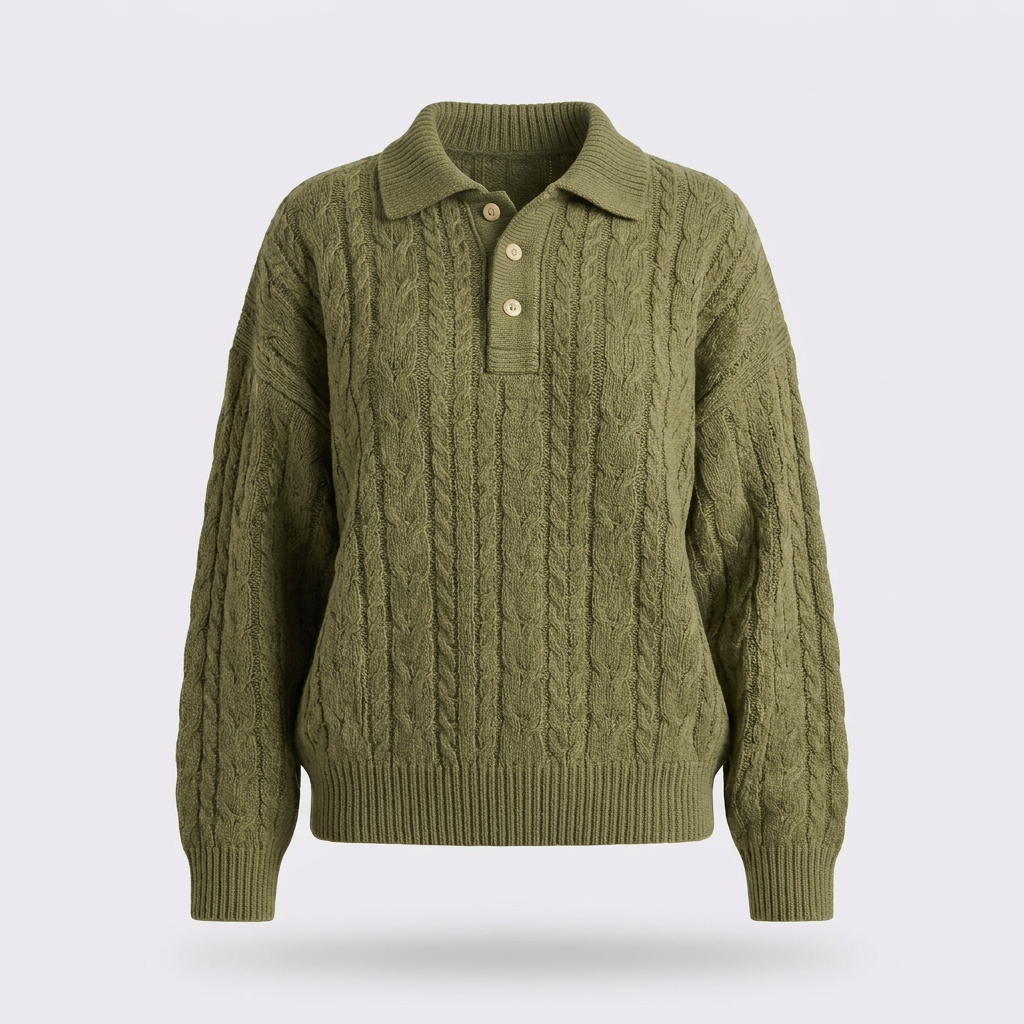 Original input1:1
A fit check video shows how the garment sits and moves, helping shoppers judge the fit before they buy.
A try-on haul video shows the piece styled multiple ways, giving shoppers outfit ideas and your social ads more variety.
A get ready with me video puts the garment into a familiar styling routine, making it easy to feature on TikTok and Stories.
A close-up product video brings knit, stitching and texture into view, helping shoppers inspect the details they cannot feel online.
A street-style video shows the garment moving in a real setting, helping shoppers picture it in everyday wear.
A 360 product video shows the front, sides and back, helping shoppers understand the garment’s shape and drape.
Picjam turns the product photos you already have into short UGC-style videos, directed by you and sized for every social placement.
Pick an on-model image from your gallery, or upload one from a past shoot, and Picjam animates it into a short clip with natural movement. The garment keeps its exact colour, print and fit from the original photo, so the video matches your product page.
Left: a clean on-model still with a small “Make video” chip over it. Right: the same frame as a 5s loop where the model shifts weight and the hem moves. Identical crop so the change reads instantly.
Screen recording of the Picjam video prompt box. Cursor types “slow turn, then walk toward camera”, presses generate, cut to the finished clip playing in the viewer. Crop tight to the panel and hide account details.
Choose a ready-made format like a fit check or street walk, or describe the movement you want in plain words. Picjam handles pacing, camera movement and framing so the clip feels filmed on a phone, not rendered.
Every clip exports in vertical 9:16 for TikTok, Instagram Reels and Stories, with 4:5 and 1:1 for feed posts and product pages. Use the same AI model across all of them so your social content looks like one creator, week after week.
One clip shown in three generic phone frames: a feed post, a story with a progress bar, and a sponsored ad with a Shop now button. Draw the UI generically, with no platform logos.
A 4 × 3 grid of SKU tiles from one collection. Four tiles are playing short clips, the rest are stills, with a progress bar reading “36 of 48 videos ready”. Shows scale at a glance.
Add video to a batch and Picjam makes a clip for every SKU in the drop while it generates your stills. Launch a new collection with product page video and a week of social content already done.
Four examples, each made from a single product photo.
Cream cable-knit jumper. Hands stretch and release the knit, then a slow pan across the cable pattern.
Framed low on the feet and pavement, walking toward camera in late-afternoon light.
Mirror fit check in a bright bedroom with a slow front-to-back turn.
Slow on-the-spot turn against a warm-grey wall so the drape and back detail read clearly.
Choose a generated or uploaded photo.
Gallery screenshot with one on-model image selected and the Make video action highlighted.
Fit check, walk, spin or your own prompt.
The video panel with format chips visible and the prompt box half-typed.
Download 9:16 MP4 ready to post.
Finished clip in the viewer with the Download button and ratio options showing.
Real numbers from brands replacing studio shoots with Picjam.
“Quote from the Twelve Twenty Eight case study goes here. Two lines, specific, with a number in it.”
These are photography stats from the existing tool pages. Swap one for a video stat when we have it, such as ad CTR or watch time on Picjam clips.
Video and UGC generation starts on Studio. Every plan above it includes it too.
For small sellers getting started with AI product imagery.
For brands getting their catalogue on-brand and into market.
For brands needing thousands of SKUs per year, with a batch production system.
Fully managed for brands running Picjam as content infrastructure.
What is an AI UGC video generator?
An AI UGC video generator turns product photos into short, user-generated-style videos, the handheld try-on and fit-check clips that perform on TikTok and Instagram. Picjam animates your on-model images into vertical clips with natural movement, so you can post social video for every product without booking creators or running a shoot.
Do I need creators, models or a shoot to make UGC videos?
No. All you need is a product photo. Picjam places your garment on an AI model, then turns that image into video. You can reuse the same saved model across every clip, so your social feed looks like one consistent creator rather than a mix of strangers.
What types of UGC video can Picjam make?
Picjam makes the formats fashion brands use most: mirror fit checks, try-on hauls, get-ready-with-me clips, fabric close-ups, street walks and 360 turnarounds. You can also write your own prompt to direct the movement, such as a slow turn followed by a walk toward camera.
Can I use AI UGC videos in paid ads?
Yes. Videos made on a Picjam plan are licensed for commercial use, including paid social, product pages and marketplaces. Ad platforms like Meta and TikTok have their own rules for labelling AI-generated content, so check them when you upload. Picjam exports 9:16, 4:5 and 1:1 to fit every ad placement.
Will shoppers think AI UGC videos are real customer reviews?
They shouldn't. Picjam makes product videos in a UGC style, not fake testimonials, so there are no talking-head clips claiming to be real buyers. We recommend labelling AI-generated video wherever you post it, which keeps your brand on the right side of platform rules and consumer law.
Which Picjam plan includes UGC video?
Video and UGC generation is included on Studio and every plan above it, including Scale and Enterprise. The Starter plan covers studio and lifestyle images, with video available as an upgrade. Compare plans on our pricing page to find the right fit for your catalogue size.
Put every product on an AI model.
Listing-ready motion for PDPs.
On-model imagery from flat lays.
Page not built yet.
Page not built yet.
Page not built yet.
Start making fit checks, try-on hauls and street-style clips today. No creators, no reshoots, no minimum catalogue size.